




Overview of the New Xbox App Rollout
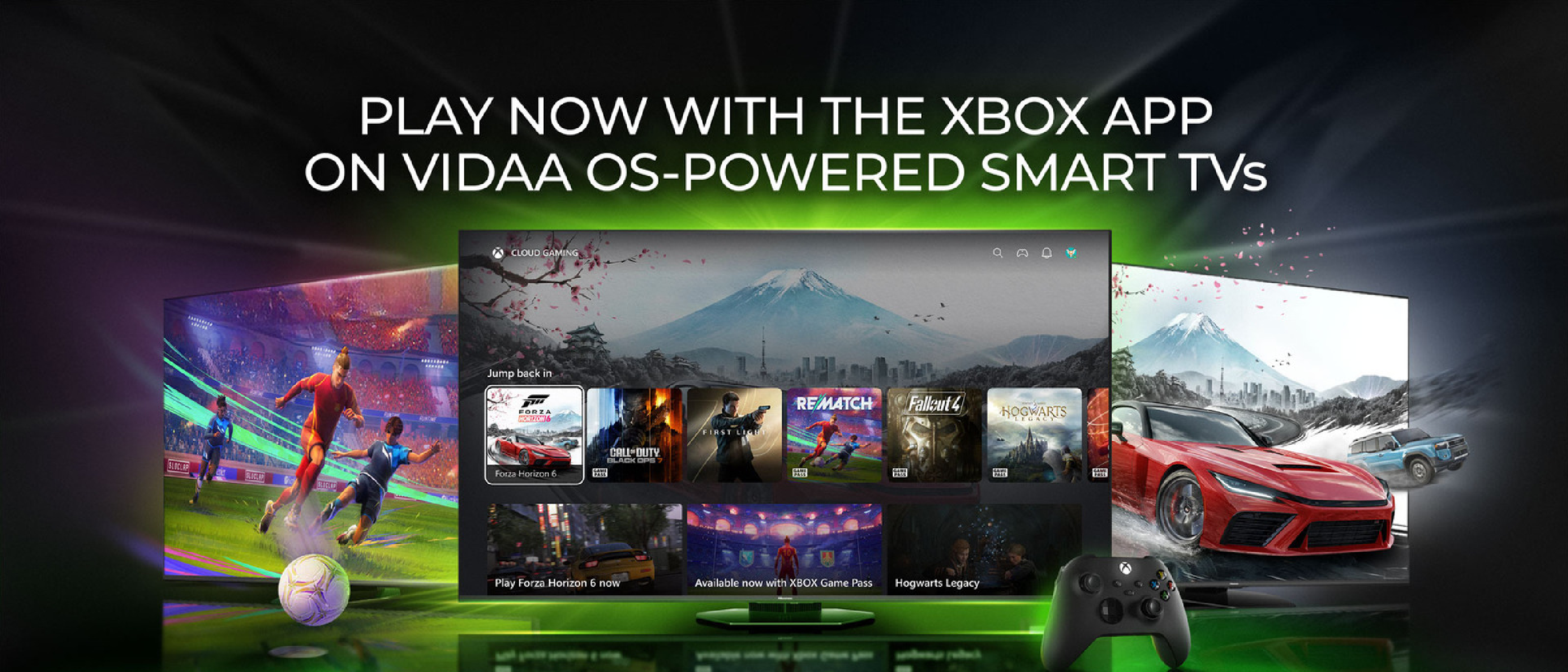
Microsoft’s gaming division has announced that the Xbox app is now officially supported on Hisense televisions and any TV running the VIDAA OS platform. The rollout, which began this month, covers models released between 2024 and 2026. By installing the app, users can launch the full Game Pass streaming library directly on their TV screen—no Xbox console required. The service works the same way it does on Samsung, LG, and Amazon Fire TV devices that have been supported for the past four years.
Key requirements are straightforward:
- An active Game Pass subscription (any tier except the PC‑only plan).
- A stable broadband connection for real‑time streaming.
- An official Xbox controller or any Bluetooth‑enabled gamepad.
If the app does not appear in the TV’s Home menu, Microsoft advises updating the TV firmware to the latest version and checking the Games section. The rollout will continue until all eligible VIDAA OS devices have the app visible.
Why It Matters for Gamers and the Broader Market
Lowering the Barrier to Entry
The direct quote from Microsoft—“who may not be able to afford or justify buying dedicated gaming hardware”—captures the strategic intent behind the move. By eliminating the need for a console, Microsoft opens Game Pass to households that already own a smart TV but are hesitant to invest in additional hardware. This aligns with the broader trend of “console‑free” gaming, where streaming services become the primary distribution channel for interactive entertainment.
Expanding the Game Pass Ecosystem
Game Pass already boasts three pricing tiers:
| Tier | Monthly Price | Core Benefits |
|---|---|---|
| Essential | $10 | Access to a curated library of over 200 titles |
| Premium | $15 | Adds cloud‑gaming on mobile and higher‑resolution streams |
| Ultimate | $23 | Over 500 games, launch‑day releases, and EA Play integration |
The addition of VIDAA OS TVs effectively adds millions of potential subscribers to this ecosystem. For Microsoft, each new device is an additional data point for usage analytics, helping refine recommendation algorithms and content licensing decisions.
Competitive Positioning
Microsoft’s rivals—Sony’s PlayStation and Nintendo—still rely heavily on dedicated hardware. While Sony has experimented with PlayStation Now on select smart TVs, the service has not achieved the same penetration as Xbox Game Pass on non‑console platforms. By cementing a presence on Hisense, a brand with strong market share in emerging regions, Microsoft gains a geographic advantage that could translate into higher subscription renewal rates.
Technical Breakdown of the Streaming Architecture
How the Xbox App Communicates with the Cloud
The Xbox app on VIDAA OS functions as a thin client. When a user selects a game, the app establishes a low‑latency WebRTC connection to Microsoft’s Azure‑based gaming servers. Video is encoded in H.264 or AV1 (depending on the TV’s hardware capabilities) and streamed at up to 1080p/60 fps. Input from the Bluetooth controller is transmitted back to the server in near‑real time, keeping latency under 30 ms on a typical 25 Mbps broadband line.
Compatibility Layer for VIDAA OS
VIDAA OS is a Linux‑derived platform that supports Android‑style APK packages. Microsoft compiled a custom version of the Xbox app that leverages the OS’s native media pipeline and Bluetooth stack. The app also includes a small hardware
abstraction layer to detect supported TV models and adjust streaming parameters accordingly. This ensures optimal performance across Hisense’s diverse hardware lineup, from budget 4K sets to premium Mini-LED displays.
Latency Mitigation Strategies
To combat input lag—a common concern in cloud gaming—Microsoft has implemented several optimizations:
- Adaptive Bitrate Streaming: The app dynamically adjusts video quality based on network conditions, prioritizing frame rate stability over resolution.
- Predictive Input Buffering: The client pre-buffers controller inputs to compensate for minor network jitter.
- Edge Server Proximity: Microsoft’s Azure gaming servers are deployed in regional data centers, reducing round-trip time for users in key markets.
User Experience and Limitations
Setup Process
- Installation: Users navigate to the TV’s app store (or the Games section on newer models) and download the Xbox app.
- Sign-In: Log in with a Microsoft account linked to an active Game Pass subscription.
- Controller Pairing: The app guides users through pairing an Xbox controller or compatible Bluetooth gamepad.
- Game Selection: Browse the Game Pass library, which is organized into curated collections (e.g., “New Releases,” “Indie Gems,” “Day One Titles”).
Known Limitations
- No Local Downloads: Unlike the Xbox console app, the VIDAA OS version does not support downloading games for offline play. All gameplay is streamed.
- Controller Dependency: While Bluetooth controllers are supported, touchscreen or TV remote controls cannot be used for gameplay.
- Regional Restrictions: Game availability may vary by country due to licensing agreements.
- Performance Variability: Users on slower or unstable internet connections may experience stuttering or compression artifacts.
Workarounds and Tips
- Wired Ethernet: For the most stable connection, users with compatible TVs should connect via Ethernet instead of Wi-Fi.
- 5 GHz Wi-Fi: If Ethernet is unavailable, a 5 GHz Wi-Fi network reduces latency compared to 2.4 GHz.
- Controller Firmware Updates: Ensure the Xbox controller is updated to the latest firmware via the Xbox Accessories app on Windows or Xbox console.
- TV Settings: Enable “Game Mode” in the TV’s picture settings to reduce input lag further.
Future Roadmap and Speculation
Potential Expansions
Microsoft has hinted at several potential expansions for the Xbox app on smart TVs:
- Free Streaming for Owned Games: The current Insider-only test for streaming owned games (without a Game Pass subscription) could roll out to all users, further lowering the barrier to entry.
- Touchscreen Support: Future updates may introduce limited touchscreen controls for select games, leveraging smartphones or tablets as secondary input devices.
- HDR and 4K Streaming: As TV hardware improves, Microsoft may enable HDR and 4K streaming for compatible models.
- Multiplayer Enhancements: Integration with Xbox Party Chat and cross-platform play could make the app a more social experience.
Competitive Responses
The success of the Xbox app on VIDAA OS may prompt competitors to accelerate their own smart TV strategies:
- Sony: Could expand PlayStation Now to more TV brands or introduce a standalone PlayStation app for streaming.
- Nintendo: Might explore cloud-based versions of its first-party titles, though its business model remains heavily tied to hardware sales.
- Google and Amazon: Both companies have cloud gaming services (Google Stadia, Amazon Luna) that could see renewed investment if Microsoft’s approach gains traction.
Long-Term Implications for the Gaming Industry
The shift toward console-free gaming could reshape the industry in several ways:
- Hardware Sales: While dedicated consoles may still appeal to enthusiasts, casual gamers could increasingly opt for streaming, reducing the need for mid-range hardware.
- Game Development: Developers may prioritize cloud optimization, leading to games designed specifically for streaming rather than local hardware.
- Subscription Models: The success of Game Pass could encourage more publishers to adopt subscription-based monetization, potentially reducing reliance on one-time purchases.
- Market Consolidation: Smaller TV manufacturers may partner with Microsoft or other cloud gaming providers to stay competitive, leading to further consolidation in the smart TV market.
Conclusion
Microsoft’s rollout of the Xbox app on Hisense and VIDAA OS-powered TVs marks a significant step in the evolution of console-free gaming. By leveraging existing smart TV hardware, Microsoft is making Game Pass more accessible to a broader audience, particularly in regions where console adoption is low. While the service is not without limitations—such as the need for a stable internet connection and a controller—the benefits of instant access to a vast library of games without additional hardware are compelling.
As the gaming industry continues to embrace streaming, the Xbox app’s expansion to VIDAA OS could serve as a blueprint for other platforms. For now, gamers with compatible TVs can enjoy a seamless, console-free experience, and Microsoft’s strategic move positions it well for the future of interactive entertainment.
FAQ
1. Which Hisense TV models support the Xbox app?
The Xbox app is rolling out to Hisense TVs released between 2024 and 2026. If your TV is within this range and runs VIDAA OS, check the Games section in the Home menu or update the TV’s firmware to the latest version.
2. Do I need a Game Pass subscription to use the Xbox app on my TV?
Yes, an active Game Pass subscription (Essential, Premium, or Ultimate tier) is required to stream games. The PC-only Game Pass tier does not include access to the TV app.
3. Can I play Xbox games on my Hisense TV without a controller?
No, the Xbox app requires an official Xbox controller or a compatible Bluetooth gamepad. Touchscreen or TV remote controls are not supported for gameplay.
4. Is the Xbox app available on all VIDAA OS TVs?
The app is rolling out to VIDAA OS-powered TVs from Hisense, Toshiba, and select European brands released between 2024 and 2026. If the app isn’t visible, check for software updates or wait for the rollout to reach your device.
5. Can I download games to my TV for offline play?
No, the Xbox app on VIDAA OS is a streaming-only service. Games cannot be downloaded for offline play.
6. What internet speed do I need for smooth gameplay?
Microsoft recommends a minimum of 25 Mbps for 1080p/60 fps streaming. Slower speeds may result in lower resolution or increased latency.
7. Will the Xbox app support 4K or HDR in the future?
While the current version supports up to 1080p, Microsoft has not ruled out adding 4K or HDR support for compatible TVs in future updates.
8. Can I use the Xbox app to play games I already own?
Currently, this feature is in testing and only available to Xbox Insiders. Microsoft may expand it to all users in the future.
9. How does the Xbox app on VIDAA OS compare to Samsung or LG TVs?
The functionality is identical across all supported platforms. The only differences may be in app availability (based on TV manufacturer partnerships) and minor UI adjustments for each OS.
10. What should I do if the Xbox app crashes or has performance issues?
- Ensure your TV’s firmware is up to date.
- Restart the TV and router.
- Try a wired Ethernet connection if possible.
- Check for controller firmware updates.
- Contact Microsoft Support if issues persist.
Source: Original Article