




The Redesign in Plain Sight
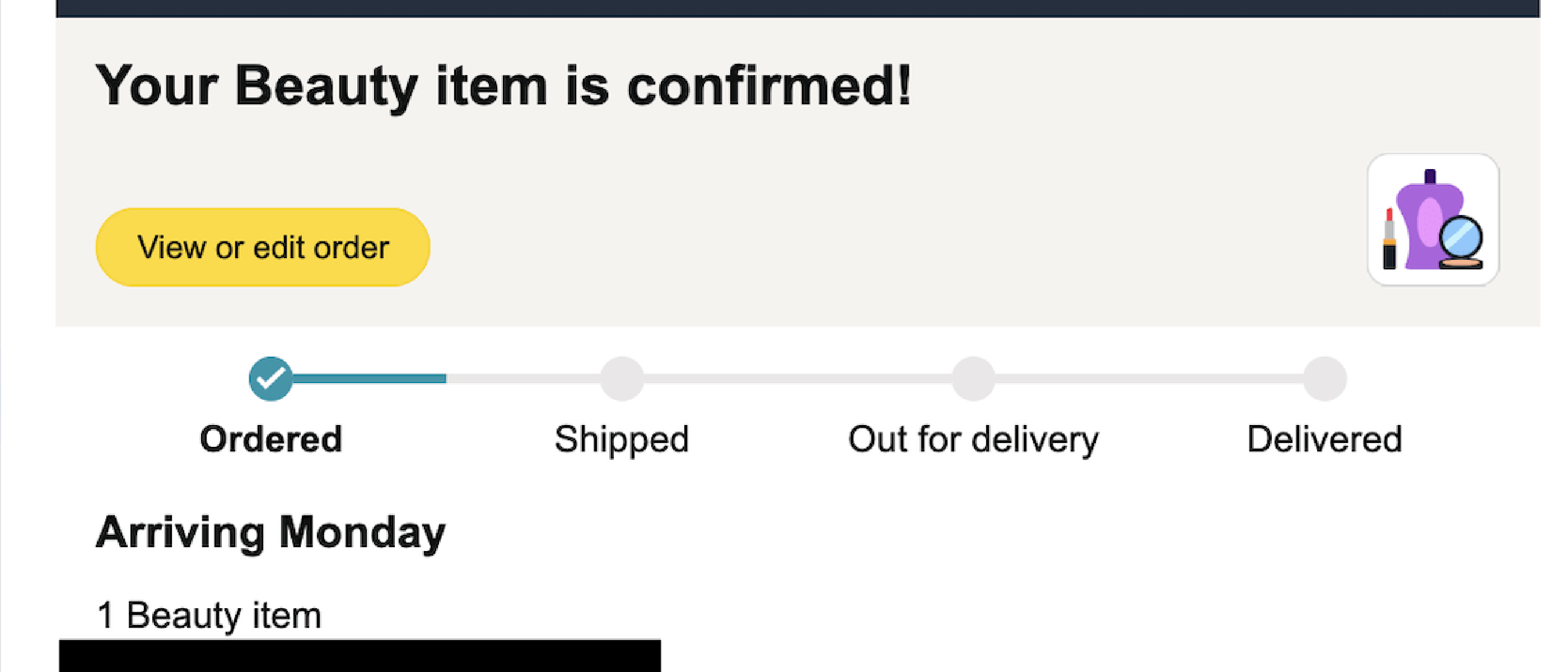
Earlier this week, The Verge reported that Amazon’s order‑confirmation emails have undergone a visual and textual overhaul. Instead of listing the exact SKU or product title, the messages now display only broad category names such as “Beauty,” “Hardware,” or “Nutrition & Wellness.” The change is accompanied by simple, clip‑art‑style illustrations that represent each category rather than the specific item purchased.
Examples shared by shoppers include:
- “Your Beauty item is confirmed!” – a retainer‑cleaning tablet.
- “Ordered: 1 Hardware item” – a generic hardware‑category notification.
- “Your Drugstore, Shoes, and other items are here!” – a multi‑category notice.
- “1 Nutrition & Wellness, 1 Wireless Accessories” – a split‑category listing.
Screenshots circulating on social media show the new layout, and many users have complained that they must click through to Amazon’s website to verify what they actually bought. The redesign is a stark departure from the detailed receipts that have been a staple of the e‑commerce experience for years.
Technical Breakdown: How Amazon Generates the New Emails
Template Engine Adjustments
Amazon’s transactional email system is built on a highly scalable template engine that pulls data from order‑management micro‑services. The recent change likely involved:
- Category Mapping Layer – A new service that translates a product’s internal taxonomy (e.g., “Oral Hygiene – Retainer Cleaning Tablet”) into a high‑level category (“Beauty”).
- Illustration Selector – A lightweight asset manager that picks a matching SVG or PNG based on the category identifier.
- Redaction Logic – A rule set that strips out any field flagged as “PII‑sensitive” before the final payload is sent to the email renderer.
These components sit behind Amazon’s existing “Email Service” (a variant of Amazon Simple Email Service, SES) and are invoked synchronously as the order is confirmed. The pipeline can be visualized as:
Order Service → Category Mapper → Redaction Rules → Template Engine → SES → Customer InboxBecause the change is applied at the template level, it can be rolled out globally in minutes without touching the underlying order database.
Data Privacy Considerations
From a technical standpoint, the redaction aligns with a growing trend to limit the exposure of personally identifiable information (PII) in outbound communications. By omitting exact product titles, Amazon reduces the risk that an intercepted email could reveal a user’s purchasing habits—a concern amplified by recent high‑profile data breaches. The approach mirrors security‑first practices highlighted in the recent Zoom Annotation Flaw Patched After AI‑Prompt Exploit article, where companies opted for tighter data handling to mitigate attack vectors.
Why It Matters: User Experience, Privacy, and Brand Trust
User Experience (UX) Trade‑offs
Pros
- Faster email rendering due to smaller payloads.
- Uniform visual language that may improve brand consistency across devices.
Cons
- Loss of immediate clarity; shoppers must open a browser tab to confirm what they bought.
- Increased cognitive load for users who rely on email as a quick reference (e.g., for expense reports or warranty claims).
The net effect is a measurable dip in perceived convenience—a metric that Amazon has historically optimized for. Early anecdotal evidence suggests a rise in “email‑open‑but‑no‑click” rates, which could affect downstream metrics like repeat purchase intent.
Privacy Implications
The redesign can be read as a proactive privacy measure. By limiting the granularity of order details, Amazon reduces the surface area for phishing attacks that mimic order confirmations. However, the move also raises questions about transparency: are customers being shielded from information they legitimately need? The balance between privacy and usability is a recurring theme in the Anthropic to Watermark Claude Text for EU AI Act discussion, where regulators push for user‑centric data handling while companies grapple with practical implementation.
Brand Trust and Communication Strategy
Amazon’s brand is built on reliability and clarity. A sudden shift that obscures order specifics may erode trust, especially among power users who have integrated Amazon receipts into personal finance tools. The company will need to accompany the redesign with clear messaging—perhaps a help‑center article explaining the rationale—to avoid speculation that the change is a cost‑cutting measure rather than a privacy‑focused upgrade.
Industry Impact: Ripple Effects Across E‑Commerce
Competitor Response
Other large marketplaces (e.g., Walmart, eBay) have historically used detailed order confirmations as a differentiator. If Amazon’s experiment proves successful in reducing spam complaints or phishing incidents, we may see a wave of “category‑only” receipts across the sector. Conversely, a backlash could reinforce the status quo, prompting competitors to double down on detail as a competitive advantage.
Regulatory Landscape
Data‑protection regulations such as the GDPR and California Consumer Privacy Act (CCPA) encourage minimization of personal data exposure. Amazon’s redesign could be interpreted as an anticipatory compliance step, positioning the retailer favorably should stricter email‑content
guidelines emerge. However, regulators may also scrutinize whether the change constitutes an unnecessary restriction on consumer access to their own purchase data—a debate that echoes recent discussions around Apple’s App Tracking Transparency Framework and its implications for user autonomy.
Third-Party Tool Integration
Many users rely on email parsing tools (e.g., expense trackers, budgeting apps) that extract order details from confirmation emails. The shift to generic category labels could break these integrations, forcing developers to update their parsing logic or abandon Amazon receipts altogether. This disruption may accelerate the adoption of Amazon’s official APIs for order data retrieval, further centralizing control over user data within Amazon’s ecosystem.
Potential Workarounds and User Adaptations
Browser Extensions and Scripts
Tech-savvy users have already begun developing browser extensions and scripts to re-inject product details into Amazon emails. These tools typically:
- Scrape the order ID from the email.
- Query Amazon’s website or API (with user credentials) to fetch the full order details.
- Overlay or replace the generic category labels with the original product names.
While these solutions restore functionality, they introduce security risks, as users must grant third-party tools access to their Amazon accounts.
Amazon’s Native Solutions
Amazon could mitigate user frustration by:
- Offering an opt-in toggle in account settings to restore detailed order emails.
- Enhancing the “View Order” link in emails to open a pre-authenticated, mobile-optimized order summary page.
- Providing a downloadable CSV of order details directly from the email, reducing the need to navigate the website.
Such features would balance privacy with usability, though their implementation would require additional engineering effort.
The Broader Trend: Minimalism vs. Utility in Digital Communication
Amazon’s redesign reflects a broader tension in digital communication between minimalism and utility. As companies prioritize:
- Privacy (reducing data exposure),
- Brand consistency (uniform visuals across touchpoints), and
- Performance (faster email rendering),
they risk sacrificing the granularity that users have come to expect. This trade-off is evident in other recent design shifts, such as:
- Apple’s iOS 17 Mail app, which hides email previews by default to reduce clutter.
- Google’s Gmail updates, which increasingly abstract away details in favor of “smart” summaries.
- Social media platforms, which replace chronological feeds with algorithmically curated content.
In each case, the goal is to simplify the user experience, but the execution often sparks backlash from users who feel disempowered by the loss of control.
Conclusion: A Privacy-First Future or a Step Too Far?
Amazon’s decision to obscure product details in order emails is a bold experiment in balancing privacy, security, and user experience. While the move aligns with broader industry trends toward data minimization, it also introduces friction for users who rely on email confirmations as a quick reference. The long-term success of this redesign will depend on:
- User feedback: Will shoppers adapt, or will complaints force Amazon to revert or refine the approach?
- Competitor actions: Will other retailers follow suit, or will they use detailed receipts as a competitive advantage?
- Regulatory clarity: Will lawmakers or privacy advocates weigh in on whether such changes are necessary or overly restrictive?
For now, Amazon’s customers are left navigating a new, less transparent shopping experience—one where a “Beauty item” could be anything from shampoo to a retainer-cleaning tablet. Whether this trade-off is worth it may ultimately hinge on how much users value privacy over convenience in their digital lives.
FAQ
Why did Amazon change its order confirmation emails?
Amazon has not publicly stated the exact reason, but the redesign likely aims to:
- Enhance privacy by reducing the exposure of personal purchase data in emails.
- Mitigate phishing risks by making it harder for attackers to mimic order confirmations.
- Streamline email templates for faster rendering and improved brand consistency.
Can I opt out of the new email format?
As of now, Amazon has not provided an opt-out option for the redesigned emails. Users who prefer detailed receipts may need to rely on third-party tools or manually check their order history on Amazon’s website.
Will this affect my ability to track orders or request refunds?
No. The change only affects the email confirmation. Order tracking, refunds, and other post-purchase actions remain accessible through Amazon’s website or app.
Are other retailers likely to adopt this approach?
It’s possible. If Amazon’s redesign proves effective in reducing spam complaints or phishing incidents, competitors may follow suit. However, a strong user backlash could deter other companies from making similar changes.
How can I see what I actually ordered if the email doesn’t show it?
You can:
- Click the “View Order” link in the email to open the order details on Amazon’s website.
- Check your order history in the Amazon app or website.
- Use a browser extension or script to re-inject product details into the email (though this may pose security risks).
Does this change comply with data protection laws like GDPR?
The redesign appears to align with the principle of data minimization under GDPR and similar regulations, as it reduces the amount of personal data shared in emails. However, regulators may still evaluate whether the change unnecessarily restricts users’ access to their own purchase information.
What should I do if I receive a suspicious order confirmation email?
If an email claiming to be from Amazon seems suspicious:
- Do not click any links or download attachments.
- Verify the order by logging into your Amazon account directly (not through the email).
- Report the email to Amazon’s phishing team at stop-spoofing@amazon.com .
Source: Original Article