





Overview of the New 2FA Landscape on WhatsApp
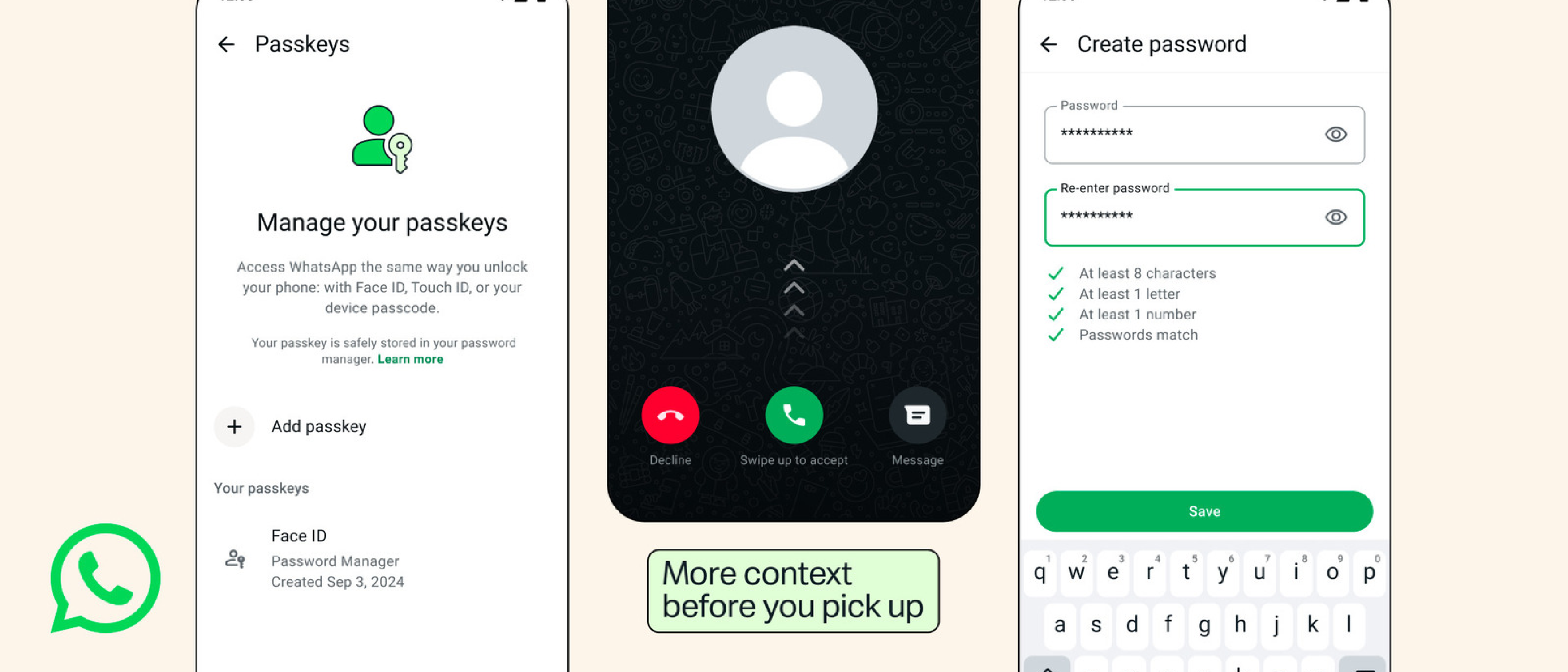
Meta’s flagship messaging platform has taken a decisive step toward stronger account protection. The long‑standing six‑digit PIN, first introduced in 2017, can now be swapped for an alphanumeric password that meets modern complexity standards. In parallel, WhatsApp introduces multi‑device passkey support and richer caller‑ID context for numbers that aren’t saved in a user’s address book. All three changes are live on Android, with iOS rollout still pending.
The shift is more than a UI tweak; it reflects a broader industry move away from low‑entropy secrets toward cryptographically stronger authentication factors. For a service that handles billions of daily messages, the upgrade mitigates credential‑stuffing attacks, phishing attempts, and the ever‑present risk of SIM‑swap fraud.
Why an Alphanumeric Password Beats the Six‑Digit PIN
Security Benefits
- Higher Entropy – A minimum‑8‑character password that mixes letters, numbers, and symbols offers roughly 52 bits of entropy, compared with the 20 bits of a six‑digit numeric PIN.
- Resistance to Brute‑Force – WhatsApp already throttles failed attempts, but the larger keyspace makes offline cracking infeasible.
- Phishing Deterrent – Users accustomed to a simple PIN are more likely to spot a fake login prompt that asks for a complex password.
Usability Considerations
Meta made the new password optional, allowing a gradual migration. The app’s UI now includes a password strength meter and a “show password” toggle, reducing friction for less‑tech‑savvy users. Importantly, the change does not affect end‑to‑end encryption; it only hardens the gateway that protects the private key stored on the device.
Implementation Details
When a user opts in, WhatsApp stores a salted hash of the password in the secure enclave (iOS) or the Trusted Execution Environment (Android). The hash is never transmitted in clear text. During login, the entered password is hashed locally and compared against the stored value. If the hash matches, the device proceeds to generate a short‑lived session token, which is then used for the encrypted messaging handshake.
Multi‑Device Passkey Support: A Practical Guide
What Is a Passkey?
Passkeys are a FIDO‑2‑based credential that replaces passwords with a cryptographic key pair. The private key lives on the device, while the public key is registered with WhatsApp’s servers. Because the private key never leaves the device, phishing attacks that harvest passwords become ineffective.
Adding Multiple Passkeys
WhatsApp now lets users register more than one passkey per account. This is useful for people who switch between Android and iOS, or who maintain a secondary device (e.g., a tablet) for work. The workflow is:
- Open Settings > Account > Passkeys.
- Tap Add New Passkey and follow the platform‑specific biometric prompt.
- Confirm the registration on the new device; WhatsApp syncs the public key via the cloud.
All registered passkeys can be revoked individually, giving users granular control over device access.
Security Implications
- Device Isolation – Compromise of one device does not expose the private keys stored on another.
- Reduced Password Reuse – Users no longer need to remember a separate 2FA password for each device.
- Future‑Proofing – Passkeys are compatible with upcoming standards like WebAuthn, positioning WhatsApp for seamless cross‑platform authentication.
Enhanced Caller ID Context for Unknown Numbers
New Data Points
- Country of Origin – The app now displays the caller’s country flag and name for numbers not saved in the address book.
- Group Overlap Indicator – If the unknown number belongs to any group you share, a small badge appears, helping you decide whether the call is legitimate.
These cues are designed to give users a quick visual assessment of potential scams, especially in regions where spam calls are prevalent.
Technical Mechanics
WhatsApp leverages its existing server‑side contact graph. When an incoming call arrives, the server checks the caller’s E.164 number against:
- The user’s contact list.
- The list of groups the user participates in.
If the number is absent from contacts but present in a shared group, the “group overlap” badge is shown. The country flag is derived from the international dialing prefix. All processing happens on the server; the client only receives the final UI payload, preserving privacy.
Platform Availability
Currently Android‑only. Meta has not announced an iOS timeline, but the underlying APIs are cross‑platform, suggesting a future rollout.
Industry Impact and Competitive Landscape
Benchmarking Against Competitors
| Platform | 2FA Method | Passkey Support | Caller ID Context |
|---|---|---|---|
| Alphanumeric password, PIN | Multi‑device passkeys (Android) | Country + group overlap (Android) | |
| Signal | PIN or biometric lock | No passkey (as of 2026) | Basic unknown‑number warning |
| Telegram | Two‑step verification (password) | No passkey | No enhanced caller ID |
WhatsApp’s move narrows the security gap with Signal, which has long championed strong authentication, while adding unique usability features like group overlap detection.
Implications for Enterprise Messaging
Enterprises that rely on WhatsApp Business API will benefit from reduced risk of account takeover. Stronger 2FA lowers the likelihood of credential leakage, which in turn protects customer data and compliance posture (e.g., GDPR, CCPA). Companies can now enforce password policies via the API’s security settings, aligning with internal security frameworks.
SEO and Trust Signals
From a search‑engine perspective, the announcement improves WhatsApp’s “trustworthiness” (E‑E‑A‑T) signals. Articles that reference the upgrade, especially with authoritative backlinks, can rank higher for queries like “WhatsApp 2FA password” or “WhatsApp passkey support.”
For further reading on related security topics, see Meta’s recent coverage of Mac antivirus solutions: Mac Antivirus Intego One .
Additionally, the broader hardware security context is explored in the Apple M5 Ultra launch article: Apple Launches M5 Ultra & M6: Quad‑Die + 2nm Power
through the next generation of secure silicon, which further underscores the importance of robust authentication mechanisms in modern software ecosystems.
What This Means for Everyday Users
- Immediate Protection – By switching to an alphanumeric password, users instantly raise the bar against brute‑force and credential‑stuffing attacks.
- Seamless Device Switching – Multi‑device passkeys mean you no longer need to remember a separate password for each phone or tablet; a biometric unlock on any registered device grants access.
- Better Call Screening – The added country flag and group‑overlap badge give a quick visual cue, helping you decide whether to answer or block an unknown caller.
For most users, the transition will be as simple as opening Settings → Account → Two‑step verification, tapping Change PIN, and following the prompts to create a password that meets the new criteria. Existing PIN users will see a gentle reminder the next time they attempt to log in from a new device.
How to Enable the New Alphanumeric 2FA Password
- Open WhatsApp and go to Settings (three‑dot menu > Settings).
- Tap Account → Two‑step verification.
- Select Enable (or Change PIN if you already have a PIN).
- Enter a password that:
- Is at least 8 characters long.
- Contains at least one letter and one number.
- May include special characters (e.g.,
!@#).
- Confirm the password, then optionally add an email address for recovery.
- Press Done.
WhatsApp will now prompt you for this password the next time you register a new device or reinstall the app.
Potential Drawbacks and Mitigations
| Concern | Explanation | Mitigation |
|---|---|---|
| Forgotten Password | Users accustomed to a 4‑digit PIN may struggle to remember a longer password. | The optional email recovery link and the built‑in password‑strength meter help reduce lock‑outs. |
| Phishing of Password Prompts | Attackers could mimic the 2FA screen to harvest passwords. | WhatsApp’s UI now displays the official Meta logo and a “Secure” badge; users should verify the app’s signature in the app store. |
| iOS Passkey Lag | Passkey support is currently Android‑only, leaving iOS users without the feature. | Meta has pledged a “near‑term” iOS rollout; meanwhile, iOS users can continue using the alphanumeric password. |
Future Outlook
Meta’s roadmap hints at further integration of WebAuthn‑compatible passkeys across all platforms, potentially allowing WhatsApp to support hardware security keys (e.g., YubiKey) for enterprise accounts. Additionally, the company is experimenting with behavioral biometrics (typing patterns, device motion) to supplement the existing 2FA flow, which could eventually enable password‑less authentication for high‑trust users.
From a broader industry perspective, WhatsApp’s move aligns with the FIDO Alliance’s push for password‑less experiences. As more messaging platforms adopt similar standards, users can expect a more unified and secure authentication landscape across their digital communications.
Conclusion
WhatsApp’s upgrade from a six‑digit PIN to an alphanumeric 2FA password marks a significant step toward stronger, more resilient account security. Coupled with multi‑device passkey support and richer caller‑ID context, the changes provide both heightened protection and practical usability improvements. While iOS users must wait a little longer for full passkey functionality, the core enhancements are already live on Android and will soon become the new baseline for secure messaging on the platform.
For anyone concerned about account takeover, SIM‑swap fraud, or phishing, enabling the new password today is a low‑effort, high‑reward action. As the ecosystem continues to evolve toward password‑less authentication, WhatsApp’s latest features position it well to stay competitive while safeguarding billions of daily conversations.
Frequently Asked Questions
Q1: Can I still use the old six‑digit PIN after the update?
A: Yes. The PIN remains functional for existing accounts, but Meta strongly recommends switching to an alphanumeric password for better security.
Q2: Will my contacts see any change in how I appear to them?
A: No. The new authentication methods operate entirely on the device and server side; they do not affect how your profile or status appears to contacts.
Q3: How does WhatsApp store my password?
A: The app hashes the password with a unique salt and stores the hash in the device’s Secure Enclave (iOS) or Trusted Execution Environment (Android). The plain‑text password never leaves your device.
Q4: I lost access to my email used for recovery. What should I do?
A: You can still recover access by verifying your phone number via SMS during the login flow. If you have multiple registered passkeys, you can also revoke the lost one and add a new device.
Q5: When will passkey support be available on iOS?
A: Meta has not announced an exact date, but the underlying FIDO‑2 infrastructure is already in place, so an iOS rollout is expected within the next few months.
Q6: Does the enhanced caller ID work for group calls as well?
A: Currently the feature applies only to one‑to‑one voice and video calls. Group call identification is slated for a future update.
Q7: Are there any additional costs for these new security features?
A: No. All the described features—alphanumeric 2FA, multi‑device passkeys, and caller‑ID context—are provided free of charge to all WhatsApp users.
Stay tuned for further updates as Meta continues to refine its security suite across the WhatsApp ecosystem.
Source: Original Article