Overview of Live Rewind and Siri Recap
Apple’s watchOS 27.3 beta marks the first public rollout of the Audio Intelligence suite that was teased earlier in the year for the Apple Watch Series 12 and Ultra 4. Powered by the new S11 chip, the suite now includes two capabilities that were previously unavailable on the watch: Live Rewind and Siri Recap.
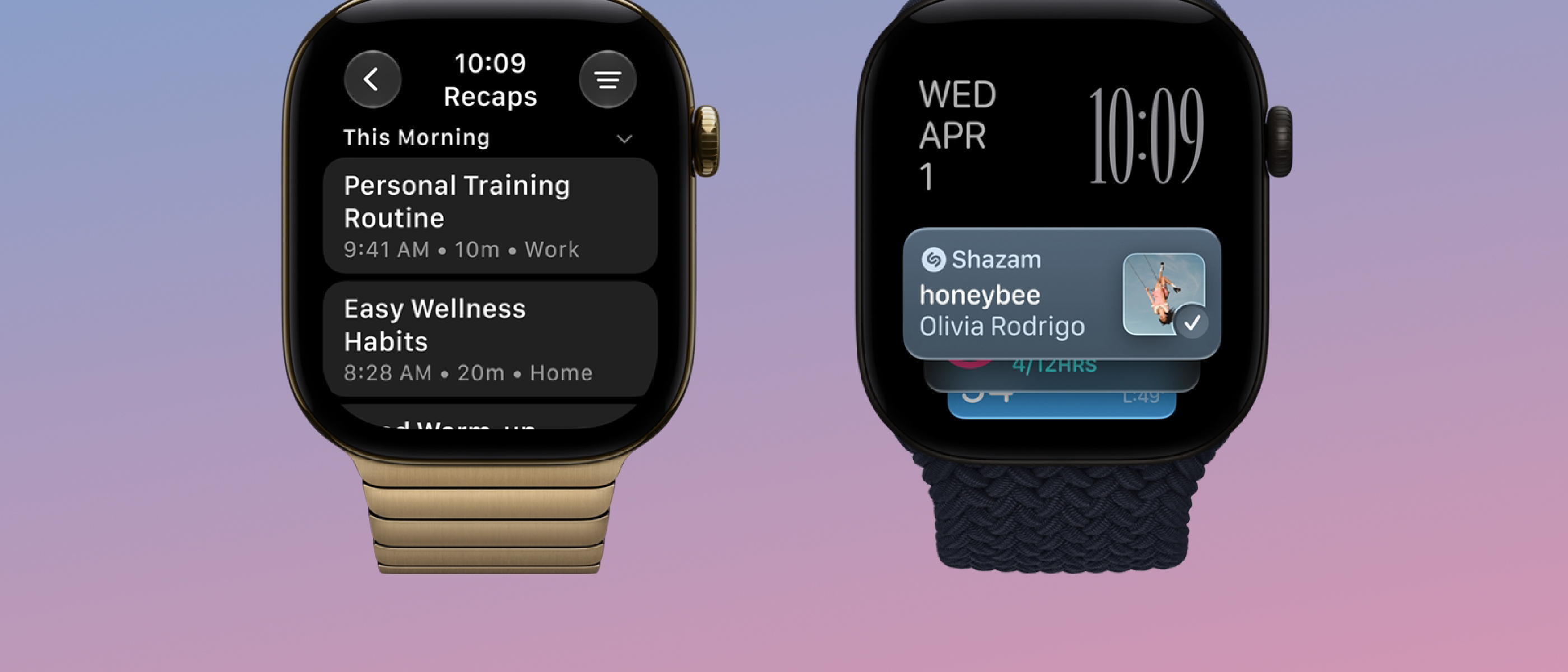
Live Rewind – A user‑initiated transcript of the most recent 15 seconds of spoken audio. By double‑pressing the Digital Crown, the watch displays a text snippet of what was just said, accompanied by an audible chime and a visual animation that signals the microphone is active. The feature is strictly on‑device unless the user explicitly sends the snippet to Siri for further processing or saves it in the Siri app.
Siri Recap – A background summarizer that listens throughout the day, extracts high‑level topics, and generates a concise title plus bullet‑point summary. Summaries are stored for seven days, auto‑deleted unless the user saves them, and can be scheduled by time, location, or both.
Both features are opt‑in, respect Apple’s privacy‑first stance, and are currently English‑only for users aged 13 and up (parental approval required for child accounts).
Technical Architecture & Privacy Safeguards
On‑Device Processing with the Secure Enclave
The S11 chip’s Secure Enclave isolates raw audio data from the rest of the system. When Live Rewind is triggered, the microphone feed is encrypted and processed inside this hardware‑isolated compartment. No raw audio leaves the watch unless the user explicitly asks Siri to act on the snippet (e.g., “What did they say about the meeting?”). In that case, a minimal, transient excerpt is sent to Apple’s Private Cloud Compute for natural‑language understanding, after which the result is returned and the original audio is discarded.
Siri Recap’s Cloud‑Assisted Summarization
While Live Rewind stays on‑device, Siri Recap relies on a hybrid model:
- Edge Capture – The watch continuously captures short, non‑identifiable audio frames. These frames are never stored; they are immediately fed into a lightweight on‑device encoder that extracts phonetic features.
- Secure Transfer – The encoded features are encrypted and transmitted to Apple’s Private Cloud Compute, where a large‑scale transformer model (part of the broader Apple Intelligence platform) assembles a contextual summary.
- Result Delivery – The summary is pushed back to the watch, displayed in the Siri app, and retained for up to seven days.
Apple’s privacy explainer emphasizes that no speaker identification occurs; summaries never label “Eric said…” or differentiate between speakers. Content that could be harmful or sensitive is filtered out before the summary is generated.
Integration with the Wider Apple Ecosystem
Both features require an iPhone 16 or later running iOS 27.3 with Apple Intelligence enabled. The watch syncs its preferences, saved snippets, and Recap rules through the paired iPhone, ensuring a seamless cross‑device experience. For developers, the new Audio Intelligence API (still in beta) offers hooks to request a Live Rewind snippet programmatically, but only after explicit user consent.
Real‑World Use Cases and User Experience
Everyday Scenarios
| Scenario | How Live Rewind Helps | How Siri Recap Helps |
|---|---|---|
| Restaurant ordering | Missed the daily special? Double‑press the Crown to see the last 15 seconds of the server’s description. | At the end of the day, Recap shows “Lunch meeting topics” with key points, letting you recall decisions without scrolling through notes. |
| Business meetings | Capture a quick clarification without pulling out a phone; the transcript appears instantly on the watch face. | Recap can be scheduled to run only during work hours, summarizing client calls and action items while ignoring personal conversations. |
| Fitness class | Missed the instructor’s cue? Live Rewind displays the last spoken instruction, keeping you on track. | After a class, Recap provides a summary of the workout structure, helping you log metrics in the Fitness app. |
Interaction Design
- Digital Crown Activation – The double‑press gesture is deliberately chosen to avoid accidental triggers. An audible chime (still audible in silent mode) and a full‑screen animation reassure nearby people that the microphone is active.
- Control Center Toggle – Users can enable or disable Siri Recap on the fly, giving immediate control over background listening.
- Saved Summaries – In the Siri app, each Recap entry can be pinned, exported to Notes, or deleted. The UI mirrors the familiar “Memories” layout from Photos, reinforcing Apple’s design language.
Industry Impact and Competitive Landscape
Apple’s move to embed conversational AI directly into a wearable is a first‑of‑its‑kind in the mainstream market. Competitors such as Google (Wear OS) and Samsung (Galaxy Watch) have offered basic voice assistants, but none provide on‑device transcription or background summarization with the same privacy guarantees.
- Privacy Differentiation – By keeping raw audio in the Secure Enclave and using Private Cloud Compute only for abstracted features, Apple sidesteps regulatory scrutiny that has plagued other AI‑enabled wearables.
- Hardware‑Software Synergy – The S11 chip’s dedicated neural engine accelerates the on‑device speech encoder, making Live Rewind feel instantaneous. This tight coupling showcases Apple’s strategy of co‑designing silicon and software.
- Ecosystem Lock‑In – Requiring an iPhone 16 or later encourages users to stay within the Apple ecosystem, especially as the watch becomes a more capable personal assistant.
The broader Audio Intelligence push aligns with Apple’s recent announcements around Apple Intelligence in iOS 27.3, as detailed in the article “Apple Intelligence Arrives in China with iOS 27.3”. That rollout introduced large‑scale language models to iPhone, and watchOS now leverages a trimmed‑down version
that rollout introduced large‑scale language models to iPhone, and watchOS now leverages a trimmed‑down version of the same underlying transformer architecture to power Siri Recap. Because the watch’s processor budget is far smaller than the iPhone’s, Apple off‑loads the heavy‑weight summarization to Private Cloud Compute while keeping the initial feature extraction on‑device. This hybrid approach lets the watch deliver “instant‑like” experiences without draining the battery or compromising privacy.
Battery Impact and Performance
Early beta testers report that enabling both Live Rewind and Siri Recap together adds roughly 3‑4 % to daily battery consumption on the Series 12 and Ultra 4. The impact is largely due to the periodic background uploads required for Recap summarization. Apple has stated that the watch will automatically throttle the frequency of feature‑extraction frames when the battery falls below 20 %, ensuring that users can still make it through a full day of wear.
Availability and Rollout Timeline
- Beta Phase: watchOS 27.3 beta 1 (public) – released 14 Nov 2026.
- Final Release: Expected December 2026 alongside iOS 27.3.
- Supported Devices: Apple Watch Series 12, Ultra 4, and later models equipped with the S11 chip.
- iPhone Requirement: iPhone 16 or newer running iOS 27.3 with Apple Intelligence enabled.
Apple has not announced a price change for the watch itself; the new features are included as part of the OS update at no extra cost.
Developer Implications
Apple opened a beta‑only Audio Intelligence API that allows third‑party apps to request a Live Rewind transcript after the user has manually triggered the feature. The API respects the same privacy contract:
- Explicit User Consent – The app can only access the transcript if the user taps a “Share with [App]” button in the Siri UI.
- Ephemeral Data – The transcript is delivered as a one‑time string and is not persisted by the system unless the app stores it locally, in which case it must follow Apple’s Data Minimization guidelines.
- Rate Limiting – To protect battery life, the API caps requests at three per hour per app.
Developers can now build richer note‑taking, meeting‑assistant, or health‑coaching experiences that integrate seamlessly with the watch’s native UI, but they must also implement the required privacy disclosures in their App Store listings.
Limitations and Known Issues
| Issue | Description | Work‑around |
|---|---|---|
| Language Support | Currently English‑only; other locales will arrive in a later update. | Switch device language to English to enable features. |
| Silent‑Mode Chime | The audible chime for Live Rewind plays even when the watch is set to silent, which can be disruptive in quiet environments. | Disable Live Rewind in Control Center if the chime is undesirable. |
| Background Listening Gaps | Siri Recap may miss brief utterances when the watch is in low‑power mode or when Bluetooth connectivity is intermittent. | Keep the watch on the wrist and ensure a stable iPhone connection for best results. |
| Child Account Restrictions | Users under 13 cannot enable the features; accounts aged 13‑17 require parental approval. | Parents can grant permission via Family Sharing settings. |
Apple’s release notes indicate that many of these issues will be addressed in watchOS 27.3.1, slated for early 2027.
What This Means for the Future of Wearable AI
Apple’s decision to embed conversational AI directly into a wrist‑worn device signals a broader industry shift toward context‑aware assistants that operate with minimal friction. By combining on‑device inference with secure, privacy‑first cloud compute, Apple demonstrates that it is possible to deliver useful AI features without sacrificing the tight security model that has long been a hallmark of its ecosystem.
Looking ahead, we can expect:
- Expanded Language Coverage – Multilingual support is likely to arrive in watchOS 27.4, leveraging the same Apple Intelligence models that now power iOS 27.3 in over 30 languages.
- Deeper Integration with Health – Apple may tie Siri Recap into the Health app, automatically summarizing doctor‑visit conversations (with consent) and adding relevant metrics to the user’s health record.
- Third‑Party Ecosystem Growth – As the Audio Intelligence API matures, developers will build niche solutions—from real‑time language translation to meeting‑action‑item extraction—further cementing the watch as a productivity hub.
Overall, watchOS 27.3’s Audio Intelligence suite sets a new benchmark for what a smartwatch can do beyond fitness tracking, positioning the Apple Watch as a true “always‑on” personal assistant.
Conclusion
watchOS 27.3 brings Live Rewind and Siri Recap out of the rumor mill and onto the wrists of millions of users. The features strike a careful balance between convenience and privacy: Live Rewind offers an on‑device, user‑initiated transcript of the last 15 seconds of speech, while Siri Recap provides AI‑generated daily summaries via a secure, hybrid processing pipeline. Although the current implementation is limited to English and carries a modest battery cost, the underlying architecture—Secure Enclave processing, Private Cloud Compute, and the S11 neural engine—lays a solid foundation for future enhancements.
For early adopters, the key takeaways are:
- Enable the features in Settings → Siri & Search → Audio Intelligence if you want on‑the‑fly transcription or daily conversation recaps.
- Use the Digital Crown double‑press for instant Live Rewind, and check the Siri app for saved Recap entries.
- Keep your iPhone 16 or newer updated to iOS 27.3 to ensure seamless syncing and cloud summarization.
As Apple continues to refine its Audio Intelligence capabilities, the line between “watch” and “assistant” will blur even further, making the Apple Watch an increasingly indispensable part of the daily workflow.
FAQ
Q: Do Live Rewind transcripts get stored anywhere? A: No. The 15‑second snippet is processed on‑device and discarded unless you explicitly ask Siri to act on it or you manually save the transcript in the Siri app.
Q: Can I turn off the audible chime for Live Rewind? A: Not in the current beta. The chime is a privacy indicator that the microphone is active. You can disable Live Rewind entirely via Control Center if the sound is a concern.
Q: How does Siri Recap handle sensitive information? A: Apple’s system filters out potentially harmful or personally sensitive content before generating a summary. Summaries never include full verbatim text and do not identify speakers.
Q: Will the features work on older Apple Watch models? A: Live Rewind and Siri Recap require the S11 chip, so they are limited to Series 12, Ultra 4, and later devices.
Q: Is there a way to export Siri Recap summaries? A: Yes. In the Siri app you can tap a Recap entry, then use the Share sheet to send it to Notes, Mail, or any other app that supports text sharing.
Q: Are there any plans for offline summarization? A: Apple has indicated that future watchOS updates may include a fully on‑device summarizer for limited use cases, but for now the cloud‑assisted model is required to achieve high‑quality results.
Q: How does this affect my data plan? A: The background uploads for Siri Recap are small—typically a few kilobytes per hour—so they have minimal impact on cellular data usage.
Q: Can developers create custom “recap” rules? A: The current API only allows apps to request a Live Rewind transcript after user activation. Custom scheduling of Recap is limited to the system UI; third‑party apps cannot modify Recap rules at this time.
Stay tuned for further updates as Apple rolls out watchOS 27.3 to the public and expands Audio Intelligence to more languages and devices.
Source: Original Article