


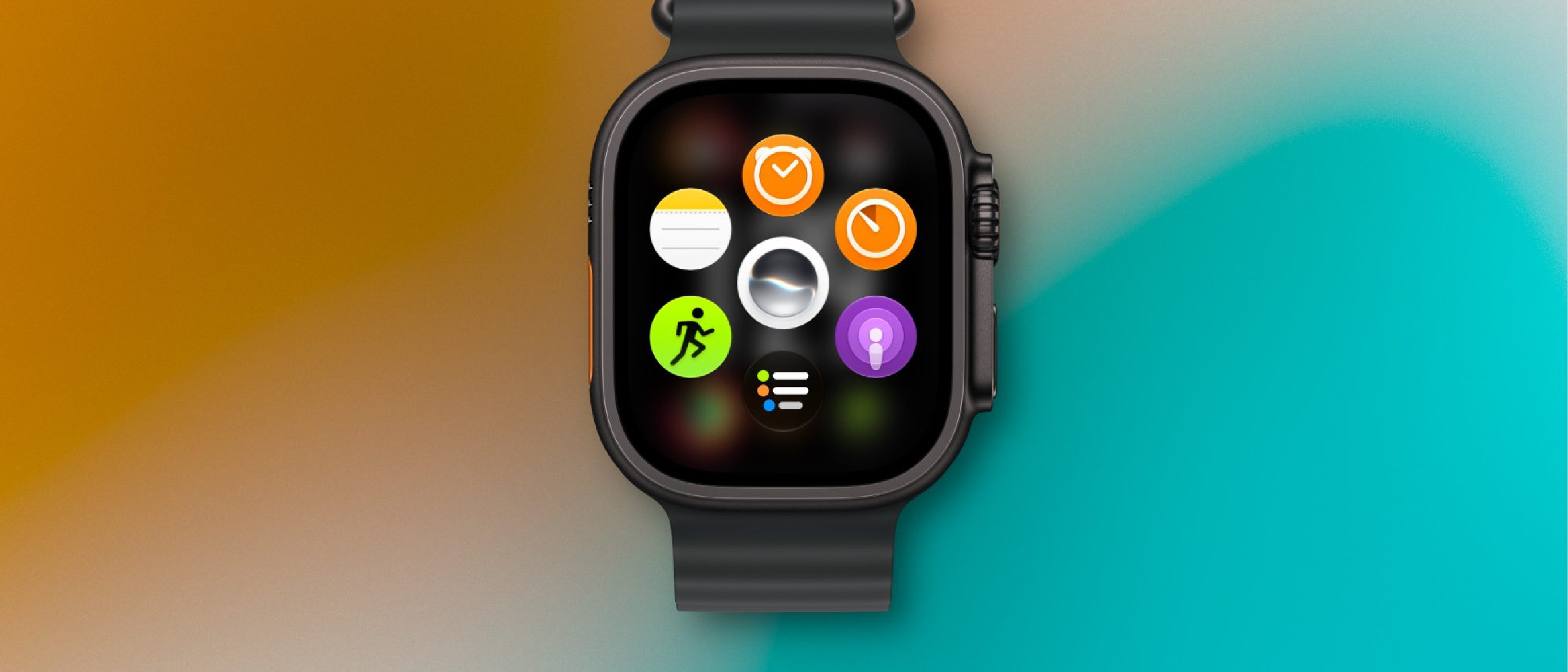
The Siri Modular Face: A New Interaction Paradigm
Apple’s watchOS 27 update brings a fresh, AI‑driven watch face that places Siri at the center of the user experience. Dubbed the Siri Modular face, it combines the familiar modular layout—multiple data‑rich complications arranged in a grid—with real‑time, context‑aware voice assistance. Rather than a static set of complications, each tile can surface Siri‑generated insights, reminders, or actionable suggestions based on the wearer’s habits, location, and health metrics.
The face is available across the entire Apple Watch lineup, from the entry‑level SE to the rugged Ultra. Its adaptive design respects the differing screen real estate of each model, scaling the number of modules while preserving readability. Early testers report that the face feels less like a passive display and more like an always‑on personal assistant that anticipates needs before the user even asks.
Technical Architecture Behind the Modular Face
1. On‑Device Machine Learning
watchOS 27 leverages Apple’s on‑device neural engine to run lightweight Siri models locally. This approach minimizes latency, preserves privacy, and reduces reliance on cellular or Wi‑Fi connectivity. The models are trained on anonymized data collected from the broader Apple ecosystem, then distilled into a compact inference engine that fits within the watch’s limited RAM.
2. Dynamic Complication Rendering
Each module is a dynamic complication powered by a new API: SiriModularComplication. Developers can supply a data source that returns a JSON payload containing:
type: the kind of content (text, icon, chart)content: the actual data or Siri‑generated phraseaction: a deep link that triggers a Siri shortcut or app function when tapped
The system caches the most recent payload and refreshes it on a schedule that balances battery life with relevance. For high‑priority modules—such as upcoming calendar events or health alerts—the refresh interval can be as short as five minutes.
3. Integration with HealthKit and Location Services
The face pulls from HealthKit to surface metrics like heart‑rate trends, VO₂ max, or sleep quality. When combined with location services, Siri can suggest context‑specific actions: “You’re at the gym—start your workout playlist” or “You’ve walked 5 km today; would you like to set a new goal?” All of this occurs without transmitting personal data to Apple’s servers, thanks to the on‑device processing pipeline.
4. Battery Management Strategies
Apple has introduced a low‑power mode for the Siri Modular face. When the watch detects a low‑battery state (< 15 %), the face automatically switches to a static layout, preserving the most critical information while suspending real‑time Siri queries. This fallback ensures that the new AI features do not compromise the watch’s all‑day battery promise.
Why the Siri Modular Face Matters to Users
Enhanced Personalization
Traditional watch faces rely on static complications that the user manually configures. The Siri Modular face, by contrast, learns from user behavior. If a user frequently checks the weather before a run, Siri will proactively display a weather module with a short‑term forecast and a “Start Run” shortcut. Over time, the face becomes a personalized dashboard that evolves with the wearer’s routines.
Streamlined Interaction
Voice commands on the Apple Watch have historically required a dedicated press of the Digital Crown or a “Hey Siri” trigger. With the modular face, a simple tap on a module can launch a Siri shortcut, eliminating the need for extra gestures. This is especially valuable for the Ultra’s outdoor users, who may have gloved hands or limited visibility.
Accessibility Gains
For users with visual impairments or motor challenges, the modular layout offers larger tap targets and spoken summaries. Siri can read out the content of each module on demand, turning the watch into a more inclusive device without requiring third‑party accessibility apps.
Industry Impact: Apple’s Position in Wearable AI
Apple has long positioned the Apple Watch as a health‑first device, but watchOS 27 signals a shift toward AI‑augmented wearables. Competitors like Samsung and Google have introduced AI‑driven watch faces, yet Apple’s on‑device approach differentiates it on privacy grounds. By keeping the inference engine local, Apple sidesteps the regulatory scrutiny that cloud‑based voice assistants face in regions with strict data‑protection laws.
The move also pressures app developers to adopt the new SiriModularComplication API. Early adopters can create richer experiences, such as finance apps that surface real‑time market sentiment generated by Siri, or travel apps that suggest nearby attractions based on the wearer’s itinerary. This ecosystem effect could accelerate the convergence of AI and wearables across the industry.
Future Outlook: What Comes After watchOS 27?
Deeper Siri Integration
Analysts anticipate that Apple will continue to embed Siri deeper into watchOS, possibly allowing multi‑modal interactions where voice, touch, and haptic feedback converge. Imagine a scenario where Siri not only suggests a module but also vibrates the watch to draw attention when a health anomaly is detected.
Cross‑Device Continuity
The modular face could become a hub for continuity across Apple devices. A notification on the iPhone might automatically generate a corresponding module on the watch, keeping the user’s context synchronized without manual setup.
Expanded Developer Toolkit
Apple’s WWDC sessions hinted at a forthcoming Siri Shortcut Builder within Xcode, enabling developers to craft custom voice phrases that map directly to modular complications. This would lower the barrier for third‑party innovation and broaden the range of AI‑driven experiences on the wrist.
Frequently Asked Questions
Q: Is the Siri Modular face compatible with older watchOS versions?
A: No. The face requires watchOS 27 and the on‑device neural engine present in Apple Watch Series 4 and later.
Q: Will the new face affect battery life significantly?
A: Apple designed the face with adaptive refresh rates and a low‑power fallback. In typical usage, battery impact is negligible.
Q: Can I disable Siri’s data collection for the modular face?
A: Users can opt out of personalized Siri suggestions in Settings → Siri & Search → Personalized Suggestions. The face will then display only static complications.
Q: How does this update compare to the previous watchOS 27 rollout?
A: For a broader view of watchOS 27’s feature set, see the recent coverage of the upgrade:
watchOS 27 Arrives This Month: What Apple Users Need
.
Q: Are there any security concerns with on‑device AI?
A: While on‑device processing reduces exposure to network attacks, Apple continues to harden the watchOS kernel. For a deeper dive into Apple’s security posture, refer to the analysis of the Zoom zero‑day exploit affecting iPhone and Mac:
Zoom Zero‑Day Exploit: Remote Takeover of iPhone & Mac
.
Q: Could AI‑generated news affect the credibility of announcements like this?
A: The rise of AI‑generated content poses verification challenges. Readers should cross‑reference official Apple press releases and reputable outlets. An exploration of these risks is available here:
When News Has No Facts: Risks of AI‑Generated Content
.
The Siri Modular face marks a pivotal moment where AI meets the wrist, turning the Apple Watch from a passive display into an anticipatory companion. As watchOS 27 rolls out to users worldwide, the real test will be how seamlessly the face integrates into daily habits and whether developers can unlock its full potential. For now, Apple has set a high bar for wearable intelligence—one that competitors will need to match both technically and ethically.
Source: Original Article