




Why Proper Atmos Setup Matters
Dolby Atmos isn’t just a marketing buzzword; it’s a fundamentally different audio paradigm that treats sound as objects moving in three‑dimensional space. When a soundbar is misaligned, the object‑based cues collapse into a flat stereo field, and the immersive promise evaporates. As Dolby puts it, “if you mount a soundbar off‑center, too high, or too low, dialogue and sound effects will feel as though they’re arriving from a whole other room.”
For streaming giants like Netflix and HBO Max, premium‑tier content is encoded with object‑based metadata that only a correctly configured Atmos chain can decode. Viewers who skip the setup steps end up hearing muffled dialogue and misplaced explosions, turning a blockbuster into a sub‑par experience. Proper placement also reduces listener fatigue; the brain doesn’t have to work harder to locate sounds that are already positioned accurately.
Core Components of an Atmos‑Enabled Soundbar
Understanding the hardware inside the bar clarifies why placement is critical.
- Upward‑Firing Drivers – Small tweeters angled toward the ceiling. They bounce sound off a flat surface to simulate overhead speakers.
- Side‑Firing Drivers – Emit sound toward the side walls; reflections broaden the soundstage.
- Digital Signal Processing (DSP) – Some bars, like the Sonos Beam, rely on sophisticated algorithms to virtualize height channels without physical up‑firing drivers.
The Sonos Beam is a notable example: it forgoes upward drivers entirely, using “sound‑coding tech” to create a virtual Atmos field. This makes it ideal for studios or apartments where ceiling height or décor (light fixtures, fans) would otherwise block reflected waves.
Choosing the Right Bar for Your Space
| Use‑Case | Recommended Driver Layout | Reason |
|---|---|---|
| Large living room, high ceiling | Upward + side‑firing | True height cues and wide dispersion |
| Small apartment, low ceiling | Virtual DSP (e.g., Sonos Beam) | No reliance on ceiling reflections |
| Gaming rig with PC or Xbox | Upward drivers + eARC | Low latency, high‑bandwidth audio |
Signal Path: eARC, Bitstream, and Source Devices
The digital path from source to speaker is as important as the physical placement.
- Source Device – TV, Xbox One, or a Blu‑ray player must output a Bitstream signal. This tells the soundbar to handle Dolby Atmos decoding rather than the TV.
- eARC Connection – Enhanced Audio Return Channel provides up to 37 Mbps bandwidth, sufficient for uncompressed Dolby Atmos. A standard ARC link will truncate the signal, leading to down‑mixed audio.
- TV Audio Settings – Set the TV to “Audio Bitstream out”. This disables internal decoding and passes the raw Dolby‑encoded stream straight to the bar.
If any link in this chain is broken—say, a TV set to PCM or a HDMI cable that only supports ARC—the Atmos experience collapses to stereo or 5.1 surround.
Pro tip: Use a certified high‑speed HDMI cable (18 Gbps) to guarantee eARC stability, especially when pairing with gaming consoles that push high frame‑rate HDR content.
Room Acoustics and Placement Strategies
Even with perfect hardware, the room itself can sabotage Atmos. Follow these guidelines for optimal acoustics:
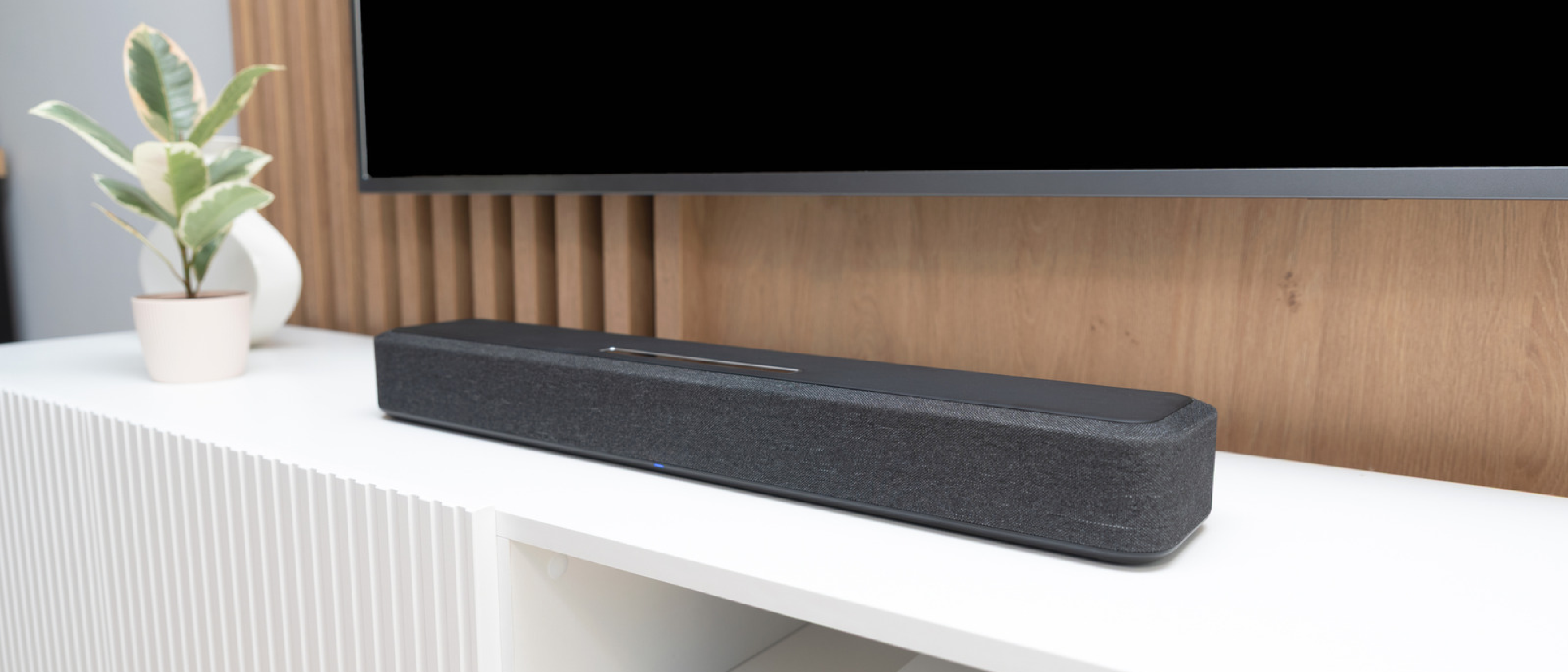
- Positioning – Place the bar slightly in front of the TV, not tucked under it. A gap of 2–4 inches allows the drivers to radiate freely.
- Ceiling Requirements – A flat, reflective ceiling is essential for upward‑firing drivers. Avoid low‑profile fixtures, fans, or acoustic tiles directly above the bar.
- Height – Mount the bar no higher than halfway up the wall. This keeps the reflected ceiling path within the listener’s ear level.
- Alignment – Keep the bar parallel to the couch and as close to ear height as possible. Misalignment skews the perceived direction of height objects.
- Side‑Firing Optimization – Remove furniture, shelving, or heavy curtains that block the first‑wall reflection. Hard, reflective surfaces (bare walls, glass) enhance side‑firing performance.
Real‑World Example
A user in a 12 ft × 15 ft living room installed an Atmos bar with upward drivers but placed it directly under a recessed light. The ceiling reflections were absorbed, resulting in a “flat” soundstage. After moving the bar 3 inches forward and swapping the light for a recessed LED strip, the user reported a dramatic improvement in height cues, especially during aerial scenes in Top Gun: Maverick.
Optimizing Side‑Firing and Up‑Firing Drivers
Upward‑Firing Calibration
- Measure Ceiling Height – Ideal height is 8–10 ft. Below 7 ft, the reflected path shortens, causing a “boxy” effect.
- Test with a Calibration Mic – Many soundbars include an auto‑calibration routine that emits test tones and measures reflected energy. Use it to fine‑tune driver angles.
Side‑Firing Calibration
- Clear the First Reflection Zone – This is the area between the side driver and the nearest wall (typically 1–2 ft).
- Add Diffusive Panels – If the room is overly “live,” place acoustic diffusers on side walls to scatter reflections evenly.
Virtual DSP Bars
For bars like the Sonos Beam, the DSP engine creates height cues by manipulating phase and timing. Even without physical up‑firing drivers, placement still
still benefits from thoughtful positioning. The Beam’s internal processing assumes a typical listening height and a clear line of sight to the listener; placing it too low (e.g., on a coffee table) or too far back behind a TV bezel can cause the virtual height cues to drift toward the floor or rear, diminishing the sense of elevation. Aim to keep the bar at ear level when seated and maintain at least a 2‑inch gap between the front of the bar and the TV screen.
Fine‑Tuning the Audio Experience
| Adjustment | How to Do It | When It Helps |
|---|---|---|
| Room EQ (if available) | Run the bar’s built‑in calibration (often called “TruePlay,” “Room Calibration,” or similar) using the supplied microphone or a smartphone app. | Compensates for uneven wall absorption, especially in rooms with large windows or carpeted floors. |
| Manual EQ Boost | Increase the “Height” or “Surround” sliders in the bar’s app to accentuate overhead effects. | Useful when ceiling reflections are weak (low ceilings, acoustic tiles). |
| Latency Settings (Gaming) | Enable “Game Mode” or set the audio delay to 0 ms in the bar’s app. | Reduces lip‑sync issues on Xbox One, PlayStation, or PC gaming. |
| Firmware Updates | Check the manufacturer’s app or website monthly for updates; install over Wi‑Fi or via USB. | New codecs, improved DSP algorithms, and bug fixes that can unlock better Atmos decoding. |
Common Pitfalls & How to Fix Them
No Atmos Signal Detected
- Check TV Output: Verify the TV’s HDMI‑CEC is enabled and the audio output is set to “Bitstream” or “Dolby Digital Plus.”
- Confirm eARC: Ensure the HDMI port you’re using on the TV is labeled “eARC.” Some models have separate ARC/eARC ports.
- Cable Quality: Use an HDMI 2.1 cable rated for 48 Gbps; older cables may not sustain the required bandwidth.
Dialog Sounds Like It’s Coming From the Ceiling Only
- Height Overload: If the bar is too close to the ceiling, upward‑firing drivers may bounce sound directly back to the listener, creating a “cone” effect. Raise the bar or tilt it slightly forward.
- Room Mode: Switch the bar from “Cinema” to “Music” mode; many bars apply extra height emphasis in cinema presets.
Bass Is Boomy or “Muddy”
- Subwoofer Placement: If you have an external sub, place it near a wall but not directly in a corner; corners amplify low frequencies excessively.
- Crossover Settings: Adjust the crossover frequency (usually 80 Hz–120 Hz) so the bar’s drivers and subwoofer share the workload evenly.
Audio Drops Out When Switching Sources
- HDMI Handshake: Power‑cycle the TV and soundbar, then reconnect the HDMI cable.
- Source Prioritization: Some TVs prioritize the last active HDMI input; set the Atmos‑capable device as the default audio source in the TV’s menu.
Advanced Setup: Integrating a Dedicated Subwoofer & Rear Speakers
While many Atmos‑enabled soundbars claim “all‑in‑one” performance, adding a wireless subwoofer and optional rear‑surround modules can push the experience closer to a full‑blown home‑theater system.
Wireless Subwoofer Pairing
- Most bars (e.g., Sonos Arc, Samsung HW-Q950A) include a dedicated sub‑woofer pairing button. Press the button on the bar, then on the sub, and wait for the LED to confirm a secure link.
- Position the sub on the same side of the room as the primary listening position for balanced low‑frequency response.
Rear‑Surround Modules
- Some manufacturers sell detachable rear speakers that wirelessly connect via Bluetooth or a proprietary RF link. Place them behind the listening area, angled toward the seats.
- Ensure the rear speakers are at ear height and not obstructed by furniture; this preserves the object‑based placement of rear‑channel effects (e.g., aircraft fly‑bys).
Calibration After Expansion
- Run the full room‑calibration routine again after adding any new speakers. The bar’s DSP will re‑map the height and surround objects to the expanded speaker layout.
Summary: The Checklist for a Perfect Atmos Bar
Hardware
- ✅ Soundbar with upward‑firing (or virtual DSP) drivers.
- ✅ eARC‑compatible TV and HDMI 2.1 cable.
- ✅ Optional subwoofer/rear modules if desired.
Placement
- ✅ Bar centered, 2–4 inches in front of the TV.
- ✅ Height ≤ ½ wall height, ear‑level when seated.
- ✅ Clear ceiling area for upward reflections; flat surface preferred.
- ✅ Side‑firing path free of large furniture or heavy curtains.
Configuration
- ✅ TV audio set to “Bitstream” / “Dolby Digital Plus.”
- ✅ Enable eARC on both TV and soundbar.
- ✅ Run auto‑calibration (TruePlay, Room EQ, etc.).
- ✅ Update firmware before first use.
Content
- ✅ Subscribe to Atmos‑enabled tiers on Netflix, HBO Max, Disney+, or use Atmos‑encoded Blu‑ray discs.
- ✅ Verify the source device (Xbox One, PlayStation 5, PC) is outputting Dolby Atmos bitstream.
Following this checklist ensures you’ll hear the subtle rustle of leaves overhead, the precise direction of a helicopter’s rotors, and dialogue that feels anchored to the screen—not floating somewhere else in the room.
Frequently Asked Questions
Q: Can I use a regular HDMI ARC port instead of eARC?
A: You can, but ARC’s limited bandwidth (up to 7 Mbps) forces the signal to be compressed to Dolby Digital Plus, which discards the object‑based metadata needed for true Atmos. eARC preserves the full, uncompressed Atmos stream.
Q: My ceiling is sloped—will upward‑firing drivers still work?
A: Sloped or textured ceilings scatter reflections, reducing the clarity of height cues. In such cases, a virtual‑DSP bar (like the Sonos Beam) or adding ceiling‑mounted Atmos speakers is preferable.
Q: Do I need to disable TV speakers when using a soundbar?
A: Yes. Turn off the TV’s internal speakers in the audio menu to prevent phase cancellation and ensure the bar handles all audio output.
Q: How do I know if a piece of content is actually Atmos?
A: Look for the Dolby Atmos logo on the streaming app’s title card, in the playback info screen, or on the Blu‑ray disc packaging. Some services also display “Dolby Atmos” in the audio settings menu.
Q: Will adding a subwoofer degrade the Atmos effect?
A: No, provided the subwoofer is properly integrated via the bar’s automatic crossover. It handles low‑frequency content, freeing the bar’s drivers to focus on directional cues.
Q: Is there any benefit to using a sound‑absorbing panel behind the bar?
A: Generally not. The bar’s drivers need an open path to radiate sound. Acoustic panels behind the bar can deaden the forward‑firing drivers, reducing overall clarity.
Q: Can I use a soundbar with Atmos in a home‑office setup?
A: Absolutely. For a compact desk setup, a virtual‑DSP bar placed on the desk (or mounted low on the wall) works well, especially if you pair it with a small desktop subwoofer for added punch.
Final Thought
Dolby Atmos soundbars are engineered to bring cinema‑grade immersion into the living room, but they’re only as good as the environment they inhabit. By respecting the physics of upward‑firing reflections, ensuring a clean eARC signal path, and fine‑tuning the room’s acoustics, you unlock the full potential of object‑based audio. Whether you’re watching a blockbuster, streaming a binge‑worthy series, or battling foes on Xbox One, the right placement and configuration turn every sound into a three‑dimensional story.
Source: Original Article