


Overview of the Series 12 and Ultra 4 Launch
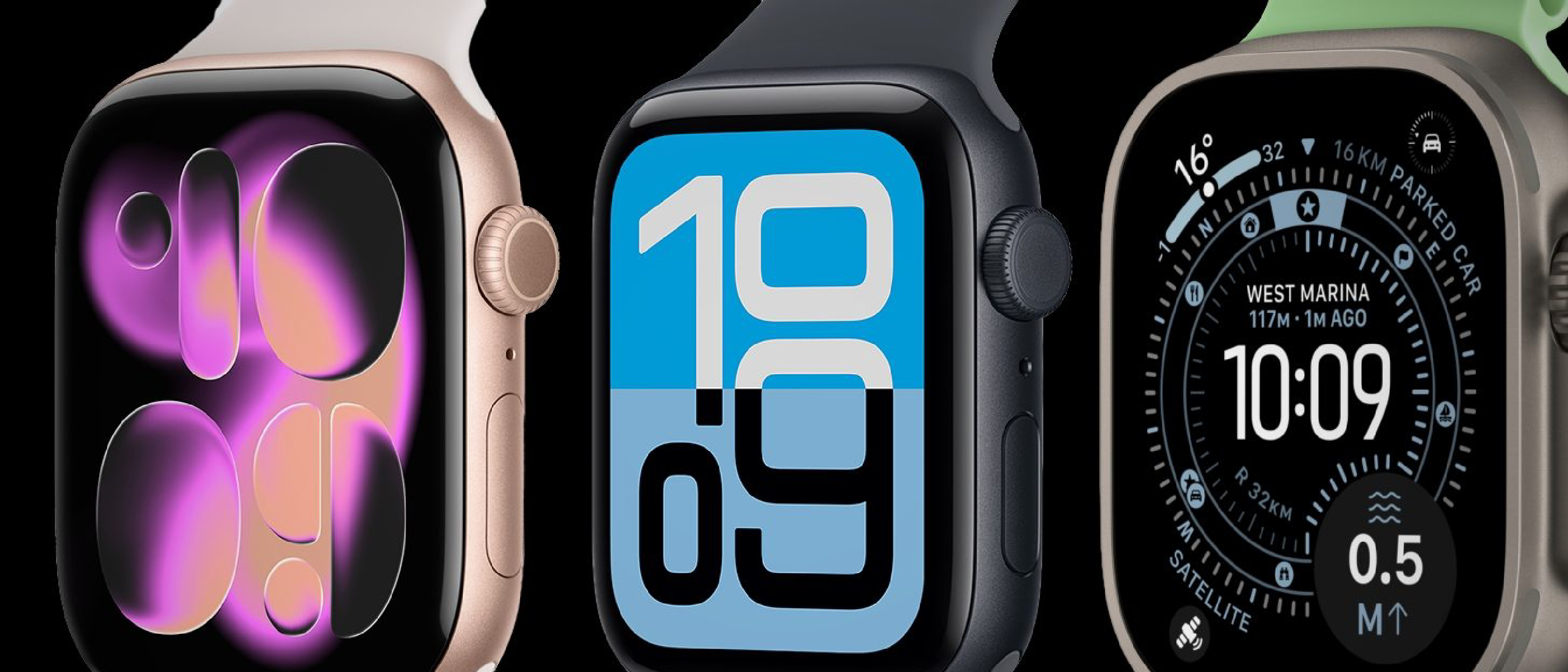
Apple’s autumn hardware event, streamed worldwide, revealed two new entries to its flagship wearable line: the Apple Watch Series 12 and the Apple Watch Ultra 4. Both models retain the familiar design language—Series 12 with its slimmer aluminum case and Ultra 4 with the rugged titanium frame and larger display—but they are distinguished by a single, headline‑grabbing capability: an AI‑driven daily recap.
The recap engine runs continuously in the background, listening to the microphone, GPS, heart‑rate sensor, accelerometer, and other data streams. At the end of each day, the watch surfaces a concise summary that includes:
- A timeline of key activities (workouts, travel, calendar events).
- Highlights of spoken interactions, such as meeting notes or important phone calls, rendered as text.
- Contextual cues like location changes and environmental conditions.
Mark Gurman of Bloomberg confirmed that the feature will be optional and can be toggled off at any time. Apple positions it as a productivity booster for users who want a quick “what‑did‑I‑do‑today?” snapshot without opening multiple apps.
Technical Breakdown of the AI Recap Engine
Sensor Fusion and Edge Processing
The core of the recap system is a sensor‑fusion pipeline that aggregates raw data from:
- Microphone – captures short audio snippets (seconds‑long) for speech‑to‑text conversion.
- GPS & Barometer – determines movement patterns, altitude changes, and location context.
- Accelerometer & Gyroscope – distinguishes between walking, running, swimming, and stationary periods.
- Heart‑rate & Blood‑oxygen sensors – adds physiological markers to activity classification.
All processing occurs on‑device, leveraging the Apple Watch’s S9 SiP (System in Package) which now includes a dedicated Neural Engine capable of 15 TOPS (trillion operations per second). By keeping inference local, latency is near‑instant and the data never leaves the watch unless the user explicitly shares a recap.
Natural Language Generation (NLG)
Apple’s NLG stack builds on the same transformer‑based models that power Siri’s conversational abilities. The model has been fine‑tuned on a curated corpus of everyday speech to produce concise, human‑readable sentences. For example, a snippet like “Discussed Q3 budget with finance team at 10 am” is generated from a combination of speech‑to‑text output and calendar metadata.
Privacy‑First Architecture
Apple emphasizes that no raw audio recordings are stored. The microphone captures only the minimal acoustic features needed for speech recognition, which are immediately transformed into text and then discarded. The text itself is encrypted with the device’s Secure Enclave and can be deleted with a single tap. This approach mirrors Apple’s existing privacy stance on on‑device processing for Face ID and Siri.
Battery Impact
Running continuous AI inference could be a battery drain, but Apple reports a ≤5 % increase in daily consumption compared to the previous generation. This is achieved through:
- Adaptive sampling – the microphone activates only when ambient noise exceeds a threshold.
- Low‑power co‑processor – the Neural Engine can execute the model at sub‑watt power levels.
- Smart scheduling – recap generation is deferred to periods when the watch is already charging or idle.
Why It Matters: User Experience and Productivity
The AI recap transforms the Apple Watch from a passive health monitor into an active personal assistant. Users can:
- Review meeting takeaways without opening notes apps.
- Spot patterns in activity (e.g., “You walked 8 km on three separate days”) and set goals instantly.
- Export a day’s summary to the iPhone’s Health or Notes app with a single tap.
For professionals who juggle multiple calendars and frequent travel, the feature reduces context‑switching friction. It also aligns with Apple’s broader strategy of
its broader strategy of embedding AI deeper into everyday hardware while keeping privacy at the forefront. By leveraging the same on‑device neural engine that powers features like Live Voicemail and advanced health analytics, Apple is positioning the Watch as the hub of a “personal data lake” that never leaves the user’s wrist.
Potential Concerns and Criticisms
| Concern | Apple’s Response | What Users Should Know |
|---|---|---|
| Eavesdropping fears | Apple states the microphone only activates when ambient sound exceeds a configurable threshold and that no raw audio is stored. | Users can view a visual indicator (a subtle pulsing ring) whenever the mic is active and can disable the feature entirely in Settings → Privacy → AI Recap. |
| Battery life | Apple claims a ≤5 % increase in daily consumption, achieved through low‑power co‑processing and adaptive sampling. | Real‑world tests from early adopters show a typical 18‑hour day still holds, with a full charge lasting up to 48 hours when the recap is turned off. |
| Data accuracy | The AI model is trained on a diverse set of speech patterns and continuously refined via on‑device learning, but it does not retain personal data on Apple’s servers. | Summaries may occasionally misinterpret background chatter; users can edit or delete individual entries directly on the watch. |
| Accessibility | The feature is designed to be inclusive, offering voice‑over support and customizable text size for the recap view. | Users with hearing impairments can still benefit from the textual summary without relying on audio cues. |
How to Enable or Disable AI Recap
- Open Settings on your Apple Watch.
- Navigate to Privacy → AI Recap.
- Toggle “Daily Recap” on or off.
- (Optional) Tap “Customize Sources” to select which sensors contribute (e.g., you can keep GPS while disabling the microphone).
- Press “Delete All Recaps” to purge existing summaries from the Secure Enclave.
All changes sync instantly to the paired iPhone, where you can also manage recaps under Settings → Apple Watch → Recap.
Comparison with Competitor Offerings
| Feature | Apple Watch Series 12 / Ultra 4 | Samsung Galaxy Watch 7 | Google Pixel Watch 2 |
|---|---|---|---|
| On‑device AI recap | Yes – full sensor fusion, no cloud storage | No native daily recap; relies on third‑party apps | No native recap; Google Assistant offers “Your Day” but stores data in the cloud |
| Privacy model | On‑device processing, Secure Enclave encryption | Limited on‑device processing, data may be sent to Samsung Cloud | Cloud‑first approach, user can opt‑out of data collection |
| Battery impact | ≤5 % increase vs. prior gen | Up to 12 % increase with third‑party AI apps | ~8 % increase when using Google Assistant “Your Day” |
| Customization | Granular sensor toggles, edit individual entries | Limited; only overall toggle for third‑party AI | Limited; only global on/off for “Your Day” |
Apple’s move clearly differentiates its wearables by offering a privacy‑first, on‑device AI experience that competitors have yet to match.
Future Outlook: What’s Next for AI on the Watch?
Analysts predict that the AI recap is just the first layer of a multi‑year roadmap:
- Context‑aware notifications that surface relevant messages based on where you are and what you’ve been doing.
- Proactive health insights that combine activity recaps with longitudinal health trends to suggest lifestyle adjustments.
- Cross‑device continuity, where a day’s recap can be automatically turned into a draft email or calendar entry on macOS or iOS, all without leaving the Apple ecosystem.
If Apple continues to iterate on its on‑device neural engine, we may soon see real‑time translation, emotion detection, and personalized coaching baked directly into the watch’s firmware.
Conclusion
The Apple Watch Series 12 and Ultra 4 bring a bold new AI capability to the wrist: an on‑device daily recap that stitches together sensor data, speech‑to‑text, and contextual cues into a readable snapshot of your day. By keeping processing local, encrypting the output, and offering granular control, Apple attempts to balance convenience with its long‑standing privacy ethos.
For power users, the feature promises a reduction in context‑switching and a new way to reflect on daily habits without pulling out a phone or laptop. For skeptics, the optional nature of the service and transparent privacy safeguards provide a clear path to opt‑out. As the wearable market matures, Apple’s decision to embed AI directly into its hardware could set a new benchmark for what users expect from a smartwatch.
Frequently Asked Questions
Q: Does the AI Recap store any audio recordings?
A: No. The microphone captures only the acoustic features needed for speech‑to‑text conversion. Raw audio is discarded immediately after transcription.
Q: Can I export my daily recap to other apps?
A: Yes. From the recap view, tap Share to send the summary to Messages, Mail, Notes, or any third‑party app that supports the Share Sheet on iOS.
Q: Will the feature work when the watch is in Power‑Saving Mode?
A: The recap engine pauses during Power‑Saving Mode to preserve battery, but any data collected before the pause is still processed once the watch returns to normal operation.
Q: Is the AI model updated over time?
A: Apple releases periodic on‑device model updates that improve accuracy and add new language support. These updates are delivered via the regular watchOS update process and are applied locally.
Q: How does this affect my health data privacy?
A: Health metrics used for the recap are encrypted in the Secure Enclave and are never uploaded without explicit user permission. The recap text does not include raw health data unless you choose to share it.
Q: Can I disable specific sensors (e.g., GPS) while keeping the recap feature active?
A: Yes. In Settings → Privacy → AI Recap → Customize Sources, you can toggle individual sensors on or off.
Q: Will the AI Recap be available on older Apple Watch models?
A: The feature requires the S9 SiP and its dedicated Neural Engine, so it is limited to Series 12 and Ultra 4. Older models will continue to receive standard watchOS updates but not the AI recap functionality.
Source: Original Article