


Overview of the New Live Activities Feature
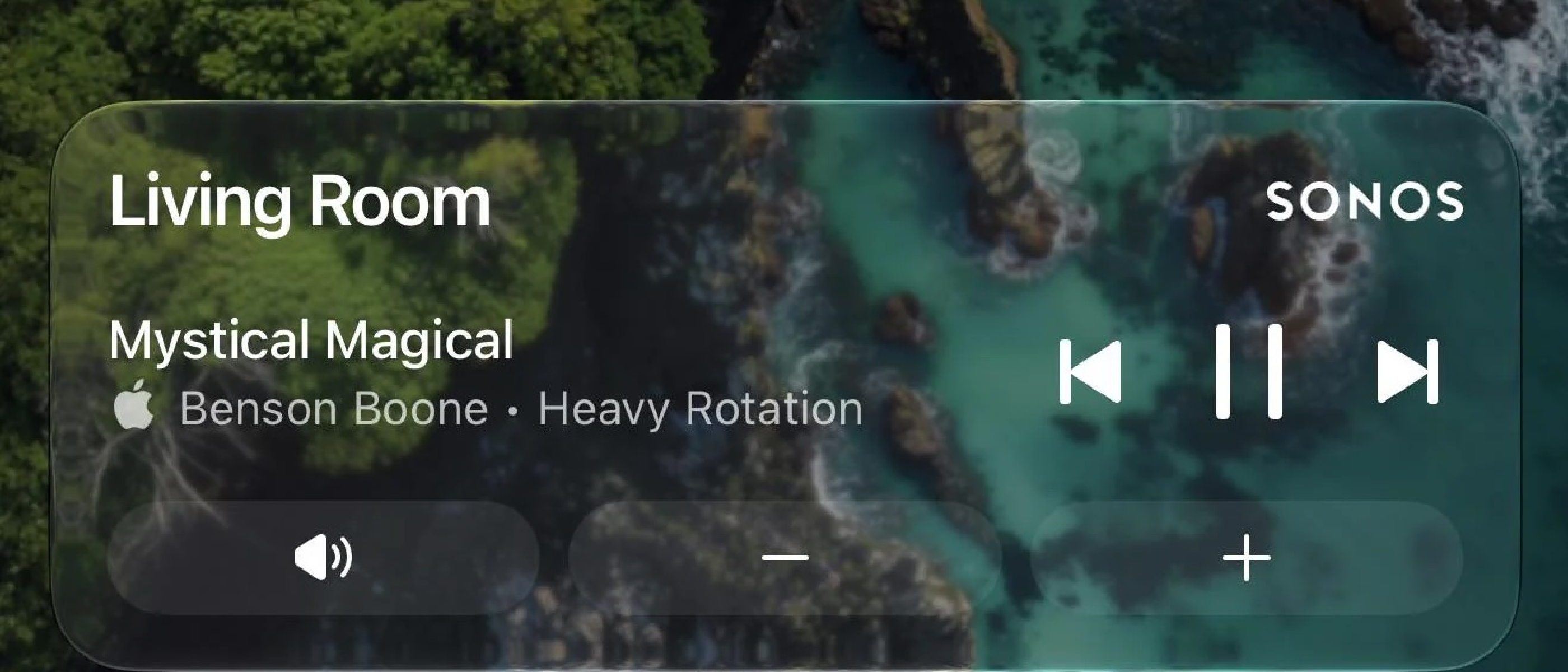
Apple introduced Live Activities in iOS 16 as a way for apps to surface real‑time information on the Lock Screen and in the Dynamic Island. Sonos, the leading multi‑room audio platform, has now embraced this API in its iPhone app. When a user starts playback on any Sonos speaker and then closes the app, a compact Live Activity appears, showing the room or group that is currently playing and offering play/pause and track‑skip buttons. The feature works not only when playback originates from the Sonos app but also when audio is launched via Direct Control from supported services, Bluetooth, or AirPlay.
Key points of the implementation:
- Trigger – Live Activity appears after playback starts and the app is backgrounded.
- Display – Shows the last‑used room or speaker group.
- Controls – Play/pause and next‑track actions are available directly from the Lock Screen.
- Album Art – Not currently displayed; Sonos is exploring alternatives.
- Cross‑Device – The activity propagates to Apple Watch and CarPlay, though interactive controls are absent for now.
The rollout was announced on Reddit by Sonos and reported by 9to5Mac and MacRumors, underscoring the community‑driven demand for tighter iOS integration.
Why It Matters for Sonos Users
Faster Access to Core Controls
Historically, iOS users had to unlock their device, reopen the Sonos app, or rely on Control Center widgets to manage playback. The Live Activity removes those friction points, delivering a single‑tap interface that lives on the Lock Screen. For users who frequently switch rooms or groups, this translates into a more fluid listening experience.
Consistency Across Apple Ecosystem
By supporting Apple Watch and CarPlay, Sonos aligns its UI with the broader Apple ecosystem. Even though the watch and CarPlay versions currently lack interactive buttons, the visual presence of the activity informs users that Sonos playback is active, reducing ambiguity when driving or exercising.
Competitive Parity
Other audio platforms—
such as Spotify, Apple Music, and even smart speaker rivals like Amazon Echo, have long offered persistent lock-screen controls. Sonos’ delay in adopting Live Activities had become a recurring pain point in user forums and product reviews. This update closes that gap, ensuring Sonos remains competitive in an increasingly crowded multi-room audio market.
Room for Improvement
While the addition of Live Activities is a significant step forward, the absence of album art and limited Apple Watch/CarPlay controls highlight areas for future refinement. Sonos has acknowledged these limitations, signaling that further enhancements may be on the horizon. For now, users can expect a more streamlined experience, but the feature’s full potential—such as richer metadata or deeper integration with Apple’s ecosystem—remains untapped.
How to Enable Live Activities in the Sonos App
The feature is available to all iOS users running the latest version of the Sonos app (version 16.3 or later). No additional setup is required; Live Activities will automatically appear on the Lock Screen once playback is initiated. Users can customize the duration of the Live Activity in iOS Settings under Face ID & Passcode > Live Activities > Sonos.
For those who prefer not to use the feature, it can be disabled entirely by toggling off Sonos in the same settings menu.
Conclusion
Sonos’ implementation of Live Activities addresses a long-standing request from its user base, offering a more intuitive and accessible way to control playback without diving into the app. While the feature is not without its limitations—particularly around album art and cross-device controls—it represents a meaningful improvement in usability. As Sonos continues to refine its iOS integration, users can look forward to an even more seamless multi-room audio experience.
For now, the update serves as a reminder of how small but thoughtful software enhancements can significantly elevate the day-to-day experience of smart home devices.
FAQ
Q: Do Live Activities work with all Sonos speakers? A: Yes, the feature is compatible with all Sonos speakers and systems, provided they are running the latest firmware and are controlled via the updated iOS app.
Q: Can I see the song title or artist name on the Live Activity? A: Currently, the Live Activity displays only the room or group name and playback controls. Sonos has not yet implemented song or artist metadata, though this may change in future updates.
Q: Why don’t the controls work on Apple Watch or CarPlay? A: Sonos has stated that while the Live Activity appears on these platforms, interactive controls are not yet supported. This is likely due to technical constraints or prioritization of the core Lock Screen experience.
Q: Will Sonos add album art to Live Activities in the future? A: Sonos has acknowledged the request for album art and is “looking into alternative ways to enhance the Lock Screen experience.” No timeline has been provided, but the company appears open to the idea.
Q: How do I disable Live Activities if I don’t want them? A: You can turn off Live Activities for Sonos by going to Settings > Face ID & Passcode > Live Activities and toggling off Sonos.
Source: Original Article