


What the New Three‑Band EQ Actually Does
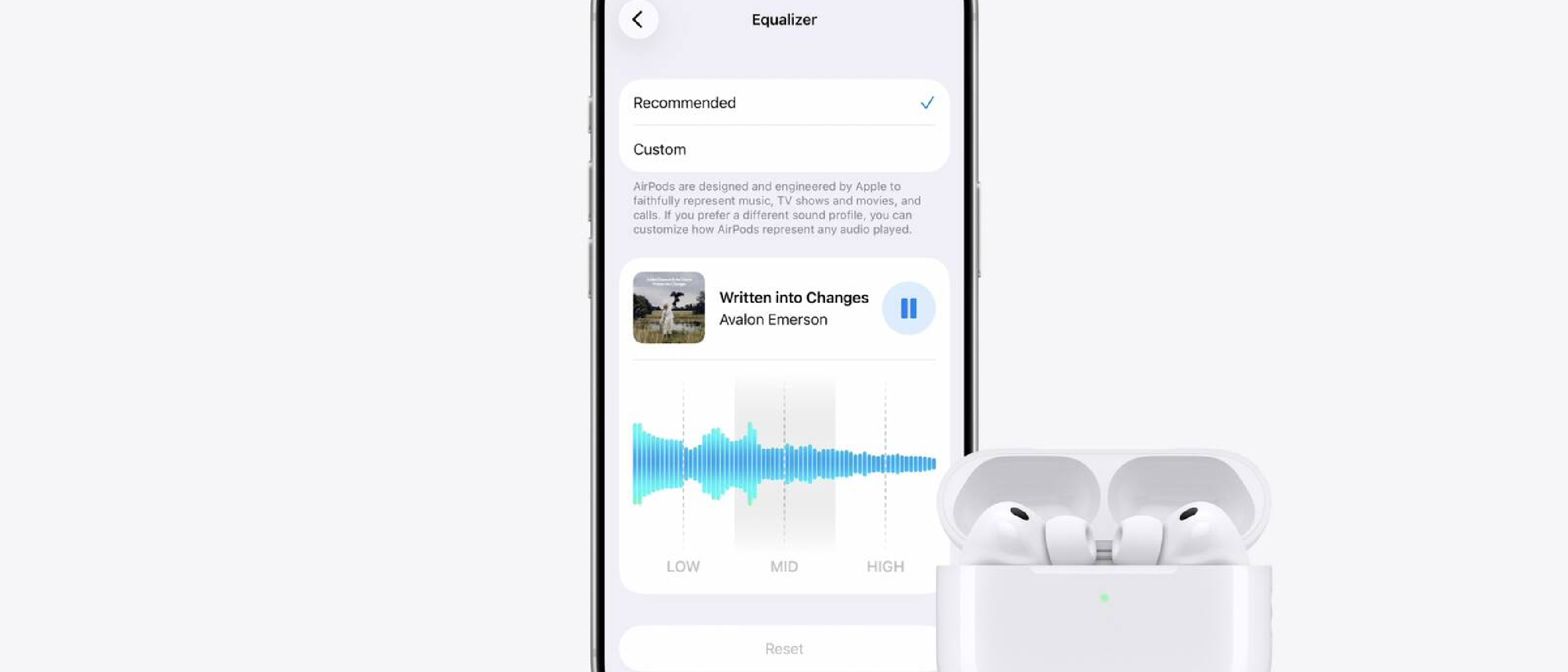
Apple’s iOS 27 public beta finally gives AirPods owners a level of audio control that has long been a missing piece in the Apple ecosystem. The three‑band equalizer lives inside the AirPods settings panel and works on any audio source—Apple Music, Spotify, podcasts, or even system sounds. Users can now adjust:
| Band | Frequency Range | Typical Use |
|---|---|---|
| Lows | 20 Hz – 250 Hz | Bass weight and punch |
| Mids | 250 Hz – 4 kHz | Vocal clarity and instrument definition |
| Highs | 4 kHz – 20 kHz | Treble detail, sibilance, and spatial cues |
A real‑time preview button sits above the sliders, allowing you to audition changes without leaving the settings page. Two reset options—Reset (reverts to your last custom profile) and Recommended (restores Apple’s default curve)—make experimentation low‑risk.
The EQ is device‑specific: it applies to all audio routed through the paired AirPods, not just Apple‑branded apps. Moreover, the profile syncs automatically to iPadOS 27 and macOS 27 Golden Gate when the same AirPods are connected, ensuring a consistent listening experience across your Apple devices.
Technical Breakdown: How Apple Made It Possible
H2 Chip as the Enabler
All supported AirPods models share Apple’s second‑generation H2 chip, which provides the processing headroom needed for on‑device EQ calculations. The chip’s DSP (digital signal processor) can now run three independent filter banks in real time without noticeable latency or battery drain. Apple’s firmware update—available only through the AirPods Beta Updates toggle—flashes the new DSP code onto the earbuds.
Firmware Installation Workflow
- Pair the AirPods with an iPhone running iOS 27.
- Open Settings > AirPods > AirPods Beta Updates and enable the toggle.
- Place the AirPods in their case, connect to power, and keep the case near an unlocked iPhone.
- The beta firmware downloads and installs automatically (≈30 minutes).
During installation, the H2 chip’s secure boot chain verifies the new DSP image, preventing any unsigned code from running. This mirrors Apple’s approach to iOS security updates and explains why only H2‑equipped models receive the feature.
Cross‑Device Sync Mechanics
Apple leverages iCloud Key‑Value storage to propagate the custom EQ profile. When you adjust the sliders on an iPhone, the profile is serialized into a small JSON blob (≈200 bytes) and uploaded to the user’s iCloud container. iPadOS 27 and macOS 27 poll this container on AirPods connection and apply the same DSP parameters instantly. The process is encrypted end‑to‑end, preserving privacy.
Why It Matters: User‑Centric Audio Customization
Closing the Gap with Competitors
For years, premium headphone makers such as Sony, Bose, and Sennheiser have offered on‑device EQ or companion apps that let audiophiles fine‑tune their sound signature. Apple’s default “one‑size‑fits‑all” tuning has been a point of criticism, especially among users who switch between bass‑heavy EDM playlists and dialogue‑heavy podcasts. The new three‑band EQ puts AirPods on a more even playing field, giving users the freedom to shape the sound without third‑party apps.
Real‑World Listening Scenarios
- Gym Workouts: Boost lows for a more motivating bass response while keeping mids clean for voice‑over coaching.
- Conference Calls: Reduce highs to tame sibilance, making speech easier on the ears during long Zoom sessions.
- Cinema at Home: Raise mids and highs to enhance dialogue and surround‑sound effects when watching movies on Apple TV. (Apple’s own streaming service benefits from the same EQ, a synergy highlighted in their recent Apple TV’s 2026 Cape Fear remake article .)
Battery Impact and Performance
Apple’s engineering team reports that the DSP workload adds less than 0.5 % to overall power consumption, a negligible increase given the H2 chip’s efficiency. Users should see no measurable difference in battery life compared with the stock configuration.
Industry Impact: What This Signals for the Audio Market
Apple’s Shift Toward Greater Customization
The move suggests Apple is listening to long‑standing community feedback. Historically, Apple has prioritized simplicity over granular control; the iOS 27 EQ is a rare instance where the company adds a “power‑user” feature without cluttering the UI. This could pave the way for future audio‑centric enhancements, such as spatial audio presets or user‑defined head‑related transfer functions (HRTFs).
Potential Ripple Effects
- Third‑Party App Developers: Apps that previously bundled their own EQ (e.g., Spotify’s “Equalizer” tab) may reconsider the necessity of duplicate controls, focusing instead on content discovery.
- Hardware Competitors: Sony, Bose, and Sennheiser might accelerate their own firmware‑level innovations to stay ahead, perhaps adding AI‑driven adaptive EQ that learns a user’s preferences over time.
- Regulatory Landscape: As more devices expose audio processing controls, discussions around hearing health and safe listening limits could gain traction, especially in regions with stricter exposure standards.
Step‑by‑Step Guide: Enabling and Using the Custom EQ
- Update Your Devices – Install the iOS 27 public beta (or later) on your iPhone, iPad, or Mac.
- Enable AirPods Beta Firmware – Navigate to Settings > AirPods > AirPods Beta Updates and toggle it on.
- Install the Firmware – Follow the 30‑minute installation routine described earlier.
- Open AirPods Settings – In Settings, tap the AirPods entry at the top of the screen.
- Access Audio & Routing – Select Audio & Routing, then tap Equalizer.
- Choose “Custom” – Move the three sliders to your desired levels. Use the preview button to test changes instantly.
- Save or Reset – Tap Reset to revert to your last custom profile, or Recommended to go back to Apple’s default curve.
Because the profile syncs via iCloud, you only need to perform these steps once per AirPods pair. Any subsequent device you connect will automatically adopt the same EQ settings.
Future Outlook: What Comes After the Three‑Band EQ?
Anticipating More Granular Controls
Analysts speculate that Apple may eventually expose a five‑band or parametric EQ in later beta cycles, especially as the H2 chip’s processing capacity continues to grow. A parametric approach would let users adjust center frequencies and Q‑factors, offering studio‑level precision.
Integration with Spatial Audio and Lossless Formats
Apple’s push toward Spatial Audio and Lossless streaming could benefit from a dynamic EQ that adapts to the content’s frequency distribution. Imagine an AI‑driven “Smart EQ” that automatically boosts dialogue in movies while preserving the immersive soundstage for music.
Community‑Driven Profiles
Apple could introduce a profile sharing feature, similar to the way Apple Music users share playlists. Users could upload their custom EQ curves to iCloud, allowing friends to import a “Bass‑Heavy” or “Voice‑Clear” preset with a single tap. This community aspect would echo the collaborative spirit seen in forums discussing AirPods firmware tweaks.
Frequently Asked Questions
Q: Which AirPods models support the new EQ?
A: AirPods Pro 2, AirPods Pro 3, AirPods 4, and AirPods Max 2—all of which contain the H2 chip. Original AirPods Max and earlier generations are not supported.
Q: Does the EQ affect only Apple Music?
A: No. The EQ applies system‑wide to any audio routed through the AirPods, including third‑party streaming services, podcasts, and system sounds.
Q: Will using the custom EQ drain my AirPods battery faster?
A: The additional DSP load adds less than 0.5 % to power consumption, which is generally imperceptible in daily use.
Q: Can I sync the EQ profile to non‑Apple devices?
A: Currently, the profile syncs only via iCloud to iOS, iPadOS, and macOS devices. There is no cross‑platform support for Android or Windows.
Q: How does this update relate to Apple’s broader media strategy?
A: By giving users more control over audio output, Apple strengthens the value proposition of its media services. The synergy is evident in the way the EQ enhances the listening experience for Apple TV content, as discussed in the
Apple TV’s 2026 Cape Fear remake article
.
Q: Are there any privacy concerns with the EQ data?
A: The EQ profile is stored as an encrypted JSON blob in the user’s iCloud container. Apple’s privacy policy states that this data is not used for advertising or profiling.
Closing Thoughts
The introduction of a three‑band equalizer in iOS
27 marks a pivotal moment in Apple’s audio strategy—one that balances accessibility with customization. While the feature may seem incremental to casual users, its implications for audiophiles, content creators, and even casual listeners are profound. By democratizing EQ controls, Apple isn’t just catching up to competitors; it’s redefining what it means to own a pair of wireless earbuds in an ecosystem where hardware, software, and services converge.
The Broader Implications for Apple’s Ecosystem
1. Strengthening the “Walled Garden” with User Agency
Apple’s ecosystem has long been criticized for its rigidity, particularly in audio. The three-band EQ represents a rare concession: users now have the tools to tailor their listening experience without leaving Apple’s ecosystem. This could reduce the temptation to switch to third-party apps or hardware, reinforcing brand loyalty. For example, a Spotify user who previously relied on the app’s built-in EQ might now prefer Apple’s system-wide solution, especially since it syncs seamlessly across devices.
2. A Gateway to More Advanced Audio Features
The EQ’s introduction could be the first step toward a suite of audio customization tools. Future updates might include:
- Adaptive EQ: AI-driven adjustments based on ambient noise or content type (e.g., automatically boosting mids during a podcast).
- Spatial Audio Presets: User-defined profiles for different genres (e.g., “Concert Mode” for live recordings or “Studio Mode” for mixing).
- HRTF Customization: Allowing users to fine-tune head-related transfer functions for a more personalized spatial audio experience.
These features would align with Apple’s broader push into immersive audio, particularly as spatial audio becomes a cornerstone of its media services.
3. Impact on Apple’s Hardware Roadmap
The EQ’s reliance on the H2 chip suggests Apple is future-proofing its audio hardware. The company may prioritize DSP capabilities in upcoming AirPods models, potentially introducing:
- Higher-resolution EQ: More bands or parametric controls for professional users.
- On-device AI: Real-time audio processing to optimize sound for different environments (e.g., reducing echo in large rooms).
- Health Integration: EQ adjustments tied to hearing health metrics, such as reducing high frequencies if the user’s hearing data suggests sensitivity.
User Feedback and Early Adoption Challenges
Early beta testers have praised the EQ’s simplicity and real-time preview, but some challenges have emerged:
- Firmware Installation Hurdles: Users report occasional failures during the beta firmware update, requiring multiple attempts. Apple’s support forums suggest ensuring the AirPods case is fully charged and within inches of the iPhone during installation.
- Sync Delays: While EQ profiles sync across devices, some users experience a brief lag (10–30 seconds) when switching between iPhone and Mac.
- Limited Granularity: Audiophiles note that a three-band EQ is less precise than the 10-band EQs offered by competitors like Sony. However, Apple’s approach prioritizes ease of use over complexity.
Comparing Apple’s EQ to Competitors
| Feature | Apple (iOS 27) | Sony (WH-1000XM5) | Bose (QuietComfort Ultra) | Sennheiser (Momentum 4) |
|---|---|---|---|---|
| EQ Bands | 3 (low, mid, high) | 5 (parametric) | 10 (graphic) | 10 (graphic) |
| Device-Specific | Yes (AirPods only) | Yes (headphones only) | Yes (headphones only) | Yes (headphones only) |
| Cross-Device Sync | Yes (Apple ecosystem) | No | No | No |
| Real-Time Preview | Yes | Yes | Yes | Yes |
| Battery Impact | <0.5% | ~1% | ~1.5% | ~1% |
| Firmware Updates | Beta (iOS 27 required) | Stable (companion app) | Stable (companion app) | Stable (companion app) |
Apple’s solution stands out for its seamless integration with the ecosystem, but competitors still offer more advanced controls. The trade-off is intentional: Apple aims to appeal to the 90% of users who want “good enough” customization without overwhelming them.
The Role of Community and Third-Party Tools
Despite Apple’s closed ecosystem, the EQ’s introduction has sparked creativity in the AirPods community. Developers are already exploring workarounds to:
- Export/Import EQ Profiles: Tools like AirBuddy (a third-party AirPods utility) may add support for sharing custom EQ curves.
- Automation: Shortcuts users are experimenting with automating EQ changes based on time of day or location (e.g., boosting bass at the gym).
- Advanced Tuning: Some users are combining Apple’s EQ with third-party apps like Boom 3D for even finer control, though this requires disabling Apple’s EQ to avoid conflicts.
Apple has not officially endorsed these tools, but their existence highlights the demand for deeper customization.
Conclusion: A Step Forward, But Not the Final One
The three-band EQ in iOS 27 is a long-overdue feature that bridges the gap between Apple’s signature simplicity and the demands of power users. It’s a testament to the company’s ability to listen to feedback while maintaining its ecosystem’s integrity. However, it’s also just the beginning.
As Apple continues to refine its audio strategy—whether through spatial audio, lossless streaming, or health-focused features—the EQ serves as a foundation for more ambitious innovations. For now, users can enjoy a more personalized listening experience, and competitors will need to respond with their own ecosystem-wide solutions.
The real question is: What’s next? Will Apple introduce adaptive EQ, or will it double down on hardware improvements like the H3 chip? One thing is certain: the era of “one-size-fits-all” audio is coming to an end, and Apple is leading the charge—one frequency band at a time.
Final FAQ Addendum
Q: Can I use the EQ with AirPods connected to an Apple Watch? A: No. The EQ is currently limited to iPhone, iPad, and Mac. Apple Watch does not support custom EQ profiles, though this may change in future watchOS updates.
Q: Does the EQ work with transparency mode or noise cancellation? A: Yes. The EQ applies to all audio modes, including transparency and active noise cancellation. However, the effect may be less noticeable in noisy environments.
Q: Will Apple add more EQ bands in future updates? A: While unconfirmed, Apple’s history of iterative improvements suggests a five-band or parametric EQ could arrive in iOS 28 or later, especially if user feedback demands it.
Q: How does the EQ interact with Apple’s “Headphone Accommodations” feature? A: The EQ and Headphone Accommodations (which adjust audio for hearing impairments) work independently. If both are enabled, the EQ applies first, followed by the accommodations. Users can toggle either feature without affecting the other.
Q: Is there a way to save multiple EQ presets? A: Not natively. However, users can manually note their preferred settings or use third-party tools to save and switch between presets.
Source: Original Article