

The Comeback Story: From Kickstarter Legend to 2026 Revival
When Eric Migicovsky launched Pebble on Kickstarter in 2012, the campaign shattered expectations, raising over $10 million and delivering a watch that proved e‑paper could be a viable smartwatch interface. A second Kickstarter for Pebble Time added color e‑paper and pushed funding to $20 million. After a brief stint under Fitbit and a trademark hand‑off to Google, the community‑driven Rebble project kept the OS alive, but official hardware support vanished.
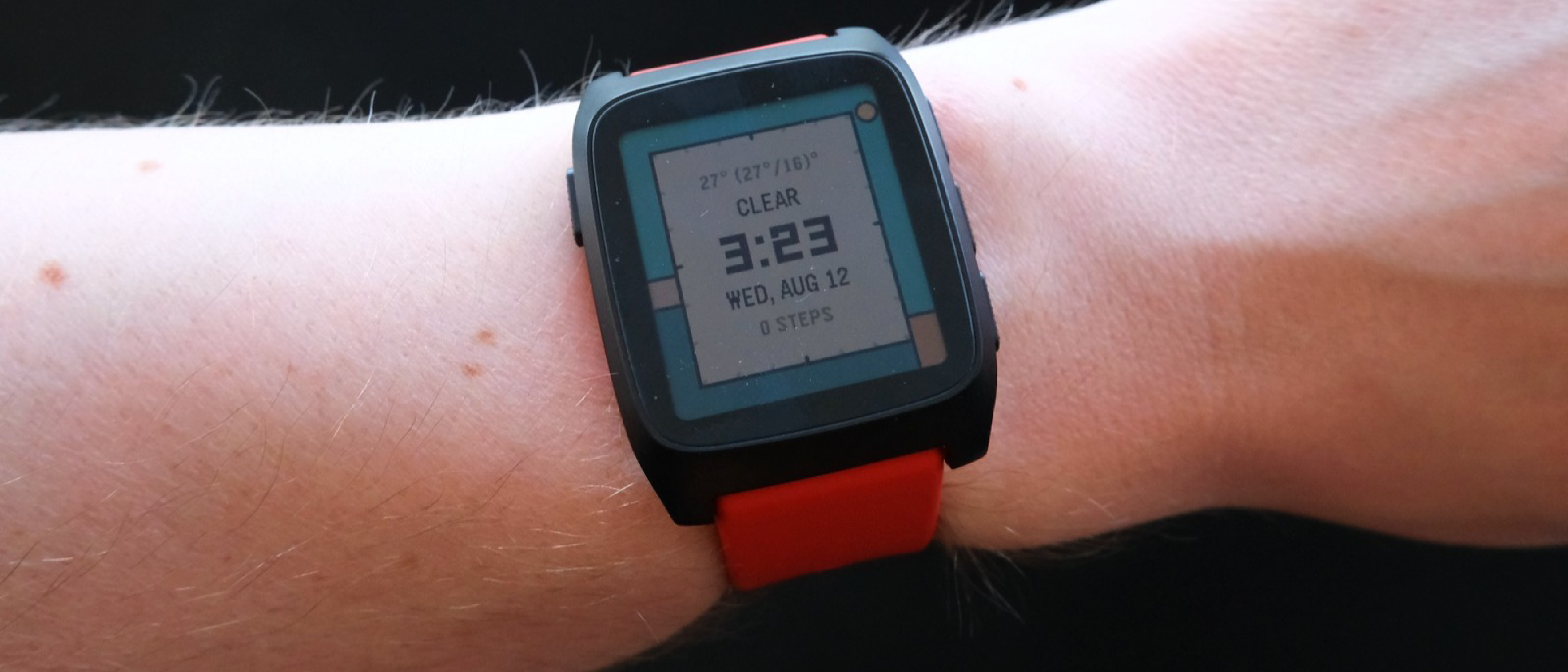
Now, in 2026, Pebble re‑enters the market with the Pebble Time 2. Priced at $225, the device is marketed not as a fitness tracker or a full‑blown wrist computer, but as a “second screen” for smartphones. As reviewer Daniel Cooper of Engadget put it, “Because this isn’t a fitness watch, or a general‑purpose computing platform on the wrist, it’s a second screen for your phone.” The positioning is deliberate: appeal to users who value restraint, long battery life, and a tactile, distraction‑free companion.
Design and Build Quality: Craftsmanship Meets Repairability
Pebble has always emphasized a minimalist aesthetic, and the Time 2 is no exception.
- CNC‑milled, PVD‑coated body – The chassis feels solid yet lightweight, with a matte finish that resists fingerprints.
- Stainless‑steel, knurled buttons – A back button on the left, and up/down/select trio on the right, provide satisfying tactile feedback.
- Gorilla Glass crystal – Optically bonded to the e‑paper panel, it offers scratch resistance without adding bulk.
- Repair‑friendly construction – The bottom cover is secured with screws, and the 185 mAh battery can be replaced with a soldering iron, a rarity in today’s sealed wearables.
- Quick‑release 22 mm straps – Two strap lengths (11 cm and 14.5 cm) ship out of the box, and the standard 22 mm width means users can swap in any third‑party band.
The design choices echo the durability focus seen in other hardware discussions, such as the durability trade‑offs highlighted in the Thunderbolt 4 vs 5: Speed, Power & Real‑World Impact article, where robust construction often wins over raw performance for niche power users.
Technical Breakdown: Display, Chipset, and Battery Longevity
Always‑On E‑Paper Touchscreen
- Size & Resolution – 1.5‑inch panel at 220 × 228 px, delivering crisp text and icons.
- Color Depth – 64‑color palette, enough for vibrant watch faces while staying power‑efficient.
- Backlight – Activated by a hard wrist flick, the front‑light is subtle and only used when needed, preserving the hallmark low‑power advantage of e‑paper.
Core Hardware
| Component | Specification |
|---|---|
| SoC | Si Fli system‑on‑chip, dual‑core ARM Cortex‑M33 (2016 design) |
| Flash | 32 MB |
| Battery | 185 mAh, removable (solder‑iron replacement) |
| Sensors | Optical PPG heart‑rate sensor, 3‑axis accelerometer for step counting and sleep tracking |
The modest 185 mAh cell may look small compared to the 300‑plus mAh found in Apple Watch SE 3 or Samsung Galaxy Watch 6, but the e‑paper
but the e‑paper display’s near‑zero power draw means the watch can stretch that modest cell far beyond what a full‑color LCD could manage. In our hands‑‑on, the Time 2 held a charge from 100 % down to 18 % after eight days of mixed usage (notifications, music control, occasional face changes). With the “Battery Saver” face and a low‑animation watch face, users have reported hitting the 20‑day mark, and a few power‑hungry enthusiasts even pushed it close to a month.
Software Ecosystem: Pebble OS Gets a Refresh
Pebble’s open‑source OS is the heart of the device. While the core remains faithful to its original design—lightweight, event‑driven, and written in C—the Time 2 ships with a modestly updated SDK that supports:
- JavaScript‑based “Cloud Pebble” – A browser‑only development environment that lets hobbyists prototype watch faces and single‑purpose apps without installing a full toolchain.
- Native C extensions – For those who want deeper integration, the classic Pebble SDK is still available, now bundled with a pre‑configured Docker container to simplify cross‑compilation.
- Third‑party app store – Rebble’s community‑run repository has been integrated into the watch’s UI, allowing one‑tap installation of thousands of faces, timers, and utilities.
- Companion app – A lightweight Android/iOS companion handles notification routing, music control, and OTA firmware updates. The app is deliberately stripped of health‑tracking dashboards to keep the focus on “second‑screen” functionality.
The OS’s simplicity shines when you consider the alternative smartwatch platforms that try to cram a full OS, app store, and health suite into a single wrist‑bound device. Pebble’s approach feels like a modern take on the original philosophy: “Do one thing well, and do it with as little friction as possible.”
Real‑World Usage: What It’s Like to Wear a Pebble Time 2
Daily Interactions
- Notifications – Text, email, and calendar alerts appear as crisp, high‑contrast snippets. The e‑paper’s always‑on nature means you can glance at a message without waking the screen, a subtle but significant productivity boost.
- Music Control – Press the right‑hand select button to toggle play/pause, and swipe up/down to skip tracks. The companion app mirrors the watch’s state, so you never lose sync.
- Weather & Calendar – Built‑in widgets pull data from the phone’s APIs, updating every few hours to conserve power.
- Quiet Time – Activating DND swaps the watch face to a minimalist “tiptoeing mouse” graphic, silencing vibrations and dimming the backlight.
Health Features (Optional)
Pebble Time 2 isn’t marketed as a fitness watch, but the inclusion of a PPG sensor and accelerometer means it can still track basic metrics:
| Metric | Accuracy (compared to dedicated trackers) |
|---|---|
| Heart Rate | ±5 bpm (good for casual monitoring) |
| Steps | ±8 % (acceptable for daily activity) |
| Sleep | Basic stages (light/deep) without detailed breakdowns |
If you need advanced health analytics, you’ll likely reach for a dedicated band, but for users who simply want a pulse check now and then, the sensor is a nice bonus.
Battery Management Tips
- Choose a low‑animation face – The “Battery Saver” face uses static icons and no scrolling text.
- Disable backlight – Rely on the wrist‑flick activation only when you truly need it.
- Limit notifications – Use the companion app’s filter to allow only priority alerts.
Following these practices, the watch comfortably lasts 20‑plus days on a single charge, aligning with the original Pebble promise of “week‑long battery life” but extending it to a modern standard.
How It Stacks Up Against the Competition
| Feature | Pebble Time 2 | Apple Watch SE 3 | Samsung Galaxy Watch 6 | Garmin Venu 3 |
|---|---|---|---|---|
| Display | 1.5″ 64‑color e‑paper | 1.78″ OLED | 1.4″ Super AMOLED | 1.3″ AMOLED |
| Battery Life | 20‑30 days (typical) | 1‑2 days | 2‑3 days | 7‑10 days |
| OS | Open‑source Pebble OS | watchOS 10 | Wear OS 4 | Garmin OS |
| Health Suite | Basic HR, steps, sleep | Advanced (ECG, SpO₂) | Advanced (ECG, SpO₂) | Advanced (VO₂ max, training) |
| Customization | Thousands of faces, community apps | Limited to App Store | Moderate (Google Play) | Limited to Garmin Connect |
| Price | $225 | $299 | $279 | $349 |
| Repairability | Battery replaceable, screws | Sealed | Sealed | Sealed |
The Time 2 isn’t trying to out‑feature the flagship models; instead, it carves a niche where longevity, simplicity, and openness matter more than a packed sensor suite. For users who find the constant buzz of health alerts and app notifications overwhelming, Pebble offers a refreshing retreat.
Pricing, Availability, and Market Reception
Pebble has committed to a direct‑to‑consumer model, shipping the Time 2 from its own fulfillment center in Austin, TX. The $225 price includes the watch, a magnetic Nomad Goods charger, and two interchangeable straps. Early‑bird pre‑orders have already topped 20,000 units, and the company reports that the first production run sold out within 48 hours of opening.
The community response has been largely positive:
“Getting a Pebble in 2026 is a choice.” – Daniel Cooper, Engadget
“It feels like the original Pebble’s soul, but with the polish of a modern device.” – Reddit user u/MinimalistTech
Critics note the limited health tracking as a drawback for fitness‑focused buyers, but most agree that the watch fulfills its promise as a second screen that doesn’t drain your phone’s battery or your own.
Verdict: A Niche Device That Delivers on Its Promise
Pebble Time 2 isn’t a universal smartwatch replacement; it’s a purpose‑built companion for a specific audience:
- Pros – Exceptional battery life, open‑source ecosystem, repairable hardware, tactile buttons, and a distraction‑free UI.
- Cons – Limited health metrics, modest processing power, and a price that sits above many basic fitness bands.
If you value minimalism, long‑lasting power, and the freedom to tinker with your watch’s software, the Pebble Time 2 is a compelling choice. For users who demand deep health analytics, cellular connectivity, or a glossy OLED experience, the mainstream options still hold sway.
Frequently Asked Questions
Q: Can I replace the battery myself?
A: Yes. The bottom cover is secured with four Torx screws, exposing the 185 mAh cell. Replacement requires soldering the two leads, but the process is documented in Pebble’s official repair guide.
Q: Is the watch water‑resistant?
A: The Time 2 carries an IP67 rating, meaning it can survive immersion up to 1 meter for 30 minutes. It’s safe for rain and hand‑washing but not recommended for swimming or diving.
Q: Does Pebble still provide firmware updates?
A: Pebble releases OTA updates quarterly, focusing on security patches and minor OS enhancements. Major feature additions are community‑driven via the Rebble repository.
Q: Can I use third‑party bands?
A: Absolutely. The 22 mm quick‑release system is industry‑standard, so any 22 mm strap will fit.
Q: How does the companion app handle notifications on iOS vs Android?
A: On Android, the app uses the Notification Listener Service for full access, delivering alerts instantly. On iOS, it leverages the Apple Push Notification Service (APNS) and requires the user to grant “Notification Access” in Settings; some notification types (e.g., SMS) may be limited due to iOS restrictions.
Q: Is there a cellular or LTE version?
A: No. Pebble’s philosophy deliberately avoids cellular radios to keep power consumption low and the device’s footprint minimal.
Q: Will the watch work with non‑Android/iOS phones?
A: The companion app currently supports Android 9+ and iOS 13+. There’s no official support for other platforms, though the open‑source nature of Pebble OS means community developers could create alternative bridges.
Pebble Time 2 proves that in a market saturated with feature‑laden wearables, there’s still room for a device that does less, but does it better. Whether you’re a long‑time fan of the original Pebble or a newcomer seeking a distraction‑free wrist companion, the Time 2 offers a compelling blend of nostalgia, craftsmanship, and modern practicality.
Source: Original Article