


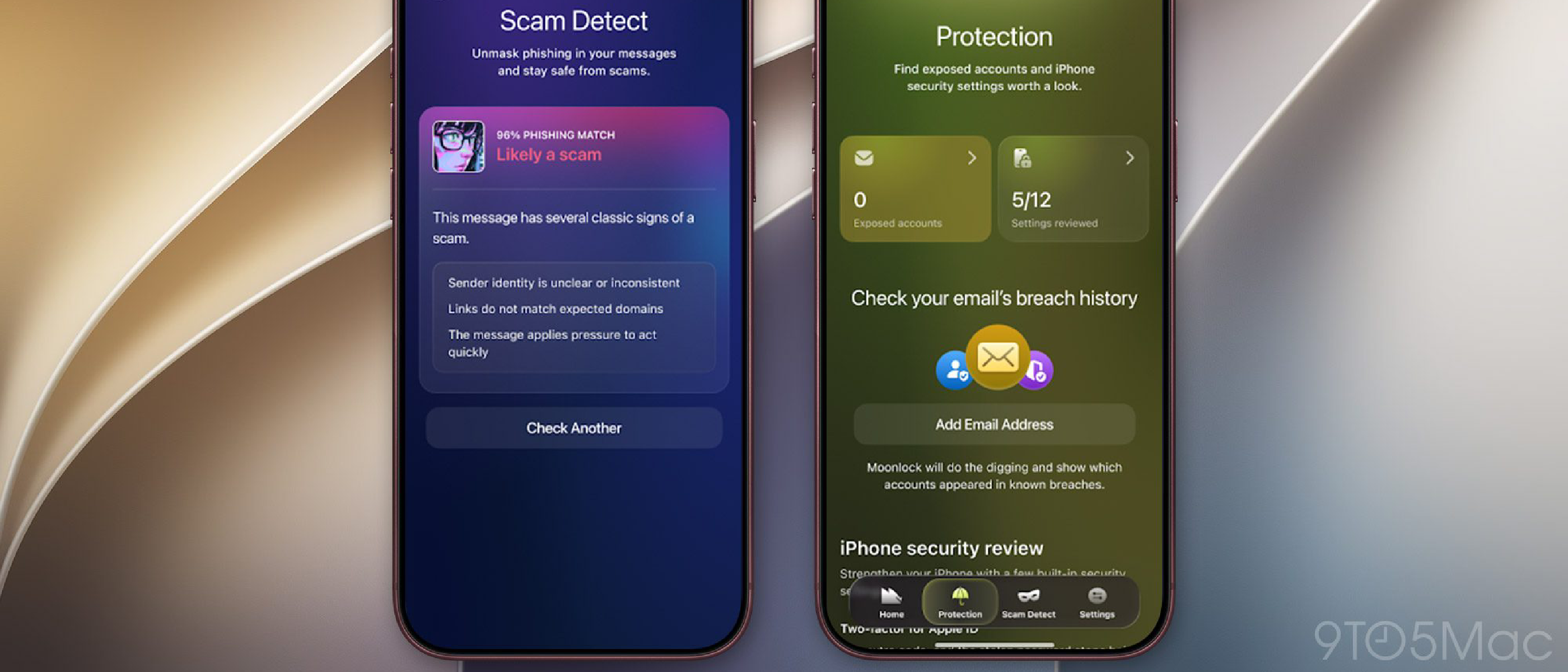
Why Moonlock on iPhone Matters
The iPhone ecosystem has long been praised for its tight security controls, yet social‑engineering attacks—phishing texts, malicious links, and spoofed calls—continue to bypass even the most robust sandboxing. According to recent reports, over 30 % of iOS users have encountered at least one suspicious message in the past year. MacPaw’s decision to bring Moonlock, previously a macOS‑only utility, to iOS directly addresses this gap.
Key reasons the launch is significant:
- Real‑time protection: Moonlock scans incoming URLs and phone numbers the moment they appear, delivering an on‑screen warning before the user can interact.
- User‑centric design: The iOS version respects Apple’s UI conventions, offering concise alerts that avoid the “alert fatigue” common in third‑party security apps.
- Ecosystem integration: By leveraging Apple’s Network Extension framework, Moonlock can inspect traffic without requiring a jailbreak, preserving device integrity.
In a market where Apple’s own anti‑phishing filters are largely server‑side, Moonlock adds a client‑side layer that can react instantly to newly emerging threats.
Technical Breakdown of Moonlock’s Scam Detection
Moonlock’s iPhone implementation relies on a combination of on‑device heuristics and cloud‑assisted intelligence. While the company has not disclosed the full algorithmic stack, the observable behavior points to three core components:
1. URL Reputation Engine
When a link is tapped, Moonlock queries a locally cached reputation database that stores hashes of known malicious domains. If the hash is absent, the app sends a lightweight request to MacPaw’s remote API, which returns a risk score based on:
- Historical phishing reports
- Domain age and registration patterns
- Similarity to known malicious URLs (fuzzy matching)
The response is cached for 24 hours, reducing network overhead for repeated visits.
2. Call‑Screen Analysis
Using the CallKit framework, Moonlock intercepts incoming call metadata. It cross‑references the caller ID against a continuously updated blacklist of numbers associated with scams, robocalls, and spoofed identities. When a match is found, the user sees a banner stating “Potential scam – proceed with caution.”
3. Machine‑Learning Anomaly Detection
A lightweight on‑device model evaluates textual patterns in SMS messages (e.g., urgency cues like “Your account will be closed”). The model runs in the background, flagging messages that deviate from typical user communication. Because the model is executed locally, privacy‑sensitive data never leaves the device.
These layers work together to produce a confidence score. If the score exceeds a configurable threshold, Moonlock displays a modal warning with options to “Open Anyway,” “Copy Link,” or “Report.” The reporting feature feeds anonymized data back to the cloud service, helping improve future detections.
Industry Impact and Security Landscape
Moonlock’s arrival on iOS arrives at a pivotal moment for mobile security. Several recent incidents illustrate the growing sophistication of scams:
- The Zoom Zero‑Day Exploit demonstrated how a single vulnerability could grant attackers full control of an iPhone, underscoring the need for layered defenses. (Read more: Zoom Flaw Let An Attacker Take Over Your Device Including Iphone And Mac)
- The Zoom Annotation Flaw showed that even seemingly innocuous features can become attack vectors when combined with AI‑generated prompts. (Details: Zoomsday Hack Uncovered Using Fewer Than 20 Ai Prompts)
By providing a proactive, user‑visible shield, Moonlock complements Apple’s existing security stack and raises the baseline for what users expect from third‑party protection. It also pressures competitors—such as Norton Mobile, Lookout, and Avira—to enhance their iOS offerings, potentially leading to a richer ecosystem of anti‑scam tools.
From a business perspective, MacPaw’s move signals confidence in the iOS market’s willingness to adopt paid or freemium security utilities. Historically, iOS users have been reluctant to install “security” apps due to Apple’s restrictive policies. Moonlock’s seamless integration suggests that the barrier is lowering, especially as developers learn to work within Apple’s approved APIs.
Future Outlook for Mobile Anti‑Scam Tools
Looking ahead, several trends are likely to shape the evolution of tools like Moonlock:
Increased AI‑driven Phishing Generative AI can craft highly personalized phishing messages at scale. Detection engines will need to incorporate natural‑language understanding that can keep pace with AI‑generated content.
Cross‑Platform Threat Intelligence Sharing As MacPaw already operates Moonlock on macOS, a unified threat‑intel platform that shares data across desktop and mobile could dramatically improve detection speed. Users who encounter a malicious link on macOS would instantly benefit from protection on their iPhone.
Regulatory Pressure Governments worldwide are drafting legislation that mandates real‑time scam detection for mobile carriers and app developers. Early adopters like Moonlock may find themselves ahead of compliance requirements, gaining a competitive edge.
Privacy‑Centric Design With privacy regulations tightening, future versions will likely shift more analysis onto the device, minimizing data sent to the cloud. Edge‑ML models that run entirely offline will become a selling point.
MacPaw’s roadmap, while not publicly disclosed, will probably address these areas to maintain relevance in a rapidly shifting threat landscape.
Frequently Asked Questions
Q: Does Moonlock require a jailbreak to function on iPhone? A: No. Moonlock uses Apple‑approved APIs such as Network Extension and CallKit, so it works on any non‑jailbroken iOS device.
Q: Is there a cost associated with Moonlock on iPhone? A: The announcement did not include pricing details. Users should monitor the App Store listing for subscription or one‑time purchase information.
Q: How does Moonlock protect my privacy while scanning messages? A: All text analysis is performed locally. Only anonymized metadata (e.g., hash of a suspicious URL) is sent to MacPaw’s servers for reputation checks.
Q: Can I disable Moonlock for specific apps? A: Yes. The settings panel allows users to whitelist trusted apps or contacts, preventing alerts for known safe sources.
Q: Will Moonlock work on iPadOS as well? A: The current release targets iPhone devices. An iPadOS version may follow, but no official timeline has been announced.
Moonlock’s iPhone debut marks a notable step forward in the fight against mobile scams, blending on‑device intelligence with cloud‑backed reputation data. As phishing tactics evolve, tools that provide immediate, user‑friendly warnings will become indispensable. For iOS users seeking an extra layer of protection, Moonlock offers a compelling solution that aligns with Apple’s security philosophy while filling a critical gap left by native defenses.
Source: Original Article