



What Apple Is Trying to Change in Mail
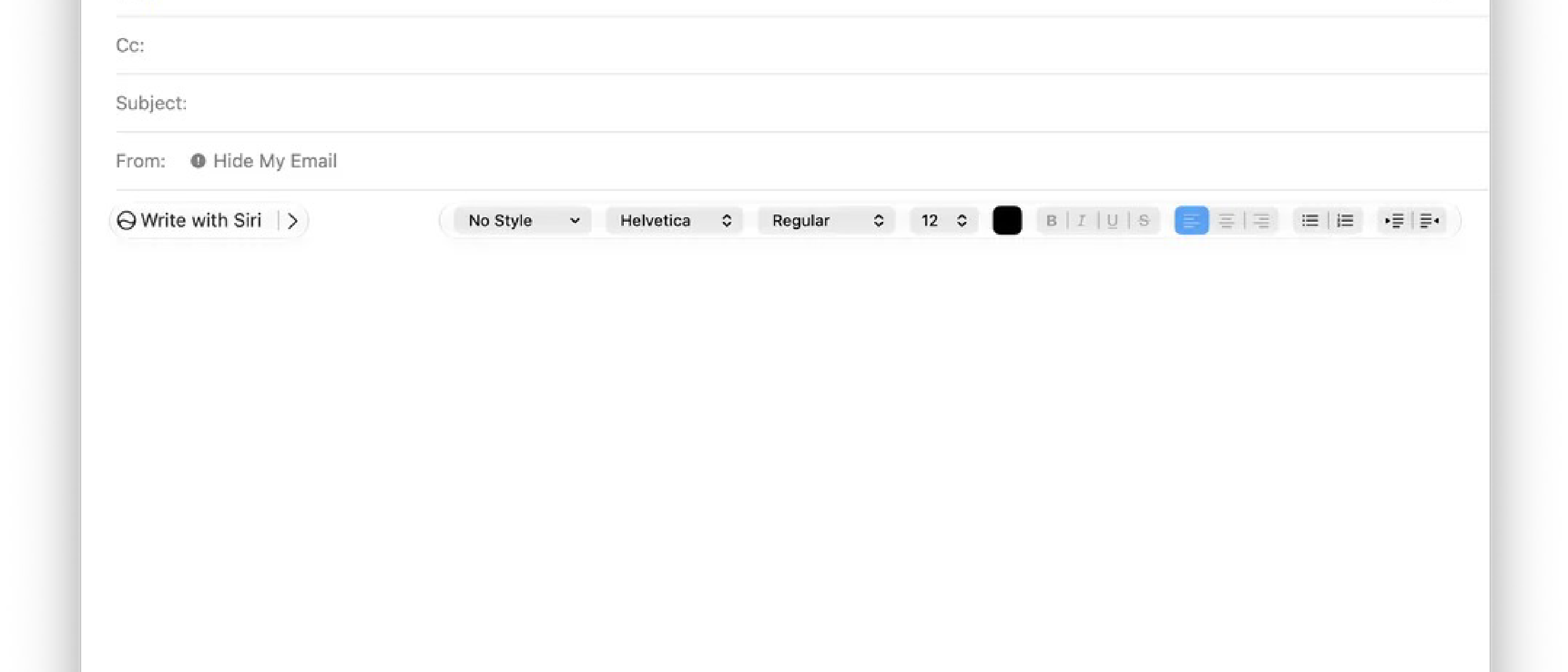
Apple’s latest macOS beta, 27 Golden Gate, contains a hidden experiment that could rewrite how users compose email on the desktop. A new formatting bar replaces the familiar row of font‑size, bold, and alignment icons with a large, Siri‑AI‑centric button labeled “Write with Siri.” The bar is only visible when the internal feature flag is toggled on, and even then it only appears in reply windows, not in brand‑new drafts.
The redesign collapses traditional controls to a thin strip on the right side of the composer. When a user activates “Write with Siri” and begins typing a prompt, those legacy controls disappear entirely, forcing the AI‑driven workflow to dominate the screen real estate.
This is not a cosmetic tweak; it is a deliberate shift toward AI‑first email creation. By surfacing Siri’s writing tools at the top of the UI, Apple signals that it wants users to think of the Mail app as a collaborative partner rather than a simple text editor.
Technical Breakdown of the New Bar
1. Feature Flag Architecture
Apple has wrapped the redesign behind an internal feature flag. This approach lets engineers ship the code to beta testers without exposing it to the broader public. The flag can be toggled via the defaults write command or through the System Settings > Developer options panel. Because the flag is off by default, most beta participants never see the new UI, which explains why the discovery was made by a MacRumors forum member, mactracker.
2. Siri AI Integration Layer
The bar is powered by Apple Intelligence, the umbrella framework that unifies on‑device machine‑learning models. Siri’s natural‑language generation (NLG) model runs locally on the Mac’s Apple Silicon, leveraging the Neural Engine for low‑latency response. When a user types a prompt such as “Draft a meeting invitation for next Thursday,” the model:
- Parses intent and extracts entities (date, participants, location).
- Generates a draft using a transformer‑based language model fine‑tuned on professional correspondence.
- Returns the text to the compose window, where it can be edited or accepted.
Because the processing stays on‑device, Apple avoids sending email content to the cloud, aligning with its privacy‑first narrative.
3. UI Interaction Flow
- Write with Siri – Primary entry point; opens a small text field for prompts.
- Edit with Siri – Appears after a draft is generated; lets users ask for refinements (“Make this more concise”).
- Proofread – Runs a grammar‑and‑style checker, highlighting suggestions inline.
- Rewrite – Re‑phrases selected sentences while preserving meaning.
- How does this sound? – Provides a tonal analysis, indicating whether the draft reads formal, friendly, or urgent.
The Smart Reply suggestions, originally introduced with the first wave of Apple Intelligence, have been migrated from an inline bubble to the new bar. Hovering over a suggestion displays a preview without inserting the text, a subtle usability improvement that mirrors the behavior seen in other AI‑enhanced messaging platforms.
User Experience Implications
Streamlined Drafting vs. Loss of Control
For power users who rely on precise formatting—tables, custom fonts, or markdown—collapsing the traditional controls can feel restrictive. The bar’s design assumes that most email composition can be handled by AI, which may not hold true for developers, marketers, or legal professionals who need granular styling.
Contextual Smart Replies
The new hover‑preview for Smart Reply reduces accidental insertion, a pain point in earlier versions where a single tap could commit a suggestion. This mirrors the evolution of reply assistance in other ecosystems, such as the X Algorithm Update Prioritizes Replies article that discusses how platforms are refining suggestion relevance.
Accessibility and Localization
Because the AI runs locally, it can leverage the system’s language settings to produce drafts in the user’s preferred language. However, early beta reports indicate that the UI does not yet adapt to right‑to‑left scripts, and the “Write with Siri” prompt field lacks full VoiceOver support. Apple will need to address these gaps before a public rollout.
Industry Impact and Competitive Landscape
Apple’s Position in the AI‑Assisted Productivity Space
Apple’s move puts it directly against Microsoft’s Copilot in Outlook and Google’s Gemini‑enhanced Gmail. While Microsoft emphasizes cloud‑based assistance with deep Office integration, Apple’s on‑device approach offers stronger privacy guarantees. This could attract enterprise customers wary of data leakage.
Ripple Effects on Third‑Party Mail Clients
If the redesign proves successful, third‑party developers may feel pressure to embed similar AI toolbars. The YouTube Fights AI Slop with New Monetization Rules piece highlights how platforms are tightening AI content policies; Apple may follow suit by enforcing stricter content guidelines for AI‑generated email, especially in regulated industries.
Potential for Cross‑Product Synergy
Apple’s broader AI strategy includes Siri integration across iOS, macOS, and watchOS. The Mail bar could become a hub for cross‑device drafting—start a draft on a Mac, continue on an iPhone, and finalize on an iPad—all powered by the same on‑device model. This aligns with the rumored launch of the first foldable iPhone alongside macOS 27, suggesting a unified UI experience across form factors.
Future Outlook and Risks
Timeline to General Availability
The feature is currently buggy—only appearing in reply windows and disappearing when the flag is toggled off. Apple’s internal testing cadence suggests that a polished version could ship with the final macOS 27 release in September 2024, coinciding with the iPhone 18 Pro launch. However, as one insider noted, “Whether the redesign makes the general release of macOS 27 is anyone’s guess at this point.”
Potential Pitfalls
- User Trust: If AI‑generated drafts contain factual errors or tone mismatches, users may lose confidence in the tool.
- Performance Overhead: Running large language models on older Mac hardware could increase CPU/GPU load, impacting battery life on laptops.
- Regulatory Scrutiny: AI‑generated communications may fall under emerging regulations (e.g., EU AI Act). Apple will need transparent disclosure mechanisms.
What to Watch For
- Bug Fixes: Look for updates that enable the bar in new‑compose mode and restore collapsed formatting controls on demand.
- Privacy Controls: Settings that let users opt‑out of on‑device AI or limit data retention.
- Developer APIs: Apple may expose the underlying model via a new IntelligenceKit framework, enabling third‑party apps to embed similar “Write with Siri” experiences.
Frequently Asked Questions
Q1: Do I need an Apple‑ID with a paid iCloud plan to use “Write with Siri”?
A: No. The feature runs entirely on‑device and does not require additional iCloud storage.
Q2: Can I revert to the classic formatting bar?
A: While the flag is active, you can hide the new bar by disabling the feature in Terminal:defaults write com.apple.mail EnableSiriFormattingBar -bool NO
Q3: Is the AI model updated automatically?
A: Apple pushes model updates through regular macOS updates, similar to how it updates the Neural Engine firmware.
Q4: Will this work on Intel‑based Macs?
A: Early beta builds target Apple Silicon. Intel Macs may receive a scaled‑down version or be excluded entirely.
Q5: How does this compare to Microsoft Outlook’s Copilot?
A: Outlook’s Copilot relies on cloud processing and integrates tightly with Office 365 data. Apple’s solution stays local, emphasizing privacy over deep data mining.
Conclusion
Apple’s experimental Siri‑AI formatting bar in macOS 27’s Mail app is a bold statement: email composition is moving from manual typing to collaborative AI assistance. By foregrounding “Write with Siri,” Apple is betting that users will accept AI‑generated drafts as a default workflow, even at the cost of temporarily hiding familiar formatting tools. The approach aligns with broader industry trends—enhanced Smart Reply, AI‑driven proofreading, and cross‑device continuity—while preserving Apple’s privacy‑first ethos.
If Apple can smooth out the current bugs, broaden accessibility, and provide clear user controls, the redesign could set a new standard for desktop email clients. Competitors will undoubtedly respond, and the next few months should reveal whether Siri‑AI becomes a staple of macOS productivity or a niche experiment that stays behind a feature flag.
Source: Original Article