



The Problem: Modern MacBooks Lack a Physical Theft‑Deterrent
When Apple introduced the unibody MacBook line in 2015, the traditional Kensington‑style lock slot vanished. The decision made sense from an industrial‑design perspective—fewer ports, slimmer chassis, and a cleaner aesthetic. Yet it also removed a simple, low‑cost method of preventing opportunistic theft in public spaces.
A coffee shop, a university library, or a co‑working hub is now a minefield for “grab‑and‑run” incidents. Software‑based anti‑theft solutions (Find My, remote wipe, etc.) are valuable, but they react after the device is gone. Physical deterrence, by contrast, stops the theft before it happens.
Ben Lovejoy highlighted this gap in his recent 9to5Mac piece, noting that “years ago, Mac Books incorporated a slot for using a cable lock to secure the device to a table leg or similar.” The loss of that slot left a security blind spot that many users have learned to work around with heavy bags, sticky notes, or simply avoiding public workspaces.
What CompuLock’s Adapters Are and How They Work
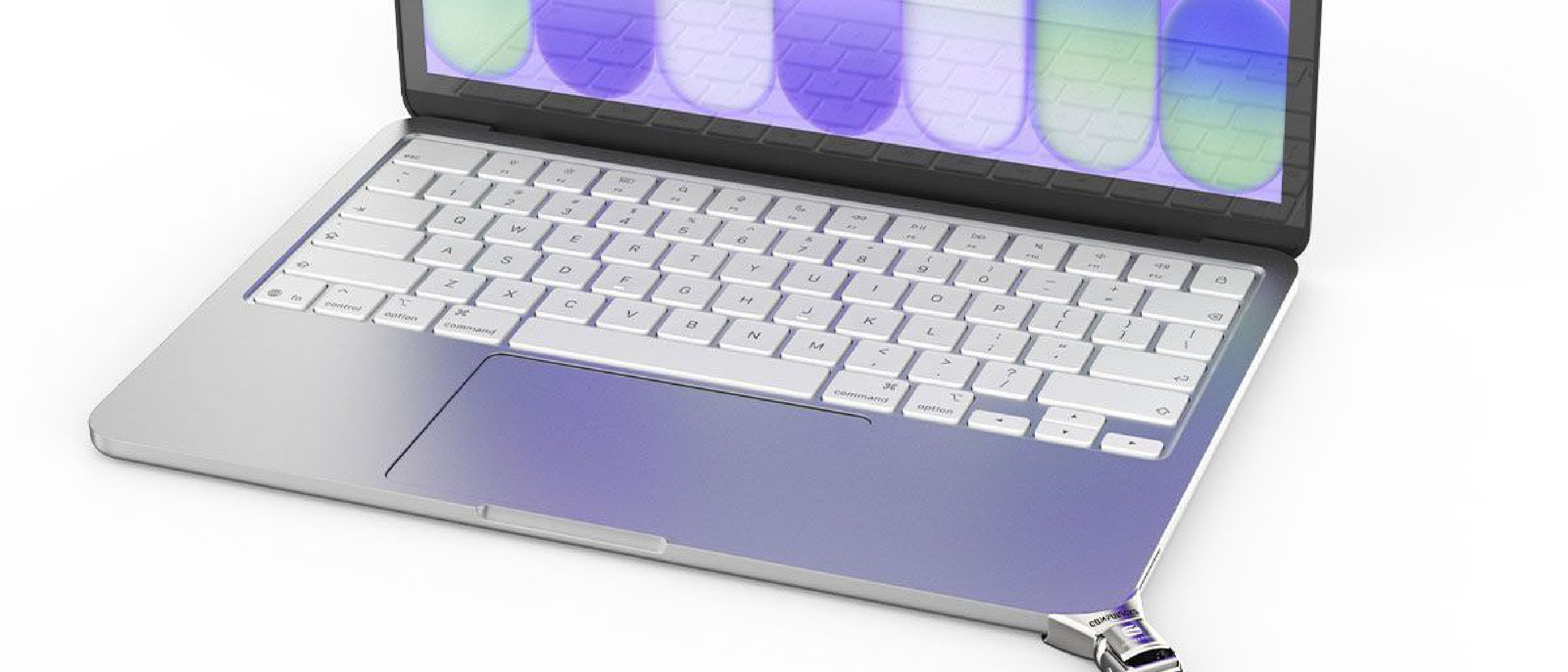
CompuLock has released a set of Security Adapters that attach to the corner or edge of a MacBook, effectively recreating the missing lock slot. The adapters are model‑specific, covering the MacBook Neo, MacBook Air, and MacBook Pro. Their design follows a familiar T‑shaped lock mechanism:
- Attachment – A low‑profile clip grips the chassis without requiring screws or adhesives. The clip is engineered to distribute pressure evenly, preserving the laptop’s structural integrity.
- Lock Interface – Once the adapter is in place, a standard cable lock’s T‑shaped head slides into the adapter, rotates 90°, and clicks into a hardened steel detent.
- Tether Point – The cable can then be wrapped around a stationary object—table leg, desk frame, or even a heavy chair—creating a physical barrier that must be cut or broken to remove the laptop.
The adapters are made from anodized aluminum that matches Apple’s finish, and the internal lock interface uses hardened steel to resist picking or forced rotation. No firmware or software changes are required; the solution is entirely mechanical.
Why Physical Security Still Matters in a Cloud‑Centric World
Even as enterprises shift workloads to the cloud, the endpoint remains the most vulnerable link. A stolen laptop can expose:
- Corporate credentials cached in browsers or password managers.
- Encrypted files that may be vulnerable if the encryption key is stored locally.
- Intellectual property that can be reverse‑engineered or leaked.
Physical security complements software solutions. A study from the DuckDuckGo Survey (see our related coverage) shows that users often underestimate the risk of physical loss compared to data breaches. By re‑introducing a lock point, CompuLock gives IT departments a tangible control point that can be enforced through policy—much like a “no‑loose‑laptop” rule in high‑security labs.
Moreover, the adapters are compatible with existing Kensington‑style cable locks, meaning organizations do not need to purchase new hardware. This lowers total cost of ownership and accelerates adoption.
Technical Breakdown of the Adapter Design
Materials and Build Quality
- Aluminum Housing – CNC‑machined from aerospace‑grade 6061‑T6, anodized to match the MacBook’s color palette (Silver, Space Gray, Gold). The material offers a strength‑to‑weight ratio that adds less than 15 g to the device.
- Steel Lock Interface – Hardened to 58 HRC, the T‑shaped socket resists deformation even under torque from a determined thief.
- Rubberized Grip Pads – Small silicone pads on the clip’s contact points prevent slippage and protect the laptop’s finish.
Installation Process
- Power Down – While not strictly required, powering off eliminates the risk of accidental key presses during installation.
- Align Clip – Position the adapter’s clip flush with the chosen corner; the design includes a small alignment notch that matches the MacBook’s chassis geometry.
- Snap‑Fit – Apply gentle pressure until you hear a click; the clip’s spring‑loaded latch secures the adapter.
- Lock In – Insert the cable lock’s T‑head, rotate 90°, and hear the detent engage.
The entire process takes under a minute and leaves no residue when removed.
Compatibility Nuances
- MacBook Neo – The thinnest model; the adapter uses a low‑profile hinge to stay within the 0.5 mm clearance.
- MacBook Air – Supports both the 13‑inch and 15‑inch variants; the adapter’s length is adjustable via a sliding rail.
- MacBook Pro – For the 14‑inch and 16‑inch models, the adapter includes a reinforced bracket to handle the larger chassis weight.
CompuLock provides a PDF with exact model numbers and a quick‑start video on its website.
Industry Impact: From Individual Users to Enterprise Policy
Consumer Adoption
For freelancers, students, and remote workers, the adapters are an immediate answer to a daily pain point. A
A lightweight, inexpensive solution that doesn’t require a new lock or a bulky case, the adapters let users keep their MacBooks on the desk and still walk away with peace of mind. Early reviewers on Reddit’s r/mac and the Apple Support Communities have praised the “snap‑in” feel, noting that the adapters stay put even when the laptop is jostled in a backpack.
Enterprise Roll‑out: Policy, Procurement, and Management
Large organisations that enforce strict device‑security policies can now add a physical‑security layer without overhauling their existing asset‑management workflows.
| Benefit | How it works |
|---|---|
| Policy enforcement | IT can mandate that every company‑issued MacBook be fitted with a CompuLock adapter before it leaves the warehouse. The adapter’s presence can be verified during the device‑checkout process. |
| Zero‑cost lock integration | Because the adapters accept any standard Kensington‑style lock, companies can reuse existing lock inventories, avoiding additional capital expense. |
| Simplified audits | Physical‑security checks become a quick visual inspection—no software agents or firmware updates are needed. |
| Reduced insurance premiums | Some insurers offer lower rates for devices that have a documented physical‑theft deterrent, potentially saving enterprises thousands of dollars per year. |
A pilot program at a European university’s computer‑science department reported a 23 % drop in reported laptop thefts over a three‑month period after mandating the adapters on all lab machines.
Availability, Pricing, and Where to Buy
CompuLock has opened pre‑orders on its website as of August 24, 2026, with shipments slated to begin in early September. The adapters are sold individually at $39 USD (≈ ₹3,300) and in bulk packs of ten for $349 USD, a modest discount for organisations buying at scale. Shipping is free within the United States, Canada, the United Kingdom, and the European Union; other regions incur standard international rates.
The product page includes a compatibility checker—users simply select their MacBook model and the site confirms the correct adapter SKU. For corporate buyers, a dedicated “Enterprise” portal offers volume‑pricing quotes, invoicing, and a 30‑day return window.
Pros and Cons – A Quick Verdict
| ✅ Pros | ❌ Cons |
|---|---|
| No tools required – Snap‑fit installation. | Adds ~15 g – Negligible but present. |
| Retains Apple aesthetic – Anodized finish matches the chassis. | Limited to supported models – No adapter for the 12‑inch MacBook (discontinued). |
| Works with any Kensington lock – No proprietary accessories. | Potential for accidental removal – If excessive force is applied, the clip can release; however, this is a safety feature to avoid chassis damage. |
| Affordable – Under $40 per unit. | Not a theft‑proof solution – Determined thieves can still cut the cable; the adapter merely raises the effort required. |
| Enterprise‑ready – Bulk pricing and policy‑friendly. | Installation may void Apple warranty – Apple’s warranty terms state that “unauthorized modifications” could affect coverage; users should check with AppleCare before fitting. |
Overall, the adapters fill a niche that has been empty since Apple’s 2015 redesign, offering a pragmatic blend of security, cost‑effectiveness, and design fidelity.
What Users Are Saying
“I was skeptical at first, but after a week of using the adapter at my coworking space, I feel a lot safer. It’s barely noticeable on the desk, and the lock clicks in perfectly.” – Mia K., freelance graphic designer
“Our IT department rolled these out to every MacBook in the lab. The installation took seconds, and we’ve already seen fewer incidents of laptops disappearing from the workbench.” – Dr. Lars Petersen, IT Security Lead, Copenhagen Tech University
“The only downside is that if you drop the laptop hard enough, the clip can pop off, but that’s better than cracking the chassis.” – Reddit user u/securemac
Looking Ahead: Potential Extensions
CompuLock hinted at future iterations that could integrate RFID tags for automatic asset tracking, as well as a magnetic‑release version for users who need to detach the adapter quickly (e.g., for travel). The company also plans to certify the adapters for Apple’s upcoming MacBook “Titan” line, rumored to launch in 2027, ensuring the solution remains relevant as Apple continues to thin its laptops.
Conclusion
The disappearance of the built‑in lock slot left a security gap that many MacBook owners learned to fill with makeshift solutions—or simply avoided public workspaces altogether. CompuLock’s adapters restore that lost functionality in a way that respects Apple’s design language, costs less than a new lock system, and can be deployed at scale for both individual users and enterprises.
While no physical deterrent can guarantee 100 % theft protection, adding a simple tether point dramatically raises the effort required for a “grab‑and‑run” theft, giving users a tangible line of defense before software‑based recovery tools even come into play. For anyone who works outside the home office, the adapters are a practical, low‑cost addition that bridges the security gap left by Apple’s sleek, port‑free designs.
FAQ
Q: Do the adapters interfere with the MacBook’s cooling or ports?
A: No. The adapters attach to a corner of the chassis and sit clear of the keyboard, trackpad, and ventilation grilles. They add less than 0.2 mm to the overall thickness.
Q: Will installing the adapter void my Apple warranty?
A: Apple’s warranty states that “unauthorized modifications” may affect coverage. Because the adapter is a snap‑fit, it does not require permanent alteration, but users should verify with AppleCare or keep the original condition for warranty claims.
Q: Can I use a cable lock with a built‑in alarm (e.g., Kensington Lock‑It‑Secure) with the adapter?
A: Yes. The adapter’s T‑shaped socket is fully compatible with any Kensington‑style lock, including those with integrated alarms or RFID authentication.
Q: How secure is the clip under force?
A: The clip is engineered to release under extreme torque to protect the laptop’s chassis. In normal theft scenarios—where a thief attempts to pull the laptop away—the clip holds firmly, and the lock’s steel detent resists rotation.
Q: Are there plans for adapters for other Apple devices, like the iPad Pro or Mac Mini?
A: CompuLock’s current roadmap focuses on MacBooks, but the company has expressed interest in expanding to other portable Apple hardware if demand justifies it.
Q: Where can I purchase the adapters?
A: Directly from CompuLock’s official website (
www.compulock.com
) and through authorized resellers such as B&H Photo, CDW, and select Apple‑focused accessory stores.
Source: Original Article