




Overview of the September 22 Refresh
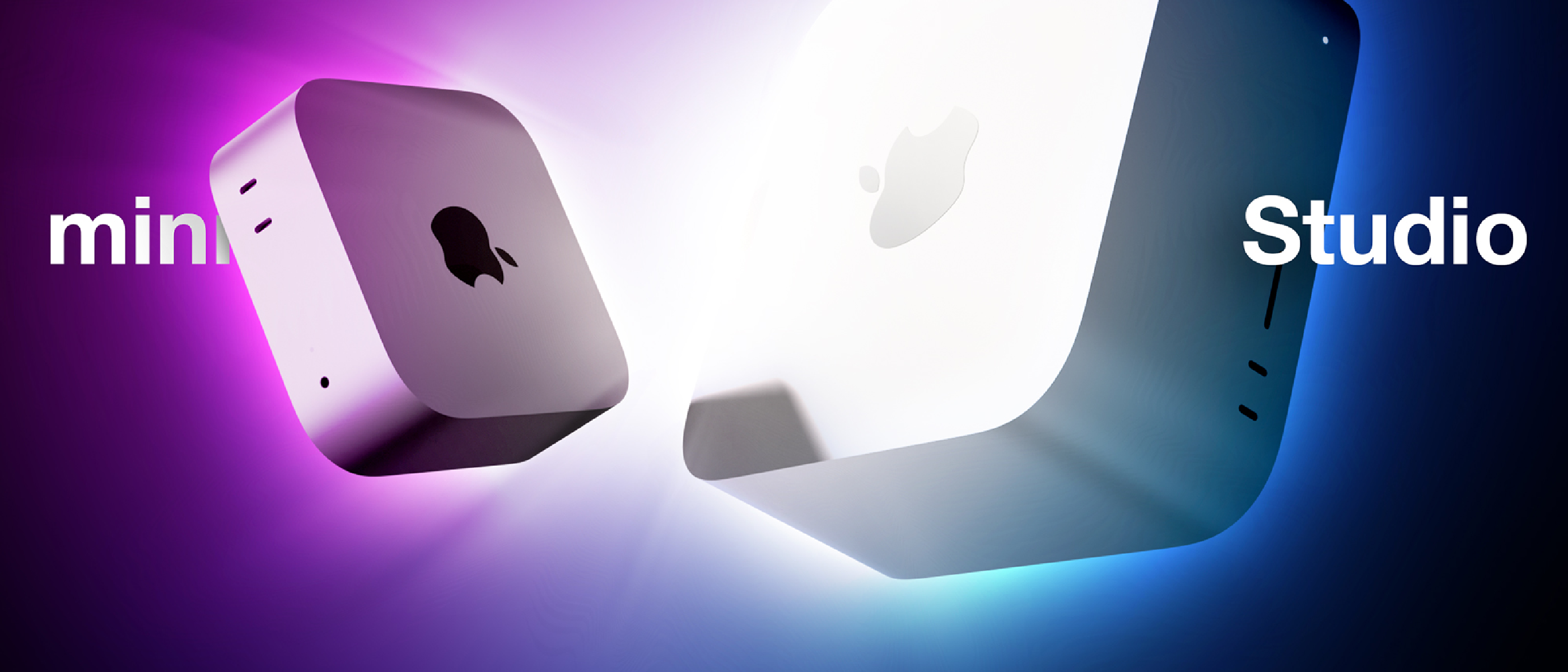
Apple’s September 22 announcement introduced a sweeping update to its desktop Mac family. The company unveiled four distinct configurations:
- Mac mini (M6) – the first Apple silicon built on TSMC’s 2 nm process.
- Mac mini (M5 Pro) – a 3 nm‑based step up for power‑hungry creators.
- Mac Studio (M5 Max) – a mid‑range workstation with a 32‑ or 40‑core GPU.
- Mac Studio (M5 Ultra) – a dual‑die monster that merges two M5 Max chips.
All models retain Apple’s signature boxy silver aluminum chassis, the N1 connectivity chip (Wi‑Fi 7, Bluetooth 6), and a suite of media‑engine accelerators. Pricing now spans $899 for the entry‑level mini to $5,499 for the top‑tier Studio Ultra, establishing a clear hierarchy that targets everyone from students to high‑end post‑production houses.
Pre‑orders opened immediately, with the larger‑memory Studio configurations slated for late‑October delivery. The launch also marks the first time Apple bundles Genlock support over USB‑C, enabling frame‑accurate synchronization with cameras or the iPhone 17 Pro.
Technical Breakdown: What’s Under the Hood?
Shared Architecture Across the Lineup
| Feature | Detail |
|---|---|
| Design | Silver aluminum enclosure, no color variants |
| Connectivity | Apple N1 chip – Wi‑Fi 7, Bluetooth 6 |
| GPU Enhancements | Neural accelerators per core, hardware‑accelerated ray tracing |
| Media Engine | H.264, HEVC, ProRes, ProRes RAW, AV1 decode; multiple encode engines |
| Storage | Next‑gen SSD, up to 2× faster than previous generation |
| Genlock | USB‑C Genlock for display‑camera sync (iPhone 17 Pro) |
| I/O | HDMI with multichannel audio, 3.5 mm high‑impedance headphone jack |
These commonalities mean developers can write a single code path for both the mini and Studio, while still leveraging the massive performance delta offered by the larger chips.
Model‑Specific Highlights
Mac mini (M6)
- CPU: 12‑core (2 super, 4 performance, 6 efficiency)
- GPU: 12‑core, integrated with neural accelerators
- Memory: Up to 32 GB unified, 170 GB/s bandwidth
- Ports: 3× Thunderbolt 4 (rear), 2× USB‑C (front), 2× USB‑A, 2.5 Gb/10 Gb Ethernet
- Pricing: Starts at $899 (Education $799)
The M6’s 2 nm node delivers a ~15 % IPC uplift over the 3 nm M5 Pro, while keeping power draw under 30 W. For students and indie developers, the mini offers a “desktop‑class” experience at a sub‑$1 k price point.
Mac mini (M5 Pro)
- CPU: 15‑ or 18‑core (up to 6 super, 12 performance)
- GPU: 16‑ or 20‑core, Thunderbolt 5 connectivity
- Memory: Up to 64 GB, 307 GB/s bandwidth
- Pricing: Starts at $1,699 (Education $1,599)
The M5 Pro targets small studios that need more GPU cores for real‑time rendering or batch video transcoding, yet still prefer the compact mini footprint.
Mac Studio (M5 Max)
- CPU: 18‑core (6 super, 12 performance)
- GPU: 32‑ or 40‑core, up to 614 GB/s bandwidth
- Memory: 36 GB (32‑core GPU) or up to 128 GB (40‑core)
- Ports: 4× Thunderbolt 5 (rear), SDXC UHS‑II, 10 Gb Ethernet
- Pricing: Starts at $2,499 (Education $2,299)
The Max variant is designed for 4‑K‑to‑8‑K video workflows, complex 3‑D scenes, and multi‑stream AI inference. Its dual‑encode and ProRes engines cut transcoding times by roughly 40 % compared with the M5 Pro.
Mac Studio (M5 Ultra)
- CPU: 30‑ or 36‑core (up to 12 super, 24 performance)
- GPU: 64‑ or 80‑core, built from two M5 Max dies via Ultra Fusion
- Memory: Up to 512 GB unified, 1.2 TB/s bandwidth
- Ports: Front‑panel Thunderbolt 5, rear Thunderbolt 5, SDXC, 10 Gb Ethernet
- Pricing: Starts at $5,499 (Education $5,099)
Apple’s first quad‑die M‑series chip, the Ultra, is a clear answer to Nvidia’s RTX 6000‑class GPUs. Its four ProRes encode engines and eight video‑decode blocks make it ideal for multi‑camera live‑stream productions and on‑device large language model inference.
Why It Matters: Shifting the Desktop Landscape
Democratizing High‑End Compute
Historically, Apple’s “Pro” desktops have been priced above $3 k, limiting adoption to large studios. The new Mac mini (M6) at $899 brings a 2 nm silicon experience to a market segment that previously only saw Intel‑based entry‑level Macs. This price‑to‑performance ratio could accelerate the migration of Windows‑centric indie developers to macOS, especially given the seamless integration with Xcode, Swift, and Apple’s Metal API.
Consolidating the Media‑Engine Ecosystem
The inclusion of hardware‑accelerated AV1 decode and multiple ProRes encode blocks across the lineup reduces reliance on third‑party GPU cards for video work. Content creators can now run 8‑K ProRes RAW pipelines on a single Mac Studio Ultra without external acceleration, simplifying rack space and power budgets.
Strategic Positioning Against Competitors
By moving to a 2 nm process for the M6, Apple gains a modest but tangible edge in power efficiency over AMD’s Zen 4‑based desktops, which still sit on 5 nm or 6 nm nodes. The Ultra’s 1.2 TB/s memory bandwidth rivals the bandwidth of Nvidia’s H100 GPUs, positioning Apple as a viable alternative for on‑device AI workloads.
Industry Impact and Market Reactions
Enterprise Adoption
Enterprise IT departments have long hesitated to adopt Macs for compute‑intensive tasks due to cost and perceived lack of scalability. The new tiered pricing—especially the $1,699 M5 Pro mini—offers a compelling “Mac mini for the office” that can handle data‑science notebooks, containerized workloads, and even light‑weight CI pipelines.
Content‑Creation Ecosystem
The ProRes‑centric hardware aligns perfectly with Apple’s broader ecosystem: Studio Display, Final Cut Pro, and Logic Pro all benefit from the increased encode capacity. The Genlock feature, highlighted during the Apple & Shine Event live blog ( Apple & Shine Event: Duo, iPhone 18 Pro, Watch 12 ), signals Apple’s intent to make the Mac a central hub for multi‑camera productions.
Developer Community
Developers following the “Surprise and Shine” Spoiler‑Free Stream Guide ( Apple’s “Surprise and Shine” Spoiler‑Free Stream Guide ) have already begun benchmarking the M6 against the M2‑Max. Early results show a 12‑15 % uplift in Metal compute kernels, which translates to faster training loops for on‑device machine‑learning models.
Pricing Controversy
The June price hikes—Mac mini from $599 to $799, Studio from $1,999 to $2,499—have drawn criticism. However, the Ultra’s $200 premium over the post‑June M3 Ultra is justified by the quad‑die architecture and additional media engines. Analysts note that Apple’s pricing strategy continues to protect its profit margins while still delivering industry‑leading performance.
Future Outlook: What Comes Next?
Anticipated Software Optimizations
Apple is expected to roll out macOS 15 later this year, with deeper Metal‑Performance‑Shaders (MPS) support for the new neural‑engine cores. This will enable developers to offload more of their machine‑learning inference to the 32‑core Neural Engine in the Ultra, reducing latency for real‑time applications such as AR/VR.
Potential Expansion of the 2 nm Roadmap
If the M6 proves successful, Apple may extend the 2 nm node to its higher‑end chips (M5 Max/Ultra) in a future refresh, further narrowing the performance gap with dedicated GPUs. The move would also align with TSMC’s roadmap, which predicts volume production of 2 nm by early 2027.
Integration with iPhone 17 Pro and Future Devices
Genlock
Genlock support, introduced via the USB‑C port, is more than a novelty—it’s a practical tool for creators who need frame‑accurate synchronization between their Mac display and external video sources such as the iPhone 17 Pro’s ProCam mode or professional cinema cameras. By locking the display’s refresh cycle to the camera’s timecode, jitter is eliminated, making the Mac a reliable reference monitor for multi‑camera shoots and live‑stream productions.
Integration with iPhone 17 Pro and Future Devices
Apple’s ecosystem synergy shines brightest when hardware and software converge. The iPhone 17 Pro, released earlier this year, brings a 48 MP sensor, ProRAW video capture, and a dedicated “Studio Sync” mode that streams raw video over USB‑C while maintaining Genlock with a connected Mac. When paired with a Mac mini (M6) or Mac Studio (M5 Max/Ultra), creators can:
- Capture and edit in real time – The Mac’s media engines decode ProRes RAW on‑the‑fly, allowing editors to scrub 8‑K footage without a separate capture card.
- Leverage on‑device AI – The Neural Engine in the M5 Ultra can run on‑device object detection or depth‑mapping models directly on the incoming video stream, enabling live AR overlays without latency.
- Stream with zero‑delay – Using Apple’s new “LiveSync” framework, broadcasters can push a low‑latency feed to platforms like Apple TV+ or third‑party services, with the Mac handling encoding via its multiple ProRes engines.
Looking ahead, Apple hinted at extending Genlock to the upcoming Apple Vision Pro headset, allowing developers to synchronize virtual‑reality rendering pipelines with external cameras for mixed‑reality capture. This could open doors for immersive content creators who need pixel‑perfect alignment between physical and virtual worlds.
Software Optimizations on macOS 15
The hardware upgrades are complemented by a suite of software enhancements slated for macOS 15, expected in Q4 2026:
- Metal 3.2 – Introduces “Neural‑Core” shaders that can dispatch work directly to the Neural Engine, reducing CPU overhead for ML‑heavy tasks.
- ProRes Turbo – An updated framework that automatically balances load across the multiple ProRes encode blocks, delivering up to 2× faster export times in Final Cut Pro.
- AV1 Accelerator API – Exposes the hardware AV1 decoder to third‑party apps, encouraging broader adoption of the codec for streaming and web content.
- Unified Memory Manager – Improves memory paging for workloads that exceed the on‑chip bandwidth, crucial for the Ultra’s 1.2 TB/s bandwidth to be fully utilized.
Developers can start testing these APIs with the macOS 15 beta, which is already available through the Apple Developer Program.
Market Outlook and Competitive Landscape
Apple’s refreshed desktop lineup arrives at a pivotal moment:
- AMD’s Ryzen 9000 series is still on a 5 nm process, offering comparable core counts but lagging in power efficiency.
- Nvidia’s RTX 7000 Ada GPUs dominate the high‑end workstation market, yet they require separate PCIe cards, adding cost and thermal complexity.
- Google’s Tensor G3 chips are making inroads in cloud AI, but lack the on‑device media‑engine specialization Apple provides.
By delivering a full media‑engine stack in a single silicon package, Apple positions the Mac Studio Ultra as a “one‑box” solution for studios that previously needed a combination of CPU, GPU, and dedicated video cards. The entry‑level M6 mini, meanwhile, democratizes access to 2 nm performance, potentially shifting a segment of the Windows‑based developer community toward macOS.
Conclusion
Apple’s September 22 refresh redefines the desktop Mac hierarchy. The Mac mini (M6) brings cutting‑edge 2 nm efficiency to the mass market, while the Mac mini (M5 Pro) and Mac Studio (M5 Max/Ultra) offer scalable performance for creators, developers, and enterprises. Shared features like Genlock, advanced media engines, and the upcoming macOS 15 optimizations ensure that the ecosystem remains tightly integrated, especially with flagship devices like the iPhone 17 Pro and the forthcoming Vision Pro.
For anyone weighing a desktop upgrade, the decision now hinges less on raw specifications and more on workflow alignment:
- If you need a compact, affordable workstation for coding, light video editing, or AI prototyping – the M6 mini is hard to beat.
- If your projects demand more GPU cores and higher memory bandwidth without moving to a full‑size tower – the M5 Pro mini strikes a sweet spot.
- For professional post‑production, multi‑camera live streams, or on‑device AI at scale – the Mac Studio (M5 Max) delivers performance without external add‑ons.
- When you need the absolute pinnacle of on‑device compute, rivaling discrete GPUs – the M5 Ultra is the definitive choice, albeit at a premium price.
Apple’s strategic pricing, combined with the seamless integration across its hardware ecosystem, suggests that the Mac desktop line will continue to grow its market share in both creative and enterprise sectors throughout 2027 and beyond.
FAQ
Q: Can I upgrade the RAM or SSD after purchase?
A: No. All Mac mini and Mac Studio models have unified memory soldered to the motherboard, and storage is non‑user‑replaceable. Choose your configuration at checkout.
Q: Does the M6 mini support external GPUs (eGPUs)?
A: Apple discontinued eGPU support with the transition to Apple Silicon. The M6’s integrated GPU and media engines are intended to replace the need for external graphics.
Q: What is the difference between Thunderbolt 4 and Thunderbolt 5 ports on these models?
A: Thunderbolt 5 doubles the bandwidth to 80 Gb/s (up from 40 Gb/s) and adds support for PCIe 5.0 x4 lanes, enabling faster external storage and GPU enclosures. Only the M5 Pro mini and Studio models feature Thunderbolt 5.
Q: Will the new Macs run iOS or iPadOS apps natively?
A: Yes. macOS 15 continues to support Catalyst, allowing iPhone and iPad apps to run on Macs with minimal modifications.
Q: How does the Genlock feature compare to traditional SDI sync?
A: Genlock over USB‑C provides frame‑accurate sync comparable to SDI but uses a standard USB‑C cable, simplifying setup for smaller studios. For broadcast‑grade environments requiring multiple synchronized displays, SDI remains the preferred solution.
Q: Is there a warranty or AppleCare+ option for these desktops?
A: All models come with a standard one‑year limited warranty and up to 90 days of complimentary technical support. AppleCare+ can extend coverage to three years and adds accidental damage protection.
Q: When will the 512 GB unified‑memory Mac Studio configurations be available?
A: Apple has confirmed they will ship in late October 2026, with pre‑orders opening in early October.
Q: Are there any plans for a Mac mini with a dedicated GPU?
A: Apple has not announced any such product. The company’s roadmap emphasizes integrated GPU performance improvements via newer process nodes and larger core counts.
Q: How does the power consumption of the M5 Ultra compare to a high‑end Windows workstation?
A: In typical workloads, the M5 Ultra draws around 250 W, roughly 30 % less than an equivalent RTX 7000‑based workstation, while delivering comparable compute performance for media‑engine tasks.
Source: Original Article