



What’s New in iPadOS 27.3 Beta?
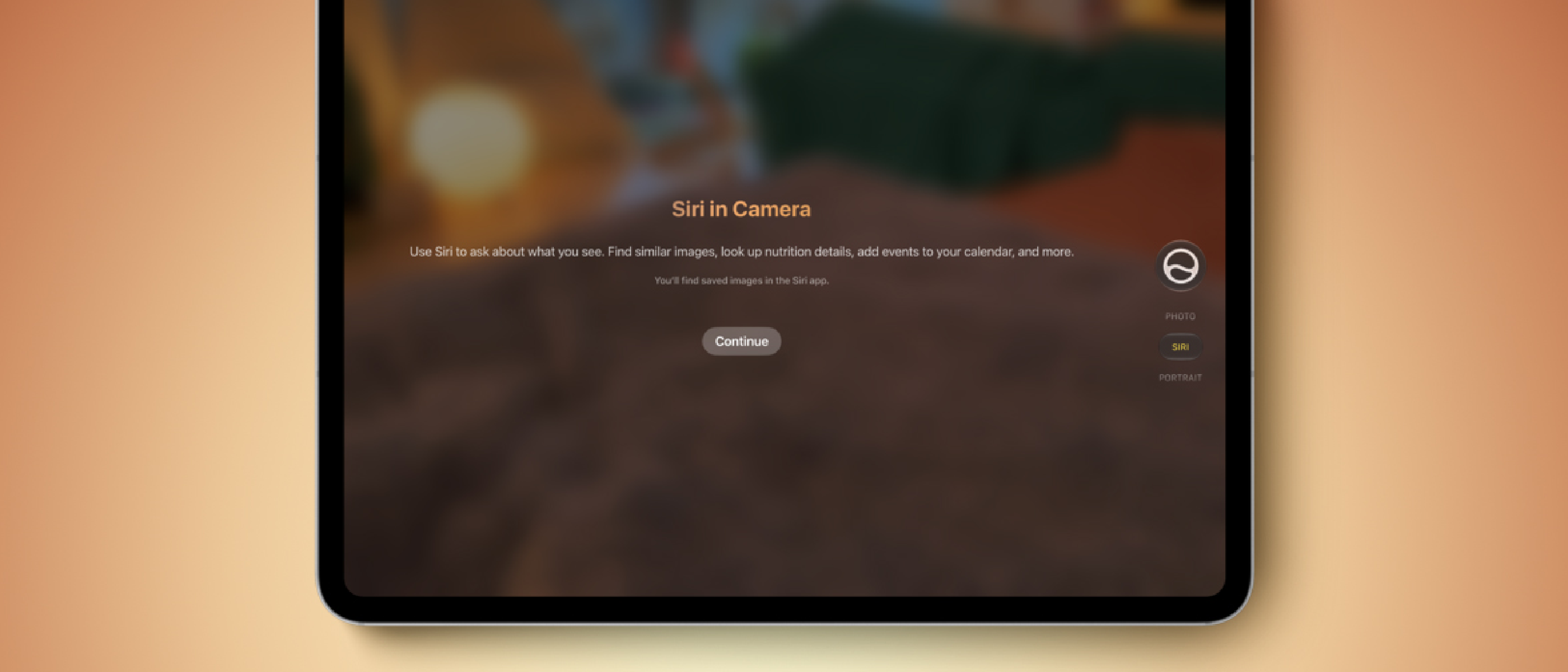
Apple’s iPadOS 27.3 beta, released today, marks the first time the Siri tab inside the native Camera app appears on iPad. The feature, originally introduced on iPhone 15 Pro and newer with iOS 27, is now available on a curated set of iPad models:
- iPad Pro – M1 chip and newer
- iPad Air – M1 chip and newer
- iPad mini – A17 Pro and A20 Pro chips
The rollout is limited to devices that can handle the on‑device machine‑learning workloads required for real‑time object recognition. Users can enable the new tab by tapping the Siri icon in the Camera UI, then point the lens at a scene and ask for details about any visible object.
Apple’s press release emphasizes the synergy with the Apple Pencil: after snapping a photo, a user can circle an object with the Pencil, and Siri will return contextual information—ranging from product specs to historical facts—without leaving the Camera app.
The beta is expected to graduate to a public release in December, giving developers a narrow window to test integration and provide feedback.
Technical Deep Dive: Siri Mode in the Camera App
Visual Intelligence Pipeline
Siri’s Visual Intelligence leverages a combination of on‑device neural engines and Apple’s proprietary Neural Engine (ANE). The pipeline can be broken down into three stages:
- Image Capture & Pre‑processing – The Camera app streams raw sensor data to the ANE, which normalizes exposure and color balance before feeding the frame into the model.
- Object Detection & Classification – A lightweight convolutional neural network (CNN) identifies bounding boxes and assigns class labels. Apple’s “Live Text” architecture is reused, but with a higher confidence threshold to reduce false positives.
- Knowledge Retrieval – Once an object is classified, a local knowledge graph (stored in the Secure Enclave) maps the label to a set of facts. For internet‑enabled queries, the device sends a minimal, anonymized token to Apple’s servers, preserving privacy while fetching up‑to‑date information.
Because the entire process runs on‑device for most common objects, latency is typically under 300 ms, delivering a near‑instantaneous response.
Apple Pencil Integration
The Pencil adds a vector‑based selection layer on top of the captured image. When a user draws a circle, the app extracts the enclosed region, runs a focused inference pass, and returns results specific to that region. This approach reduces computational load compared to scanning the whole frame again.
Compatibility Constraints
The feature’s reliance on the ANE means older iPads without a dedicated neural engine cannot support it. Apple’s decision to limit the rollout to M1‑class chips and newer ensures a consistent experience across the supported lineup.
Why Visual Intelligence Matters on iPad
Enhancing Productivity
iPads have become primary tools for designers, educators, and field technicians. The ability to instantly identify components, reference specifications, or retrieve translation data without switching apps streamlines workflows. For example, an architect can photograph a building façade, circle a decorative column, and receive material details in seconds.
Bridging the Gap Between AI and Creativity
The integration of AI directly into the Camera app blurs the line between capture and analysis. Creators can experiment with “AI‑assisted scouting,” using Siri to discover visual motifs or cultural references that inform their projects. This aligns with Apple’s broader push to embed AI into creative pipelines, as seen in the recent updates to Apple Vision Pro and ProRAW enhancements.
Privacy‑First AI
Apple’s on‑device processing model differentiates Siri’s Visual Intelligence from competing services that rely heavily on cloud inference. Users benefit from faster responses and reduced data exposure, reinforcing Apple’s privacy narrative—a point often highlighted in coverage of the company’s Q4 2026 earnings where services revenue growth was attributed to privacy‑centric features. (Read more: Apple Stock Drops Nearly 3 After Hours Following Q4 2026 Results)
Impact on Developers and the App Ecosystem
New API Surface
Apple has exposed a set of SiriKit extensions for third‑party developers to augment the Visual Intelligence knowledge base. By registering custom object identifiers and associated metadata, developers can make their products searchable directly from the Camera app. This opens a pathway for:
- Retail apps to surface product availability and pricing.
- Educational platforms to provide instant definitions for scientific specimens.
- Industrial software to deliver safety warnings for identified machinery.
The API follows the same privacy‑first principles: all custom data remains on the device unless the user explicitly opts into cloud sync.
Competitive Landscape
Competitors such as Google Lens and Microsoft’s Seeing AI have long offered object recognition, but they rely on continuous internet connectivity. Apple’s on‑device approach could shift developer expectations, prompting a wave of offline‑first AI solutions. Early adopters who integrate their catalogs into Siri’s knowledge graph may gain a visibility advantage within the Apple ecosystem.
Potential Monetization
While Siri’s Visual Intelligence is free for end users, Apple could introduce premium knowledge packs for niche domains (e.g., medical imaging, advanced engineering). This would mirror the subscription model used for Apple Music and Apple Arcade, creating a new revenue stream that aligns with the company’s services strategy.
Future Outlook and Potential Enhancements
Expanded Device Support
Given the positive reception of the iPad rollout, Apple may eventually back‑port the feature to older iPads via a hybrid cloud‑assist model, similar to how Live Text was extended to legacy devices. This would broaden the user base while maintaining acceptable latency.
Multimodal Queries
The current implementation focuses on visual cues. Future updates could combine voice, text, and gesture inputs, allowing users to ask follow‑up questions (“What’s the price of this model?”) after the initial object identification. Such multimodal interaction would deepen the conversational AI experience.
Integration with ARKit
Apple’s ARKit already supports scene understanding. Merging Siri’s Visual Intelligence with AR overlays could enable real‑time annotations in the physical world—imagine pointing the iPad at a plant and seeing growth tips appear as floating labels.
Industry Adoption
Enterprise mobility managers may begin to mandate iPads with Siri Visual Intelligence for field operations, citing reduced need for separate reference devices. This could accelerate the adoption of Apple Business Manager solutions that pre‑configure the feature for corporate fleets.
Frequently Asked Questions
Q: Which iPad models can use Siri mode in the Camera app? A: iPad Pro (M1 and newer), iPad Air (M1 and newer), iPad mini (A17 Pro or A20 Pro). Older models lack the required neural engine.
Q: Do I need an internet connection for Visual Intelligence to work? A: Most common objects are identified entirely on‑device. For obscure items, the device may send an anonymized query to Apple’s servers, requiring a brief connection.
Q: How does the Apple Pencil improve the experience? A: After taking a photo, you can circle an object with the Pencil. The app isolates that region, runs a focused inference pass, and returns information specific to the selected item.
Q: Can third‑party apps add their own data to Siri’s knowledge base? A: Yes. Apple provides SiriKit extensions that let developers register custom object identifiers and associated metadata, which appear in Visual Intelligence results.
Q: When will the feature be available to the general public? A: The iPadOS 27.3 public release is slated for December 2026, following the current beta testing period.
Conclusion
Apple’s decision to extend Siri’s Visual Intelligence to the iPad Camera app via iPadOS 27.3 beta is more than a incremental UI tweak—it signals a strategic move to embed AI deeper into the core productivity workflow of its flagship tablet line. By leveraging on‑device neural processing, tight Apple Pencil integration, and a privacy‑first architecture, the feature delivers instant, context‑rich information without compromising user data.
For developers, the newly opened API surface offers a chance to make their products discoverable directly from the camera lens, potentially reshaping how consumers interact with digital catalogs. As the ecosystem matures, we can anticipate broader device support, multimodal query capabilities, and tighter ties with ARKit, all of which will reinforce Apple’s position at the intersection of hardware, software, and artificial intelligence.
The upcoming public release in December will be a litmus test for adoption, but early indications suggest that Siri’s Visual Intelligence could become a staple of the iPad experience—much like the Apple Pencil itself.
Read more about Apple’s policy changes affecting AI‑driven apps here and explore how hardware trends like USB‑C are influencing device capabilities in the broader mobile market. (https://ltdeveloperblogs.github.io/posts/your-phones-usb-c-port-does-a-lot-more-than-just-charge-heres-what-else-it-can-do)
Source: Original Article