


Overview of Safari 27.3 Enhancements
Apple’s latest Safari update, bundled with iOS 27.3, iPadOS 27.3, and macOS Golden Gate 27.3, delivers a suite of interface and AI‑driven features that aim to streamline multitasking and improve visual ergonomics. The most visible changes are the introduction of a vertical tab bar, a new adaptive dark mode that automatically transforms bright‑colored sites, and a set of Siri‑powered actions that let users manage tabs, history, and content with voice commands. These additions are designed to work seamlessly across all Apple platforms, leveraging the unified design language that has become a hallmark of the ecosystem.
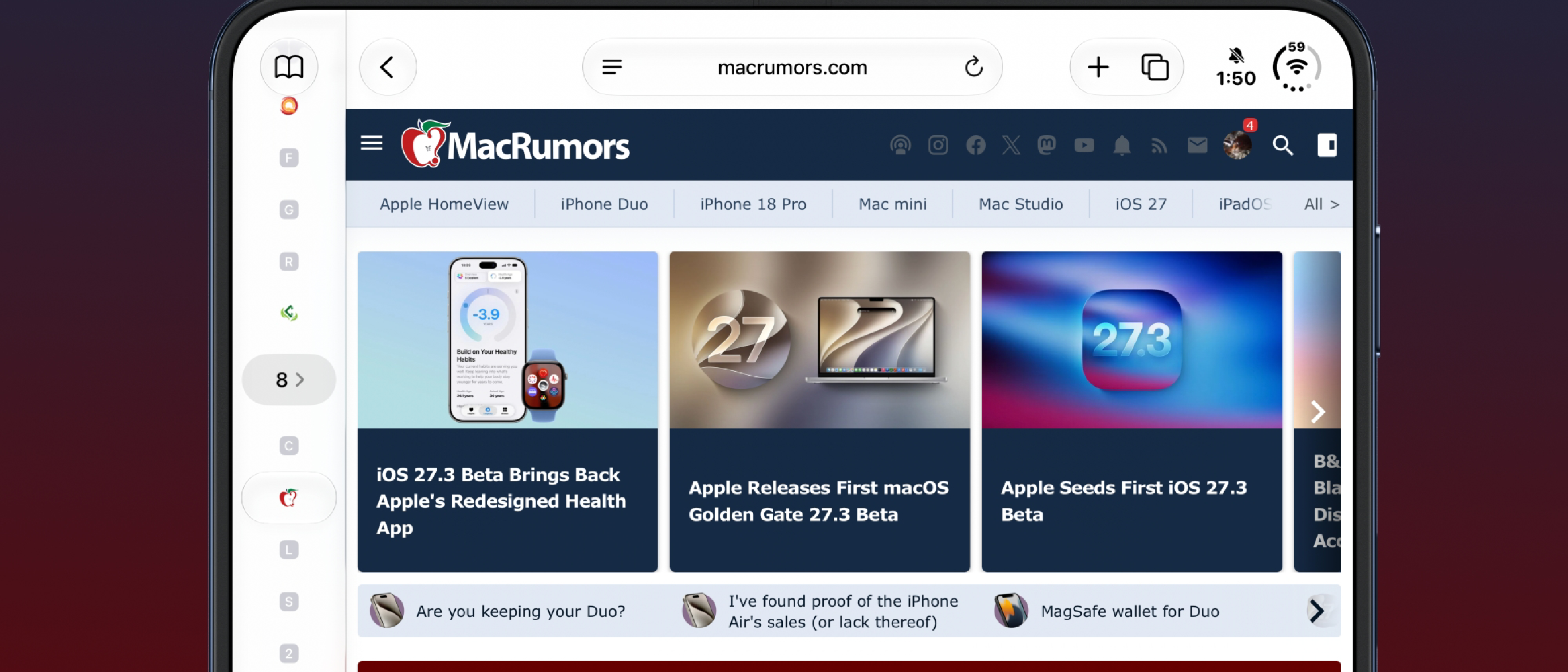
Vertical Tabs: Design, Usability, and Integration
A New Layout for Modern Screens
The vertical tab bar replaces the traditional horizontal row at the top of the window. Positioned on the left side, it uses compact icons by default to conserve horizontal space, a design that pairs well with the larger displays of the iPhone 12 and newer models. Users can toggle a wider view that displays website titles, making it easier to locate specific tabs in a crowded workspace. This feature is accessible via Safari settings on iOS and iPadOS, or the View menu on macOS.
Seamless Interaction with Topics and Tab Groups
Safari’s existing organizational tools—Topics and Tab Groups—continue to function within the vertical layout. Topics automatically sort tabs based on Apple Intelligence when enabled, grouping related sites together. Tab Groups can be pinned, swapped, or closed with a simple drag‑and‑drop gesture, and the new layout preserves these interactions without requiring a change in workflow. Developers can also programmatically create or modify Tab Groups through the Safari Web Extensions API, ensuring that third‑party tools remain compatible.
Accessibility and Customization
For users who prefer a more traditional experience, the vertical tab bar can be disabled entirely, reverting to the classic horizontal bar. The option to show titles or icons is also configurable, allowing power users to tailor the interface to their habits. This flexibility is particularly valuable for developers who test Safari on multiple devices; the ability to switch layouts quickly can speed up debugging sessions.
Adaptive Dark Mode: How It Works and When It Helps
Automatic Darkening of Bright Sites
When Safari detects a website that lacks a native dark mode, it offers an “Adaptive Dark Mode” prompt. Upon acceptance, the browser renders a dark‑mode version of the page by adjusting background colors, text contrast, and inverting logos and graphics. Vector artwork is recolored, raised surfaces are lifted, and layered shadows are rebalanced to maintain depth perception. The algorithm applies only the necessary tweaks for each site, ensuring that the user experience remains natural and not overly aggressive.
User Control and Developer Guidance
Users can enable Adaptive Dark Mode globally or on a per‑site basis. If a site already implements dark mode, Safari will not override it. Developers can also add a <meta name="safari-adaptive-dark-mode" content="ignore"> tag to prevent the browser from applying the transformation, preserving the designer’s intent. This feature is particularly useful for content‑heavy sites such as news portals or e‑commerce platforms where readability is paramount.
Security and Privacy Considerations
Because Adaptive Dark Mode modifies the DOM and CSS of visited pages, it raises questions about data integrity. Apple mitigates this by performing transformations client‑side without sending modified content to the server. However, developers should be aware that certain scripts may behave differently under the altered styles, potentially affecting analytics or ad tracking.
Siri AI Actions: New Ways to Interact with Browsing
Voice‑Controlled Tab Management
Siri can now perform a range of tab‑related actions: opening, closing, moving, and sorting tabs, as well as arranging them into Tab Groups. For example, saying “Hey Siri, move this tab to the second group” instantly repositions the current tab. This hands‑free capability is especially handy on the iPad, where multitasking often involves juggling multiple windows.
History and Privacy Commands
Siri’s new history controls let users clear browsing data for specific sites or time ranges. A command like “Clear history for example.com from the last 10 days” triggers Safari to purge the relevant entries. This feature dovetails with Apple’s broader privacy initiatives, giving users granular control over their data footprint.
Future Capabilities and Current Limitations
Apple has announced that Siri will soon be able to understand the full content of webpages, including non‑active tabs and hidden sections. While this “Siri awareness” feature is not yet in the beta, it promises to enable queries such as “Show me the price comparison across all open tabs.” For now, Siri’s knowledge is limited to the visible content of the active tab, but the roadmap suggests a significant expansion in the coming releases.
Technical Breakdown: Implementation and Compatibility
Underlying Architecture
The vertical tab bar is implemented as a native UI component that replaces the standard tab bar controller. It communicates with Safari’s tab management engine via the same APIs used for horizontal tabs, ensuring backward compatibility. Adaptive Dark Mode leverages a lightweight rendering engine that intercepts CSS rules and applies transformations in real time, without reloading the page.
Performance Impact
Benchmarks from Apple’s internal testing show less than a 5 % increase in memory usage when Adaptive Dark Mode is enabled on a typical news site. The vertical tab layout does not introduce noticeable latency, as the component is rendered using the same GPU‑accelerated pipeline as the rest of the browser. Developers can profile these changes using Instruments, focusing on the “Safari Web Content” process.
Compatibility with Extensions and Web Apps
Safari extensions that manipulate the tab bar or inject CSS must account for the new layout. The extension API now exposes a verticalTabBar property, allowing developers to query the current orientation and adjust their UI accordingly. Web apps that rely on the window.innerWidth property may need to recalculate layout thresholds when the vertical bar is active.
Industry Impact and Future Outlook
Redefining Desktop and Mobile Browsing
The vertical tab bar aligns Safari with other modern browsers that offer side‑by‑side tab management, such as Chrome’s “Tab Groups” and Firefox’s “Tab Containers.” By providing a native, system‑wide solution, Apple reduces the friction that developers face when porting web apps across platforms. The adaptive dark mode feature also positions Safari as a leader in accessibility, potentially influencing other browsers to adopt similar AI
potentially influencing other browsers to adopt similar AI‑driven dark‑mode solutions.
Potential Challenges and Considerations
UI Consistency Across Devices
While the vertical tab bar works well on larger screens, smaller iPhone displays may feel cramped if users enable the wide‑title view. Apple mitigates this by automatically collapsing titles into icons when screen real‑estate falls below a certain threshold, but developers should still test their sites on both compact and expanded layouts to ensure that critical UI elements (e.g., sticky headers or in‑page navigation) are not obscured by the tab column.
Interaction with Existing Accessibility Features
VoiceOver, Switch Control, and other assistive technologies continue to recognize tabs as distinct UI elements, but the shift from a horizontal to a vertical hierarchy changes the navigation order. Apple’s documentation recommends adding explicit accessibilityLabel and accessibilityTraits to custom tab‑related controls in web extensions so that users relying on assistive tech experience a predictable focus flow.
Impact on Third‑Party Extensions
Extensions that previously injected CSS targeting the horizontal tab bar (#tab-bar) must now account for the new selector (#vertical-tab-bar). The updated Safari Web Extensions API provides a safari.tabBar object that reports the current orientation, allowing developers to conditionally apply styles. Failure to adapt may result in broken UI or duplicated controls.
Dark‑Mode Edge Cases
Adaptive Dark Mode’s algorithm is intentionally conservative, but certain sites that rely heavily on custom SVG filters, canvas‑based graphics, or WebGL shaders may render incorrectly after color inversion. Apple advises developers to test critical visual components under the “Try Adaptive Dark Mode” prompt and, if necessary, supply a native dark‑mode stylesheet via the prefers-color-scheme media query. In rare cases where the automatic transformation interferes with brand identity, the <meta name="safari-adaptive-dark-mode" content="ignore"> tag can be used to opt‑out.
Developer Guidance and Best Practices
Detect the Tab Layout
if (window.safari && safari.tabBar && safari.tabBar.isVertical) {
    // Adjust layout or hide custom sidebars that conflict
}
This snippet lets web apps respond dynamically to the presence of the vertical bar.
Provide Native Dark‑Mode Support Even though Adaptive Dark Mode offers a fallback, supplying a proper
prefers-color-scheme: darkstylesheet ensures the most accurate rendering and avoids unnecessary DOM manipulation.Respect the Adaptive‑Dark‑Mode Meta Tag Adding
<meta name="safari-adaptive-dark-mode" content="ignore">signals Safari to leave the page untouched. Use it sparingly—only when the automatic conversion would break critical functionality or visual branding.Test Siri‑AI Interactions With Siri gaining deeper page‑content awareness, developers should verify that sensitive data (e.g., personal identifiers, payment forms) is not inadvertently exposed through voice queries. Apple’s privacy guidelines recommend marking such fields with
autocomplete="off"and using thearia-hiddenattribute where appropriate.Update Extension Manifests The new
verticalTabBarkey must be declared in themanifest.jsonof Safari extensions:{ "permissions": ["tabs", "verticalTabBar"] }This ensures the extension can query the orientation and adapt its UI accordingly.
Outlook: What’s Next for Safari?
Apple’s roadmap hints at several follow‑up enhancements that could further differentiate Safari from its competitors:
- Contextual Tab Suggestions – Leveraging Apple Intelligence to proactively suggest related tabs based on the content you’re reading, similar to the “Related Articles” panels seen in iOS Mail.
- Cross‑Device Tab Continuity – A tighter integration with Universal Control, allowing a vertical tab set on a Mac to be dragged onto an iPad screen as a floating panel.
- Expanded Siri Awareness – Full‑page indexing that will enable natural‑language queries across all open tabs, with results presented in a dedicated “Siri Insights” sidebar.
If these features materialize, Safari could become the first mainstream browser that truly unifies visual ergonomics, AI‑assisted browsing, and privacy‑first design under a single, cross‑platform umbrella.
Conclusion
Safari 27.3 marks a decisive step toward a more organized, visually comfortable, and voice‑enabled browsing experience. The vertical tab bar gives power users a desktop‑class workspace on mobile devices, while Adaptive Dark Mode fills the long‑standing gap for sites that lack native dark themes. Siri’s new AI actions turn routine tab and history management into a conversational task, and the upcoming “Siri awareness” promises to make the web feel searchable at a glance.
For developers, the changes are largely additive but do require a modest amount of testing and code adjustments—particularly around layout detection, dark‑mode handling, and extension compatibility. Apple’s clear documentation and the backward‑compatible nature of the underlying APIs should smooth the transition.
Overall, Safari 27.3 not only modernizes the browser’s UI but also reinforces Apple’s commitment to privacy‑centric, AI‑enhanced experiences. As the ecosystem adopts these tools, users can expect a more cohesive and less eye‑straining web journey across iPhone, iPad, and Mac.
FAQ
Q: Can I use both vertical and horizontal tabs at the same time? A: No. Safari allows only one tab orientation per window. You can switch between them in Settings (iOS/iPadOS) or the View menu (macOS), and the change takes effect immediately.
Q: Does Adaptive Dark Mode affect performance on older devices? A: Apple reports a sub‑5 % memory increase on typical sites. On older hardware, the impact is still minimal, but you can disable the feature globally in Settings → Safari → Appearance if you notice any slowdown.
Q: Will Siri be able to read the content of private browsing windows? A: Siri respects Private Browsing mode. Voice commands that target history or tab content will ignore private windows, preserving the intended privacy guarantees.
Q: How do I opt‑out of Adaptive Dark Mode for a specific site?
A: Add the following meta tag to the <head> of your HTML:
<meta name="safari-adaptive-dark-mode" content="ignore">This tells Safari to leave the page’s original styling untouched.
Q: Are there any plans to bring vertical tabs to Safari on Windows? A: Safari is currently only available on Apple platforms. While the vertical tab concept could be ported, there are no announced plans for a Windows version at this time.
Q: Can I customize the width of the vertical tab bar beyond the preset “icon only” and “wide” options? A: The UI currently offers only the two preset modes. However, developers can programmatically adjust the width of their own sidebars to coexist with the vertical tab column.
Q: Will existing Safari Web Extensions continue to work after the update?
A: Yes. Extensions that do not interact with the tab bar will work unchanged. Those that modify tab UI should update to reference the new verticalTabBar property to ensure full compatibility.
Q: How does Siri handle ambiguous commands like “Close the last tab”? A: Siri interprets “last” based on the most recently active tab in the current window. If multiple windows are open, you can specify the window name or say “in the first window” for clarity.
Q: Is there a way to export my vertical tab layout for backup or migration? A: Safari’s iCloud sync automatically backs up tab groups, including their orientation. You can also export a list of open tabs via the “Share → Copy Links” option, which preserves the order but not the visual layout.
Source: Original Article