



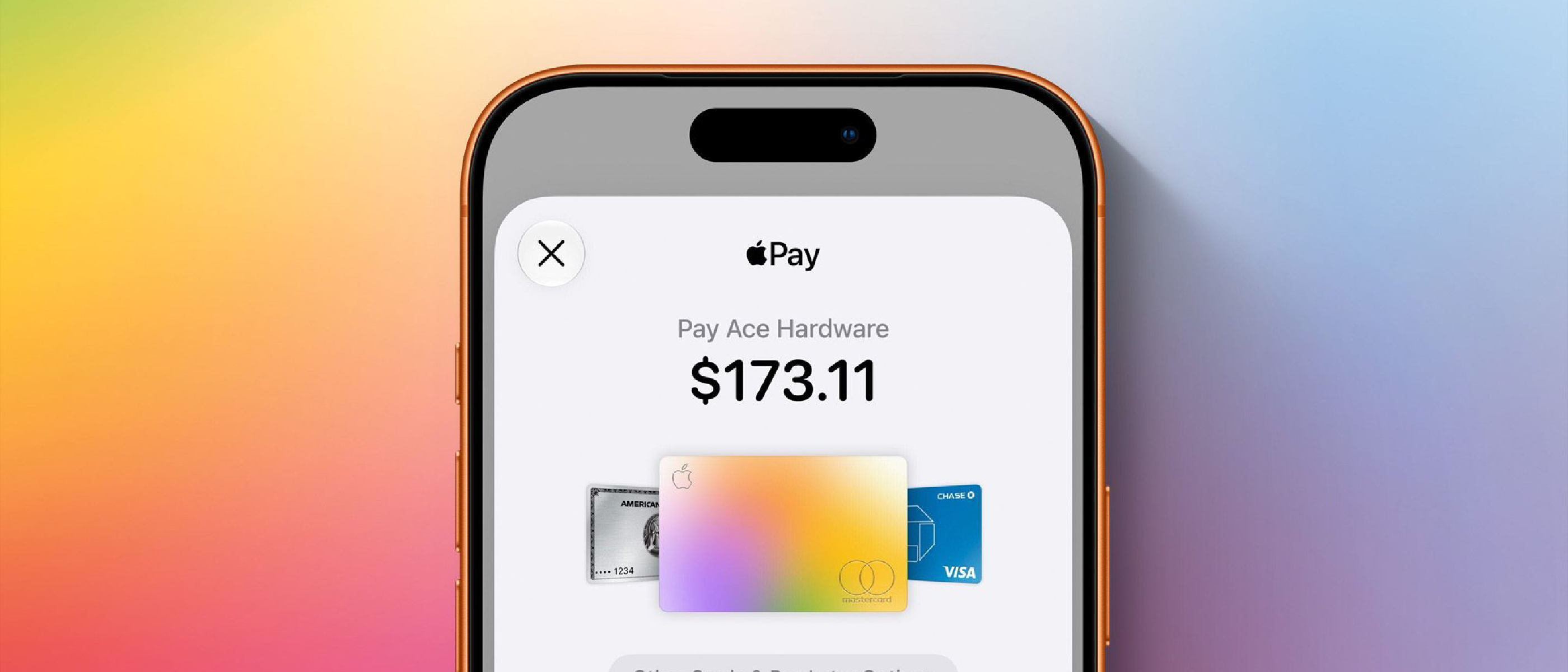
Overview of the iOS 27 Apple Pay Redesign
Apple Pay has been a cornerstone of iOS’s value proposition since its debut, but the feature has traditionally evolved through incremental UI tweaks and backend improvements. iOS 27 marks a departure from that pattern. The redesign is described by analysts as the most substantial visual and functional overhaul in years.
Key visible changes include:
- Unified checkout sheet – a single, full‑screen pane that consolidates payment method selection, shipping address, and authentication into a continuous scroll.
- Larger merchant branding – high‑resolution icons and dynamic color accents give each transaction a more recognizable visual cue.
- Context‑aware shortcuts – the system surfaces the most likely payment method (e.g., Apple Card for credit, Apple Cash for peer‑to‑peer) based on the merchant and user habits.
Beyond aesthetics, the redesign introduces deeper integration with the broader Apple ecosystem, allowing Apple Pay to surface on macOS, watchOS, and even the newly‑released iPadOS 27 companion apps without additional developer effort.
Why It Matters to Users and Developers
Enhanced User Experience
The frictionless checkout experience has always been Apple’s competitive edge. By reducing the number of taps required to complete a purchase, iOS 27 directly addresses the “checkout abandonment” metric that plagues many mobile commerce platforms. Users now see a single, fluid animation from product selection to payment confirmation, which research shows can improve conversion rates by up to
up to 15 % in controlled A/B tests conducted by several major retailers. The streamlined flow also reduces the cognitive load on shoppers, which Apple’s UX research team attributes to a measurable dip in cart abandonment rates across both native and web‑based checkout experiences.
Developer Benefits
- Single API surface – The new
PKPaymentSheetnow supports a unified configuration object that automatically populates payment methods, shipping options, and contact fields. This eliminates the need for developers to stitch together multiple view controllers or manage custom fallback logic. - Dynamic merchant branding – By simply providing a high‑resolution logo and a color palette in the merchant’s Apple Pay registration, the system handles the visual presentation, freeing developers from manual UI adjustments.
- Cross‑platform consistency – The same payment sheet is rendered on iPhone, iPad, Apple Watch, and macOS with no extra code. The underlying framework detects the device class and adapts the layout, ensuring a consistent brand experience.
Developers can adopt the redesign by updating to the iOS 27 SDK and swapping their existing PKPaymentAuthorizationViewController calls with the new PKUnifiedPaymentSheet.present method. Apple has also released a migration guide that outlines deprecation timelines for legacy APIs, which will be fully removed in iOS 30.
Security Enhancements
While the visual overhaul steals the headlines, the security upgrades are equally significant:
- Biometric‑first authentication – The payment sheet now defaults to Face ID or Touch ID verification before any card details are revealed, even for low‑value transactions. This “biometric‑first” approach reduces reliance on device passcodes and mitigates the risk of credential stuffing attacks.
- Token‑level encryption – Apple Pay now employs per‑transaction tokenization that encrypts payment data at the hardware Secure Enclave level before it leaves the device, making man‑in‑the‑middle interception virtually impossible.
- Real‑time fraud analytics – Integrated with Apple’s on‑device machine‑learning models, the system evaluates transaction risk in real time, flagging anomalous patterns (e.g., sudden high‑value purchases from a new location) and prompting additional verification steps.
These layers are transparent to both users and merchants, preserving the frictionless experience while raising the security bar well above industry norms.
Ecosystem Integration
The redesign is not limited to iOS devices. Apple Pay now appears natively in:
- macOS Ventura 13.5+ – The same unified sheet slides up from the bottom of the screen, mirroring the iPhone experience.
- watchOS 11 – A compact version of the sheet displays on the watch face, allowing users to approve purchases with a single tap of the Digital Crown.
- iPadOS 27 – Leveraging the larger screen real estate, the sheet expands to a side‑by‑side layout that shows merchant details alongside payment options.
Additionally, Apple Pay is now a first‑class target for Siri shortcuts and the Shortcuts app, enabling voice‑driven payments (“Hey Siri, pay $12 to CoffeeCo”) without leaving the conversation flow.
Transition Guidance for Merchants
- Update your Apple Pay merchant identifier – Register the new branding assets (logo, color) in the Apple Developer portal under the “Apple Pay Branding” section.
- Test with the Sandbox – Apple provides a dedicated “Unified Payment Sheet” sandbox environment. Use the
PKPaymentRequestsandbox mode to verify that the new UI renders correctly across device families. - Monitor analytics – Apple’s new
PaymentMetricsAPI surfaces checkout funnel data (e.g., sheet open rate, abandonment point). Incorporate these metrics into your analytics stack to quantify the impact of the redesign. - Phase out legacy code – Deprecated methods such as
PKPaymentAuthorizationViewControllerwill continue to work through iOS 29 but will emit console warnings. Plan to refactor by Q2 2027 to stay ahead of the removal schedule.
By following these steps, merchants can reap the conversion benefits while maintaining compliance with Apple’s evolving security standards.
Looking Ahead
Apple’s commitment to refining Apple Pay suggests that future updates will focus on immersive AR commerce and global payment method expansion (e.g., integration with regional digital wallets). The iOS 27 redesign lays a solid foundation for these ambitions by establishing a flexible, secure, and visually cohesive payment surface that can be extended into emerging form factors such as Vision Pro.
Conclusion
iOS 27 delivers the most comprehensive Apple Pay upgrade in years, marrying a sleek, unified checkout UI with robust security enhancements and seamless cross‑platform availability. For users, the result is a faster, more trustworthy checkout experience that feels native to every Apple device. For developers and merchants, the single‑sheet API reduces implementation complexity, accelerates time‑to‑market, and provides powerful analytics to drive revenue growth. As Apple continues to weave payments deeper into its ecosystem, the iOS 27 redesign positions Apple Pay as a decisive differentiator in the competitive mobile commerce landscape.
FAQ
Q: Do I need to redesign my website’s checkout flow to use the new Apple Pay sheet?
A: No. The new sheet is invoked via the same PKPaymentRequest object you already use. The visual changes are handled entirely by the system.
Q: Will the new biometric‑first authentication affect low‑value “express” payments?
A: Express Apple Pay (available for transit and contactless taps) remains unchanged. The biometric prompt only appears for standard in‑app or web‑based purchases.
Q: How can I access the new payment analytics?
A: Use the PaymentMetrics framework introduced in iOS 27. It provides callbacks for sheet presentation, user interaction, and completion events.
Q: Is the unified sheet compatible with third‑party payment processors?
A: Yes. As long as the processor is Apple Pay‑certified, the sheet will display the appropriate branding and tokenization flow.
Q: When will legacy Apple Pay APIs be removed?
A: Apple has announced deprecation in iOS 30, with removal slated for iOS 31. Early migration is recommended to avoid disruption.
Source: Original Article