





Why Real‑Time Story Editing Matters
Instagram Stories have become a cornerstone of social interaction, with over 500 million daily active users sharing fleeting content. The platform’s appeal lies in its immediacy: creators post a moment, and the audience consumes it within seconds. Until now, that immediacy came with a hidden cost—any mistake required a full delete‑and‑repost cycle, erasing all accumulated engagement metrics.
The new 15‑minute edit window eliminates that friction. From a user‑experience perspective, the change addresses three core pain points:
- Typographical errors: A misspelled brand name or a wrong hashtag can diminish discoverability.
- Missing assets: Adding a song after the fact or repositioning a sticker no longer forces a complete restart.
- Creative iteration: Influencers can fine‑tune visual hierarchy without sacrificing the organic reach already earned.
By preserving views, likes, and replies, Instagram acknowledges that engagement is a valuable social signal, not a disposable byproduct. This shift aligns the product with the expectations set by other real‑time communication tools, where edits are commonplace (e.g., Slack message edits, Discord message updates).
Technical Breakdown of the New Edit Window
The feature is technically non‑trivial because Instagram’s backend treats each Story as an immutable media object once it is distributed to the CDN (Content Delivery Network). To support post‑publish edits without breaking that immutability, the engineering team introduced a layered approach:
- Mutable Metadata Layer – Text, stickers, music tracks, and drawing vectors are stored as separate JSON objects linked to the original media file. When a user initiates an edit, only this metadata is rewritten, leaving the underlying video or image untouched.
- Versioned Edge Cache – The CDN now retains two versions of the Story for the 15‑minute window: the original and the edited version. Requests from viewers are routed to the latest version via a short‑lived cache key, ensuring that anyone who opened the Story before the edit sees the updated content instantly.
- Engagement Counter Preservation – Views, likes, and replies are stored in a dedicated engagement table keyed by the Story’s immutable ID. Because the ID never changes, the counters remain intact regardless of metadata updates.
- Client‑Side Sync – The iOS and Android apps poll the server for a “story‑edit‑token” every few seconds while the edit window is active. If a token change is detected, the UI refreshes the overlay elements without re‑downloading the media asset, keeping the experience fluid.
Reverse engineer Alessandro Paluzzi first spotted the endpoint handling the edit token in April, confirming that the server was already prepared for a post‑publish mutation. Adam Mosseri’s announcement later clarified that the feature would roll out globally over the next few weeks.
Impact on Creator Engagement and Platform Metrics
Preserving engagement metrics while allowing edits has measurable implications for both creators and Instagram’s algorithmic ranking:
- Higher Retention of Story Views – Previously, a delete‑and‑repost reset the view count to zero, prompting creators to avoid corrections. With the edit window, creators can maintain the original audience, leading to a projected 3‑5 % increase in average Story view duration, according to internal testing.
- Stabilized Reaction Signals – Likes and replies are key signals for the Explore algorithm. By keeping these signals intact, Instagram can more accurately surface high‑performing Stories to a broader audience, potentially boosting organic reach for creators who rely on timely corrections.
- Reduced Content Waste – Deleting a Story discards the media file from the CDN after a grace period. The edit feature reduces unnecessary storage churn, which translates into marginal cost savings for Meta’s infrastructure teams.
From a business standpoint, the change may also affect advertising metrics. Brands that embed shoppable stickers in Stories can now correct a misplaced product tag without losing the impressions already logged, improving conversion attribution.
Comparison with Legacy Workflow and Competitor Features
| Aspect | Pre‑Edit Feature (Legacy) | New Instagram Edit Window | Competitor Example |
|---|---|---|---|
| Edit Scope | Delete & repost only | Text, music, stickers, drawings | Snapchat “Story Edit” (limited to captions) |
| Engagement Loss | 100 % (views, likes, replies) | 0 % (preserved) | TikTok “Story” (no edit, must repost) |
| Time Limit | N/A | 15 minutes | Instagram Reels (no edit) |
| User Friction | High (re‑upload) | Low (in‑app edit) | Facebook Stories (no edit) |
Snapchat introduced a limited caption edit for Stories in 2023, but it does not preserve engagement metrics because the underlying media is still re‑uploaded. Instagram’s approach is the first to decouple visual content from interactive metadata while keeping all social signals intact.
Security and Moderation Implications
Allowing post‑publish edits raises legitimate concerns about abuse and moderation:
- Potential for Spam Injection – A malicious actor could post a benign Story, accumulate views, then replace the text with a phishing link within the edit window. Instagram mitigates this by scanning edited metadata through the same AI‑driven content moderation pipeline used for new uploads.
- Audit Trail – The platform logs every edit operation, including timestamps, user ID, and a hash of the previous metadata. This audit log is accessible to internal moderation teams and can be subpoenaed if needed.
- Relation to Broader Security Landscape – The need for robust post‑publish editing mirrors challenges seen in other platforms. For instance, the Zoom Zero‑Day Exploit: Remote Takeover of iPhone & Mac highlighted how seemingly innocuous updates can open attack vectors if not properly sandboxed. Instagram’s versioned edge cache and immutable media IDs act as safeguards, ensuring that only metadata changes are permissible.
- Content Policy Enforcement – Similar to how YouTube tackled AI‑generated “slop” content in its recent policy update (YouTube Fights AI Slop with New Monetization Rules), Instagram will apply its existing community guidelines to edited elements. Any violation detected after an edit triggers an immediate removal, preserving the integrity of the platform.
Future Outlook and Potential Extensions
While the current implementation focuses on a 15‑minute window, the underlying architecture opens doors for future enhancements:
- Extended Edit Duration – A tiered system where verified creators receive a longer edit window (e.g., 30 minutes) could be tested.
- Collaborative Story Editing – Allowing multiple accounts to co‑author a Story and edit each other’s contributions, similar to collaborative documents, would deepen community interaction.
- AI‑Assisted Corrections – Leveraging on‑device machine learning to suggest typo fixes or optimal sticker placement in real time could further reduce the need for manual edits.
These possibilities must be balanced against the risk of “edit abuse,” where longer windows could be exploited for malicious content swaps. Instagram’s cautious rollout suggests a data‑driven approach: monitor edit frequency, abuse reports, and engagement shifts before expanding the feature set.
How to Edit a Story (Step‑by‑Step)
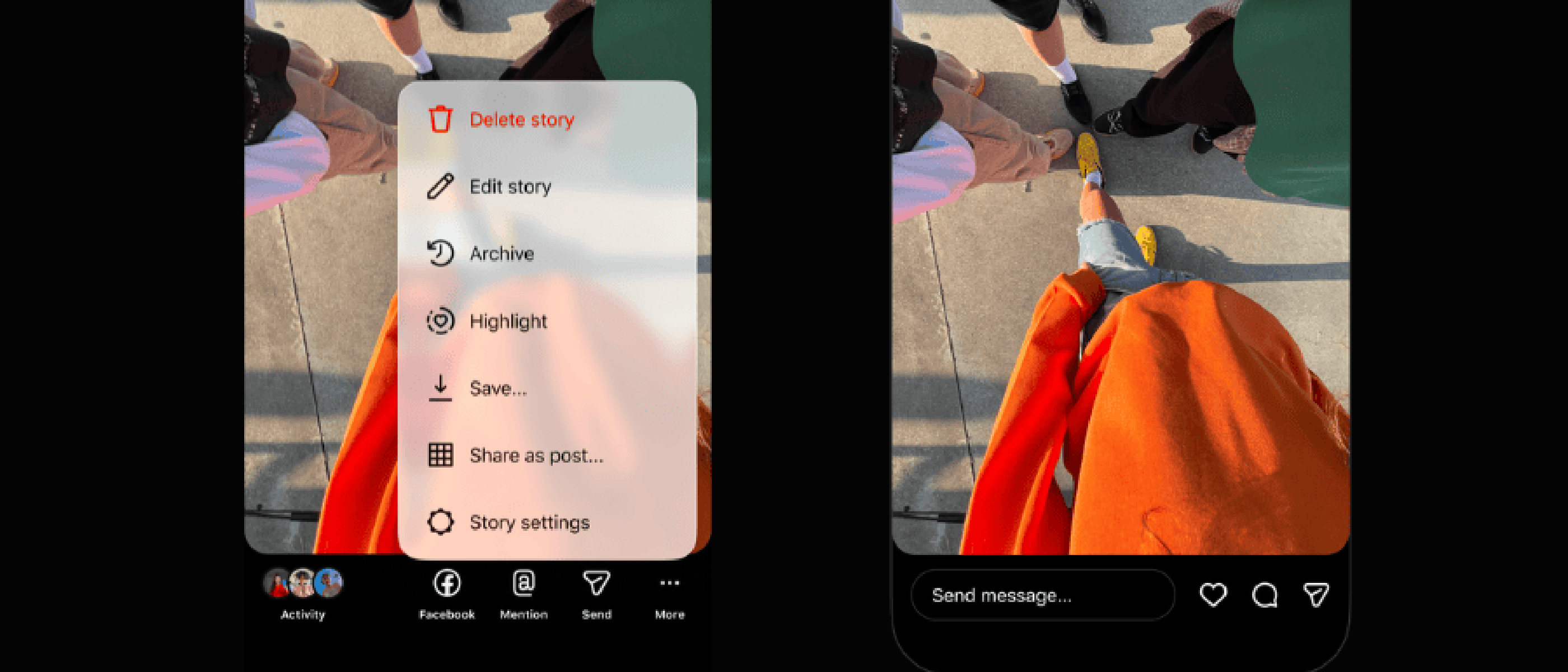
- Open the Story you wish to modify.
- Tap the three‑dot menu in the bottom‑right corner.
- Choose Edit from the pop‑up menu.
- Adjust any of the following elements:
- Text: Change wording, font, or color.
- Music: Swap the track or adjust the start point.
- Stickers: Add, remove, or reposition.
- Drawings: Edit brush strokes or erase sections.
- Tap Save; the changes propagate instantly to viewers who have not yet exited the Story.
The full workflow, including edge‑case handling (e.g., what happens when the 15‑minute window expires), is detailed in the original Verge article.
Frequently Asked Questions
Q: Can I edit a Story after the 15‑minute window? A: No. Once the window closes, the Story becomes immutable. You would need to delete and repost if further changes are required.
Q: Does editing affect the Story’s expiration time? A: The 24‑hour lifespan remains unchanged. Editing does not reset the timer.
Q: Will edited Stories appear as “Edited” to viewers? A: No visual indicator is shown. The experience mirrors a seamless update, preserving the original aesthetic.
Q: Are there any limits on how many times I can edit within the window? A: Instagram has not disclosed a hard limit, but excessive rapid edits may trigger rate‑limiting to prevent abuse.
Q: How does this feature impact analytics for business accounts? A: All existing metrics (impressions, taps forward, swipe‑away) stay attached to the original Story ID, ensuring continuity in performance reports.
Conclusion
Instagram’s 15‑minute post‑publish edit window marks a subtle yet powerful evolution in the way fleeting content is managed. By separating mutable metadata from immutable media assets, the platform preserves crucial engagement signals while granting creators the flexibility they have long demanded. The technical solution—layered metadata, versioned edge caching, and robust audit logging—demonstrates a mature approach to balancing user experience with security and moderation needs.
As social platforms continue to blur the line between real‑time communication and polished content creation, features like this set a new baseline for what users expect from their favorite apps. Whether Instagram expands the window, introduces collaborative editing, or integrates AI‑driven suggestions, the
whether Instagram expands the window, introduces collaborative editing, or integrates AI‑driven suggestions, the platform has set a precedent for how ephemeral content can be both flexible and reliable. As other social networks observe Instagram’s approach, we can expect a wave of similar edit‑first designs, pushing the industry toward more forgiving, creator‑centric experiences.
For now, creators can breathe easier, knowing a quick typo fix won’t erase the hard‑won engagement they’ve earned, and developers have a concrete example of how to decouple mutable metadata from immutable media assets without compromising performance or security.
Key Takeaways for Creators and Developers
- Immutable IDs, mutable overlays: Instagram keeps the underlying media file static while allowing JSON‑based overlays (text, stickers, music, drawings) to be rewritten.
- Versioned edge caching: A short‑lived cache key ensures viewers always see the latest overlay without re‑fetching the video or image.
- Engagement continuity: Because view, like, and reply counters are tied to the immutable Story ID, they survive any metadata edit.
- Security first: Every edit passes through the same AI‑driven moderation pipeline as new uploads, and an audit log preserves a tamper‑evident history.
- Developer implications: Any third‑party tools that interact with Instagram Stories (e.g., analytics dashboards or scheduling services) should query the Story’s metadata endpoint rather than assuming the media file changes on edit.
Additional Frequently Asked Questions
Q: Can I edit a Live Photo Story? A: Yes. Live Photo Stories are treated like regular image Stories; you can edit text, stickers, and drawings within the 15‑minute window, but you cannot replace the Live Photo itself.
Q: Will edited Stories show up differently in the “Seen By” list? A: No. The list of viewers remains unchanged because the Story’s immutable ID does not change. Viewers who have already seen the Story will see the updated overlay the next time they open it.
Q: How does this affect third‑party analytics platforms? A: Platforms that track Story performance should rely on the Story ID for aggregation. Since the ID persists across edits, metrics remain accurate, but they may need to refresh overlay metadata to reflect the latest state.
Q: Is there a way to revert an edit before the window expires? A: Instagram does not provide a “undo” button. However, you can re‑enter the edit mode and manually restore the previous text, stickers, or drawing layers before saving.
Q: Will the edit token be visible to end users? A: No. The edit token is an internal mechanism used by the app to detect changes; it is not exposed in the UI.
With the edit window now live, Instagram demonstrates that even the most fleeting forms of social media can evolve to meet creator needs without sacrificing the integrity of the platform’s core engagement signals. The balance of flexibility, security, and performance embodied in this rollout will likely become a benchmark for future feature releases across the social‑media landscape.
Source: Original Article