




Introduction to Instagram for TV
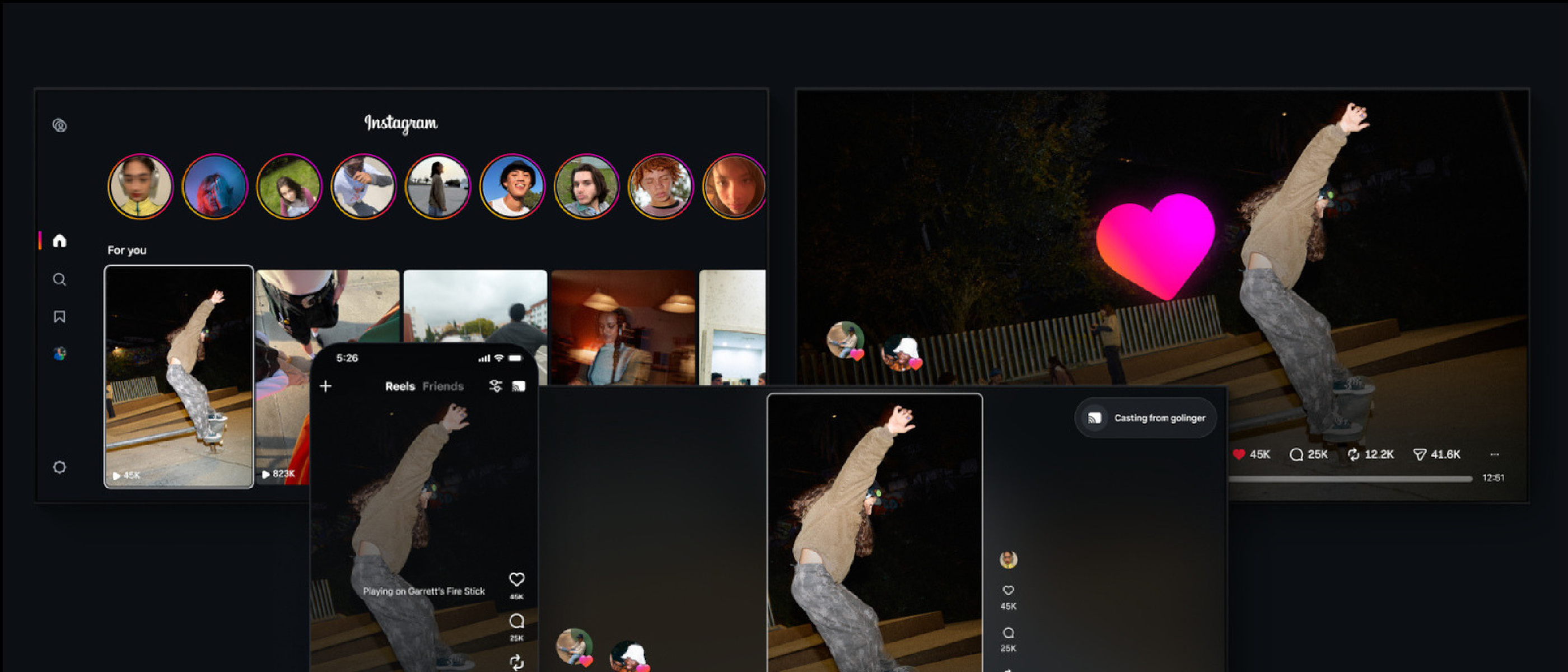
Instagram, a social media platform owned by Meta, has been steadily expanding its features and reach across various devices. The latest development in this regard is the availability of the Instagram for TV app on Samsung TVs in the US. This move follows the app’s initial launch on Amazon Fire TV devices in December and its subsequent rollout on Google TVs in February. The Instagram for TV app is designed to provide users with a unique experience, allowing them to watch reels and stories on a bigger screen, making it ideal for shared viewing experiences with friends and family.
Key Features of the Instagram for TV App
The Instagram for TV app comes with several features that enhance the user experience:
- It groups reels into channels based on different topics such as music, sports, and travel, making it easier for users to find content that aligns with their interests or the interests of their viewing group.
- Users can watch stories from friends and creators directly on their TV, further integrating the Instagram experience into a shared environment.
- The app is built around reels, which are short, engaging videos that have become a cornerstone of the Instagram platform.
Technical Aspects of the Instagram for TV App
From a technical standpoint, the development and deployment of the Instagram for TV app involve several key considerations:
App Development
The app’s development would have required careful planning to ensure a seamless user experience across different TV platforms. This includes optimizing video playback, ensuring smooth navigation, and integrating the app with the TV’s operating system.
Content Optimization
For the app to provide an enjoyable viewing experience, Instagram would have had to optimize its content for larger screens. This includes not just the video content itself but also the user interface elements, such as text, icons, and buttons, which need to be clearly visible and easy to navigate using a TV remote.
Platform Compatibility
Ensuring the app’s compatibility across different TV platforms (e.g., Samsung TVs, Amazon Fire TV, Google TV) is crucial. Each platform may have its own set of APIs, screen resolutions, and system requirements that the app must accommodate to function properly.
Experimental Features and Future Developments
Instagram is continuously working to enhance the TV app experience. Two experimental features currently being tested are:
- The ability to cast Reels from a user’s phone or videos from the Saved tab directly to their TV. This feature would significantly expand the content available for viewing on the TV app, allowing users to share a broader range of videos with others.
- A dedicated home for horizontal videos. This feature acknowledges the difference in viewing experience between mobile devices and TVs, where horizontal videos are often more enjoyable and better suited for shared viewing.
Additionally, Instagram is exploring the development of more formats tailored for a bigger screen and communal viewing. This includes:
- Long-form videos that provide more in-depth content, allowing creators to delve deeper into topics and stories.
- Episodic series designed specifically for TV viewing, which could open up new storytelling possibilities and engagement strategies for creators.
- Livestreams on TV, which would bring real-time content to the platform, offering opportunities for interactive experiences, live events, and more.
Impact on User Behavior and Content Creation
The availability of the Instagram for TV app and its evolving features are likely to influence both user behavior and content creation strategies on the platform:
- Shared Viewing Experiences: The app encourages shared viewing experiences, which could lead to new forms of engagement and interaction among users. This might include watching and discussing content together, sharing reactions, and participating in live streams.
- Content Diversity: As creators produce more content specifically designed for TV viewing, there could be a shift towards more diverse and complex storytelling on the platform. This includes longer-form videos, series, and interactive content tailored for a bigger screen.
- Monetization Opportunities: The expansion of Instagram’s features and reach could also introduce new monetization opportunities for creators, such as through ads in long-form content, sponsorships, and merchandise sales during live streams.
Challenges and Considerations
While the Instagram for TV app presents exciting opportunities, there are also challenges and considerations that Instagram and its users must address:
- Content Quality and Appropriateness: Ensuring that content is of high quality and appropriate for a shared viewing environment is crucial. This might require more stringent moderation and guidelines for creators.
- User Privacy and Data Security: As with any expansion of a social media platform, there are concerns about user privacy and data security. Instagram must ensure that user data is protected and that the app complies with relevant regulations.
- Competition and Market Trends: The social media and streaming markets are highly competitive. Instagram must stay ahead of trends and competitors to maintain user engagement and attract new users to its TV app.
Frequently Asked Questions (FAQ)
What devices is the Instagram for TV app available on?
The Instagram for TV app is currently available on Samsung TVs in the US, in addition to Amazon Fire TV devices and Google TVs.
Can I watch stories on the Instagram for TV app?
Yes, the app allows you to watch stories from friends and creators directly on your TV.
Are there any new features being tested for the Instagram for TV app?
Yes, Instagram is testing features such as casting Reels from your phone to your TV and a dedicated home for horizontal videos.
Is the Instagram for TV app free to use?
Yes, the app is free to use, but it requires an Instagram account.
Can I create content specifically for the Instagram for TV app?
Instagram is working on allowing creators to make and post long-form videos and episodic series for TV viewing, but these features are still in development.
Conclusion
The launch of the Instagram for TV app on Samsung TVs in the US marks a significant step in Instagram’s expansion into the living room. With its focus on shared viewing experiences, diverse content offerings, and experimental features, the app has the potential to redefine how we consume social media content. As Instagram continues to evolve and introduce new features, it will be interesting to see how users and creators adapt to these changes and how they impact the broader social media landscape.