





Introduction to Google Calendar’s Color Options Expansion
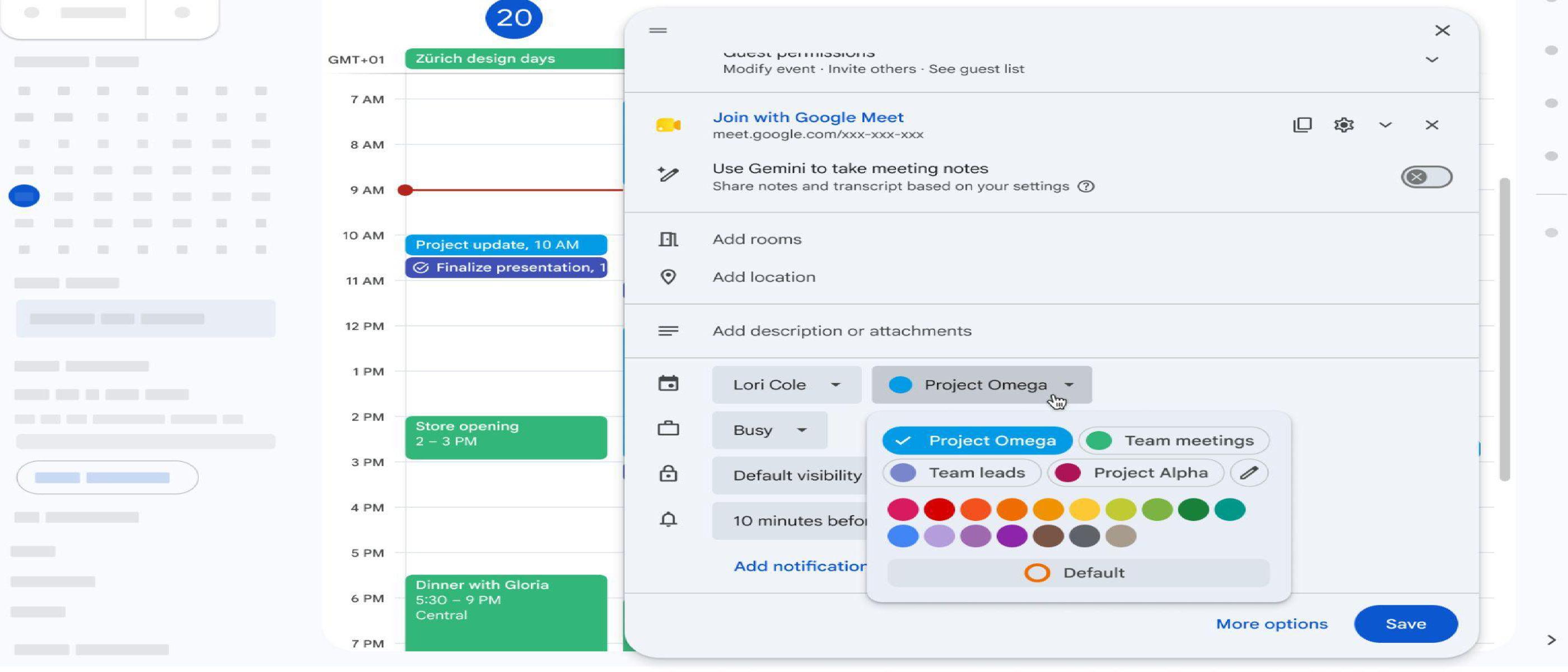
Google Calendar has been a staple in the world of digital calendars, offering users a robust platform to manage their schedules, events, and appointments. One of the key features that have made Google Calendar so popular is its ability to allow users to customize their events with different colors. However, until recently, users were limited to a mere 11 predefined colors. This limitation often led to a lack of creativity and flexibility in event planning and organization. Fortunately, Google has now expanded the color options for events in Google Calendar, providing users with access to up to 200 custom colors.
The Need for Expanded Color Options
The need for expanded color options in Google Calendar arose from the limitations of the previous system. With only 11 predefined colors available, users often found themselves struggling to differentiate between various events and appointments. This was particularly challenging for individuals who had complex schedules or managed multiple calendars. The lack of color options made it difficult to visualize and organize events, leading to a less-than-ideal user experience.
Benefits of Expanded Color Options
The expansion of color options in Google Calendar brings numerous benefits to users. Some of the most significant advantages include:
- Improved organization: With up to 200 custom colors available, users can now assign specific colors to different types of events, making it easier to visualize and manage their schedules.
- Enhanced personalization: The increased color options allow users to personalize their calendars, making them more engaging and enjoyable to use.
- Better differentiation: The expanded color palette enables users to differentiate between various events and appointments, reducing confusion and improving overall productivity.
Technical Details of the Color Options Expansion
The expansion of color options in Google Calendar is a result of significant updates to the platform’s underlying architecture. Some of the key technical details of this expansion include:
- Color Palette: The new color palette consists of up to 200 custom colors, which are available across the native Calendar web and mobile apps, as well as the Calendar API.
- Color Assignment: Users can assign specific colors to individual events, allowing for a high degree of customization and personalization.
- Color Consistency: The expanded color options ensure consistency across all platforms, providing a seamless user experience regardless of the device or platform used to access Google Calendar.
Integration with Other Google Apps
The expanded color options in Google Calendar also integrate seamlessly with other Google apps, such as Google Drive and Google Docs. This integration enables users to create a cohesive and personalized experience across all their Google apps. For example:
- Google Drive: Users can assign specific colors to folders and files in Google Drive, making it easier to organize and manage their documents and files.
- Google Docs: The expanded color options can also be used in Google Docs, allowing users to create visually appealing and personalized documents.
Impact on User Experience
The expansion of color options in Google Calendar has a significant impact on the user experience. Some of the key ways in which this update improves the user experience include:
- Simplified Event Management: The increased color options make it easier for users to manage their events and appointments, reducing confusion and improving overall productivity.
- Enhanced Visual Appeal: The expanded color palette adds a touch of personality to the calendar, making it more engaging and enjoyable to use.
- Improved Accessibility: The increased color options can also improve accessibility for users with visual impairments, as they can assign specific colors to events and appointments that are easier to distinguish.
User Feedback and Response
The response from users to the expanded color options has been overwhelmingly positive. Many users have praised the update, citing the improved organization and personalization options as significant benefits. Some users have also requested additional features, such as the ability to assign custom colors to specific calendars or events.
Best Practices for Using the Expanded Color Options
To get the most out of the expanded color options in Google Calendar, users should follow some best practices:
- Assign Meaningful Colors: Assign specific colors to different types of events or appointments, making it easier to visualize and manage your schedule.
- Use Consistent Colors: Use consistent colors across all your Google apps to create a cohesive and personalized experience.
- Experiment with Different Colors: Don’t be afraid to experiment with different colors and combinations to find what works best for you.
Tips for Power Users
For power users, the expanded color options in Google Calendar offer a range of advanced features and capabilities. Some tips for power users include:
- Using Color-Coded Calendars: Use color-coded calendars to manage multiple schedules or events, making it easier to visualize and manage complex schedules.
- Assigning Custom Colors to Events: Assign custom colors to specific events or appointments, making it easier to differentiate between various events and appointments.
- Integrating with Other Google Apps: Integrate the expanded color options with other Google apps, such as Google Drive and Google Docs, to create a seamless and personalized experience.
Frequently Asked Questions
Q: How many custom colors are available in Google Calendar?
A: Up to 200 custom colors are available in Google Calendar, across the native Calendar web and mobile apps, as well as the Calendar API.
Q: Can I assign custom colors to specific calendars or events?
A: Yes, users can assign custom colors to individual events, but not to specific calendars.
Q: Are the expanded color options available on all platforms?
A: Yes, the expanded color options are available across all platforms, including the native Calendar web and mobile apps, as well as the Calendar API.
Q: Can I use the expanded color options with other Google apps?
A: Yes, the expanded color options integrate seamlessly with other Google apps, such as Google Drive and Google Docs.
Q: How do I access the expanded color options in Google Calendar?
A: The expanded color options are available by default in Google Calendar, and can be accessed by creating a new event or editing an existing one.
Conclusion
The expansion of color options in Google Calendar is a significant update that improves the user experience and provides a range of benefits, including improved organization, enhanced personalization, and better differentiation between events and appointments. With up to 200 custom colors available, users can now create a personalized and engaging calendar that meets their unique needs and preferences. Whether you’re a casual user or a power user, the expanded color options in Google Calendar are sure to enhance your productivity and overall experience.