





What Is the Hidden Siri Popover?
Apple’s macOS 27 Golden Gate beta has quietly introduced a new, lightweight interface that brings Siri’s AI capabilities directly into the desktop environment. Unlike the traditional voice‑activated assistant, this popover appears as a small, context‑aware window that can be summoned from any application. It is designed to surface writing tools, contextual actions, and quick‑access commands without leaving the current workflow.
The feature is currently disabled by default in both the developer beta 3 and public beta 1 releases. Only a handful of testers, mainly on the r/MacOSBeta subreddit, have discovered how to toggle it on via a private feature flag. The popover’s UI is still a work in progress, with some actions not responding and inconsistent behavior across apps. Whether Apple will ship it in the final macOS 27 release remains uncertain.
How to Enable the Feature
Enabling the popover is a two‑step process that involves creating a feature‑flag directory and writing a defaults command. The commands must be run with sudo privileges.
# Create the feature flag directory
sudo mkdir -p /Library/Preferences/Feature\ Flags/Domain

# Enable the lightweight UI
sudo defaults write /Library/Preferences/Feature\ Flags/Domain/Writing\ Tools\ Lightweight\ UI_mac\ OS -dict Enabled -bool true
To disable it, simply flip the boolean:
sudo defaults write /Library/Preferences/Feature\ Flags/Domain/Writing\ Tools\ Lightweight\ UI_mac\ OS -dict Enabled -bool falseAfter executing the command, a system restart is recommended to ensure the flag takes effect. Once enabled, the popover can be summoned by clicking the Siri icon in the menu bar or by using a keyboard shortcut (if Apple later exposes one).
Feature Breakdown: Writing Tools & Contextual Actions
The popover is more than a simple voice prompt; it aggregates a suite of AI‑powered utilities that streamline common tasks. Below is a detailed look at the available actions:
Writing Tools
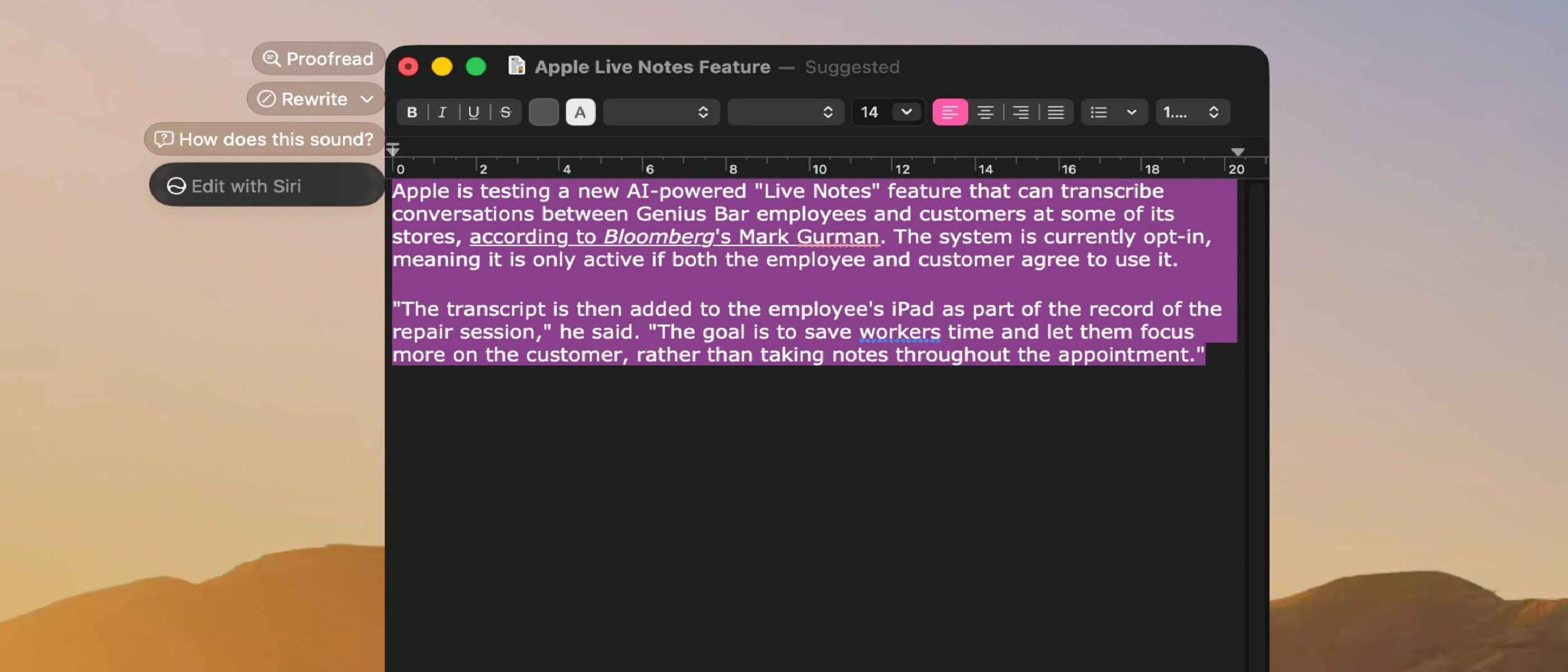
- Rewrite – Rephrase selected text for clarity or tone.
- Proofread – Detect grammar, punctuation, and style issues.
- “How does this sound?” – Get a quick read‑through of a paragraph.
- “Edit with Siri” – Open the selected text in a dedicated editor for deeper manipulation.
Contextual Actions
- Creating key points – Summarize long passages into bullet points.
- Summarizing text – Condense articles or emails into a concise overview.
- Adding contact details – Auto‑populate a contact card from a name or email address.
- Composing a message or email – Draft a new email or message directly from the popover.
Integration with Other Services
- Creating a calendar event – Add events to the user’s calendar with minimal input.
- Showing a location in Maps – Open a location in Apple Maps with a single click.
- Tracking flights – Pull flight status and gate information.
- Tracking packages – Retrieve shipment updates from supported carriers.
These actions are accessed via a simple menu within the popover, and many can be triggered with a single tap. The UI is intentionally lightweight to avoid disrupting the user’s focus.
Why It Matters for Power Users
Productivity Gains
For writers, developers, and business professionals, the popover offers a “second brain” that can handle repetitive tasks. By reducing the need to switch between applications, users can maintain context and speed. For example, a copywriter can rewrite a paragraph on the fly, while a project manager can add a new calendar event without leaving the document they’re editing.
Seamless AI Integration
Apple’s approach to AI has historically been conservative, focusing on privacy and on‑device processing. This popover demonstrates a shift toward more integrated, AI‑driven workflows that still respect user data. It aligns with Apple’s broader strategy of embedding AI into everyday tools, similar to the recent enhancements in Apple Wallet Insights and the new iCloud backup features for WhatsApp.
Competitive Edge
By offering a native, AI‑powered assistant that works across the OS, Apple positions itself against competitors like Google Assistant and Microsoft Cortana. The popover’s contextual awareness could become a differentiator for macOS, especially as developers build extensions that tap into the same feature flag.
Current Limitations & Future Outlook
Incomplete Functionality
Early reports from the r/MacOSBeta community indicate that not all actions are fully functional. Some commands return “not supported” errors, suggesting that the underlying APIs are still under development. The UI also exhibits inconsistent behavior when used in non‑Apple applications, hinting at compatibility issues.
Hidden Feature Flag
Because the feature is toggled via a private flag, it is not exposed in System Preferences. This limits adoption to power users and beta testers. Apple may choose to expose a more user‑friendly toggle in a future release, but that remains speculative.
Potential for Expansion
If Apple decides to ship the popover, we can expect incremental updates that expand the action set. Possible future additions include:
- Advanced natural language queries – Letting users ask complex questions directly from the popover.
- Cross‑app scripting – Enabling the popover to trigger AppleScript or Shortcuts actions.
- Deeper integration with third‑party services – Such as Slack, Trello, or Notion.
The feature’s success will likely hinge on how well Apple can balance privacy, performance, and usability.
Conclusion
Apple’s hidden Siri popover in macOS 27 beta represents a bold experiment in AI‑driven productivity. While still in its infancy, the feature showcases how a lightweight, context‑aware interface can streamline writing, scheduling, and information retrieval. Power users who are comfortable with terminal commands can enable the popover today and start exploring its capabilities. Whether Apple will ship it in the final release remains to be seen, but the groundwork laid by this beta could shape the future of macOS assistants.
For those interested in how Apple is evolving its AI ecosystem, you might also explore recent posts on Apple Wallet Insights and the broader impact of AI on productivity. If security concerns arise, the Mac Antivirus Intego One article offers guidance on protecting your system while experimenting with beta features. Finally, the legacy of Apple’s hardware ambitions can be traced back to the Apple Shelved Mac Pro Prototypes story, illustrating the company’s willingness to push boundaries.
As macOS 27 approaches its final release, keep an eye on how Apple refines this popover. It could become a staple of the macOS experience, redefining how users interact with AI on the desktop.
FAQ
Q: Is the popover safe to use?
A: The feature is still in beta and may contain bugs. Use it at your own risk and keep your system backed up.
Q: Can I use the popover on non‑Apple apps?
A: Currently, functionality is limited in third‑party applications. Apple may improve compatibility in future updates.
Q: Will the popover be available in the App Store?
A: No, it is a system feature toggled via a private flag. It will not be distributed as a separate app.
Q: How does this differ from Siri on iOS?
A: The macOS popover focuses on text editing and contextual actions, whereas iOS Siri is primarily voice‑driven and app‑specific.
Q: Can I disable the popover after enabling it?
A: Yes, run the disable command in Terminal and restart your Mac.
Source: Original Article