Overview of the Refresh
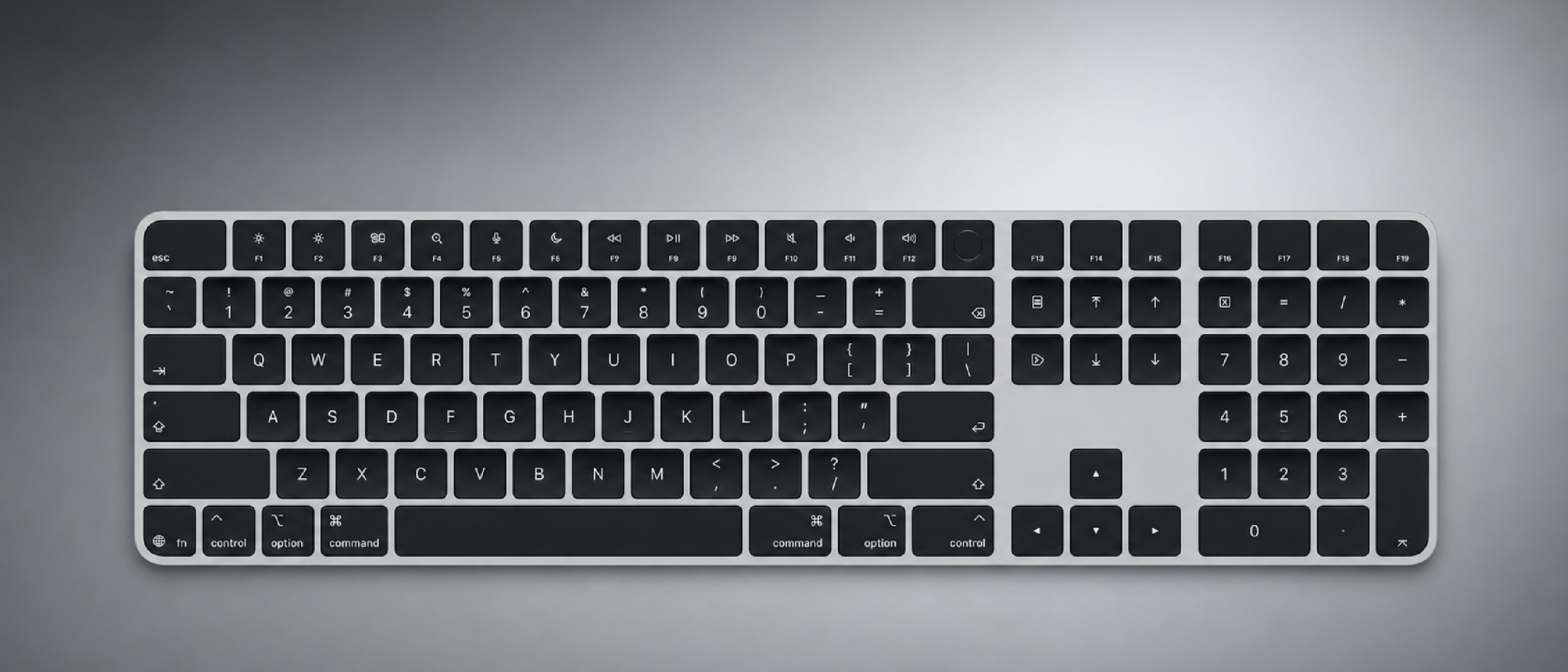
Apple’s accessory division has a reputation for subtle, incremental upgrades that often go unnoticed until users compare the new hardware side‑by‑side with the previous generation. The latest tweak follows that tradition: all U.S. English variants of the Magic Keyboard family now feature glyph‑based key labeling on the Tab, Caps Lock, Shift, Return, and Delete keys. The change also extends to the numeric‑keypad models, where Home, Page Up, Page Down, End, Clear, and Enter receive glyphs instead of printed text.
The shift from text to symbols aligns the U.S. layout with the British English and broader European models, which have already employed glyphs for years. By standardizing the visual language across regions, Apple removes a long‑standing inconsistency that occasionally confused users who switched between keyboards purchased in different markets.
Four models receive the update:
- Magic Keyboard (base)
- Magic Keyboard with Touch ID
- Magic Keyboard with Touch ID + Numeric Keypad (white keys)
- Magic Keyboard with Touch ID + Numeric Keypad (black keys)
The only U.S. English model left untouched is the Magic Keyboard with Numeric Keypad (no Touch ID), which retains the legacy text labels.
“On the new keyboards, the tab, caps lock, shift, return, and delete keycaps are labeled with glyphs rather than edge text.”
“The one U.S. English model Apple has not refreshed is the Magic Keyboard with Numeric Keypad, which lacks Touch ID and continues to use text labels on the same keys.”
Apple’s decision mirrors a similar glyph rollout earlier this year on its MacBook Air, MacBook Pro, and the newly announced MacBook Neo (if referenced separately). The consistency across laptops and peripherals suggests a broader design language strategy rather than a mere cosmetic refresh.
Technical Breakdown of the Glyph Change
Glyph Design and Manufacturing
- Laser‑etched vs. printed legends: Apple’s previous text‑based legends were typically laser‑etched into the keycap surface. Glyphs are also laser‑etched but use a simplified icon set that can be reproduced with higher precision, reducing the risk of wear over time.
- Material considerations: The keycaps remain made from the same high‑grade ABS plastic, ensuring tactile consistency. The glyphs are shallow enough to avoid altering key travel while still being visible under most lighting conditions.
- Color contrast: Glyphs are rendered in a subtle matte finish that contrasts with the matte‑white or matte‑black keycaps, improving legibility without the glossy sheen that can cause glare.
Impact on Firmware and Software
Apple’s keyboards are essentially “dumb” peripherals; they rely on the host operating system to interpret key presses. The glyph change does not require firmware updates because the underlying scancodes for Tab, Caps Lock, Shift, Return, Delete, and the numeric‑keypad navigation keys remain unchanged. macOS already maps these scancodes to the appropriate functions regardless of the visual label.
However, the visual shift does affect accessibility tools that read key legends for visually impaired users. Apple’s VoiceOver and third‑party screen‑reader software reference the functional name of the key, not the printed label, so the transition is seamless from an accessibility standpoint.
Compatibility with Existing Accessories
- Keycap replacement kits: Users who prefer the old text labels can still purchase third‑party replacement keycaps. The new glyph layout does not alter the underlying keycap dimensions, preserving compatibility.
- External keyboards: The glyph standard now matches Apple’s own external keyboards (e.g., the Magic Keyboard for iPad), simplifying cross‑device usage for professionals who toggle between a Mac and an iPad.
Why It Matters to End Users
Faster Muscle Memory Development
Glyphs are universally recognized symbols: the ⎋ for Escape, the ⇧ for Shift, the ↩ for Return, etc. By adopting these icons, Apple reduces the cognitive load for new users—especially those transitioning from Windows or Linux environments where glyphs are the norm. This can shorten the learning curve and improve typing efficiency.
Consistency Across Devices
Apple’s ecosystem thrives on a seamless experience. A user who owns a MacBook Pro, an iPad Pro with the Magic Keyboard, and a desktop Magic Keyboard now sees the same visual language on every device. This uniformity reinforces brand identity and reduces the chance of accidental key presses caused by mismatched labeling.
Aesthetic Cohesion
Design enthusiasts have long criticized the “text‑on‑edge” look of the U.S. Magic Keyboard, which felt out of step with the sleek minimalism of Apple’s other products. Glyphs restore the clean, border‑less appearance that Apple’s design language champions, making the keyboards more visually appealing on a clean desk setup.
Potential Accessibility Benefits
While the functional mapping remains unchanged, the glyphs can aid users with dyslexia or other reading challenges, as symbols are often processed more quickly than text. Moreover, the high‑contrast glyphs can be easier to locate in low‑light environments, a subtle but meaningful improvement for night‑time coders.
Industry Impact and Competitor Landscape
Setting a New Baseline for Keyboard Design
Apple’s move may pressure other peripheral manufacturers to reconsider their own labeling conventions. Companies like Logitech, Microsoft, and Keychron already use glyphs on many of their models, but a high‑profile endorsement from Apple could accelerate the industry’s shift away from text‑heavy keycaps.
Implications for Enterprise Procurement
Enterprises that standardize on Apple hardware often purchase accessories in bulk. The glyph‑only U.S. models simplify inventory management: a single SKU can serve multiple regions without the need to track separate text‑label variants. This could lower total cost of ownership (TCO) for corporate buyers.
Influence on Software UI Design
Developers building macOS applications may feel encouraged to adopt more icon‑centric shortcuts in their UI, knowing that the hardware now presents those icons natively. This could lead to a subtle but measurable shift in how shortcut hints are displayed in menus and tooltips.
Related Apple Ecosystem Articles
- Apple’s hardware roadmap continues to be discussed in depth in the article about the Apple 7‑Inch Smart Home Display Confirmed for 2024 , which highlights Apple’s commitment to cohesive design across product categories.
- Security considerations for Mac peripherals are explored in Mac Antivirus Intego One , underscoring the importance of trusted hardware in a secure ecosystem.
- Connectivity and peripheral performance are examined in Starlink Mini Home Use: Costs, Speed & What’s Next , offering context on how reliable internet can enhance the experience of cloud‑based keyboard shortcuts and remote work.
Future Outlook and Potential Follow‑Ups
Expansion to Other Layouts
While the glyph update targets U.S. English layouts, Apple may eventually roll it out to other language variants that still rely on text labels (e.g., certain Asian or Latin‑American layouts). A universal glyph set could become a global standard for Apple keyboards.
Integration with Touch ID and Future Authentication
The Touch ID‑enabled keyboards already combine biometric security with typing. Future revisions might embed dynamic glyphs that change based on user profiles or security states—imagine a lock icon appearing on the Return key when the device is locked.
Possible Firmware Enhancements
Although the current change is purely visual, Apple could leverage the next hardware revision to introduce customizable key legends via software, allowing users to assign personal icons to frequently used shortcuts—a feature that would directly compete with programmable keyboards from other manufacturers.
Environmental Considerations
Apple’s commitment to recycled aluminum and low‑carbon manufacturing extends to its accessories. By standardizing keycap designs, the company can streamline production lines, potentially reducing waste and energy consumption—a point worth monitoring as Apple reports its environmental impact in future sustainability reports.
Frequently Asked Questions
Q1: Do the glyphs affect key functionality in any way?
A: No. The underlying scancodes remain identical; only the visual legend changes.
Q2: Will existing Magic Keyboard owners receive a firmware update to display glyphs?
A: Not required. The change is purely physical; firmware remains unchanged.
Q3: Can I still purchase a U.S. Magic Keyboard with text labels?
A: The current lineup only ships with glyphs for the refreshed models. Third‑party keycap sets are still available for those who prefer text.
Q4: Are the glyphs the same across all Apple keyboards?
A: Yes. Apple uses a consistent set of icons for Tab, Caps Lock, Shift, Return, Delete, and numeric‑keypad navigation keys across its laptop and desktop keyboards.
Q5: Does this update impact pricing?
A: Apple has not announced any price changes related to the glyph refresh.
Conclusion
Apple’s decision to replace text labels with glyphs on its U.S. English Magic Keyboard lineup may appear modest, but it reflects a strategic push toward visual uniformity, user‑centric design, and ecosystem cohesion. By aligning the keyboard’s appearance with its global counterparts and recent laptop updates, Apple eliminates a long‑standing inconsistency that has puzzled both newcomers and seasoned Mac users. The move also sets a subtle benchmark for the broader peripheral market, nudging competitors toward cleaner, icon‑first keycap designs
Final Thoughts
Apple’s subtle refresh underscores how even the smallest visual tweaks can ripple through an entire ecosystem. By unifying the look of its keyboards with the rest of its hardware, the company not only tightens its design language but also removes a lingering source of confusion for users who switch between regional layouts. The decision to keep the underlying hardware unchanged means that the upgrade is essentially cost‑neutral for Apple, while delivering a perceptible improvement in both aesthetics and usability.
From a market perspective, the move may accelerate a broader industry trend toward icon‑centric keycaps. As more manufacturers adopt similar designs, users can expect a more consistent experience across different brands and form factors—something that has long been a hallmark of Apple’s approach to hardware integration.
What to Watch For
- Rollout to Additional Languages – Future updates could see the same glyph set applied to non‑U.S. English layouts that still rely on text, further homogenizing Apple’s peripheral lineup.
- Customizable Legends – Rumors suggest Apple is exploring software‑driven key‑cap personalization, which could eventually let users assign their own icons to frequently used shortcuts.
- Sustainability Metrics – With a streamlined production process, Apple may highlight reductions in material waste and energy consumption in upcoming environmental reports.
Key Takeaways
- The U.S. English Magic Keyboard family now uses glyphs on the most commonly used modifier and navigation keys.
- Only the non‑Touch ID numeric‑keypad model retains the legacy text labels.
- The visual change is purely cosmetic; functionality, firmware, and compatibility remain unchanged.
- Consistency with MacBook laptops and iPad accessories strengthens Apple’s ecosystem cohesion.
- The update could influence peripheral design standards across the broader market.
Additional Frequently Asked Questions
Q6: Will the glyphs be backlit on models that support keyboard illumination?
A: Yes. On the Magic Keyboard with Touch ID, the glyphs are illuminated in the same manner as the rest of the keycaps when the backlight is enabled.
Q7: Are there any plans to introduce new glyphs for function keys or media controls?
A: Apple has not announced any changes to the function‑key legends. Historically, those keys have retained their standard text labels across all regions.
Q8: How does this change affect third‑party keyboard mapping software?
A: Since the scancodes are unchanged, mapping tools such as Karabiner‑Elements or BetterTouchTool continue to operate without any adjustments.
Q9: Can the glyphs be customized via macOS settings?
A: Currently, macOS does not provide an option to alter the physical legends on the keyboard. Any visual customization would need to rely on external key‑cap replacements.
Q10: Will the new glyph‑based keyboards be available in the same price tier as the previous models?
A: Apple has not indicated any price adjustments tied specifically to the glyph update; the keyboards are expected to ship at the same MSRP as their predecessors.
With the glyph refresh now live, users can enjoy a cleaner, more universally recognizable keyboard layout without sacrificing the tactile feel that has made the Magic Keyboard a staple of the Mac ecosystem. Whether you’re a long‑time Mac veteran or a newcomer setting up your first workstation, the updated key legends should make the transition smoother and the overall experience a little more polished.
Source: Original Article