



Why the New Additions Matter for Creators
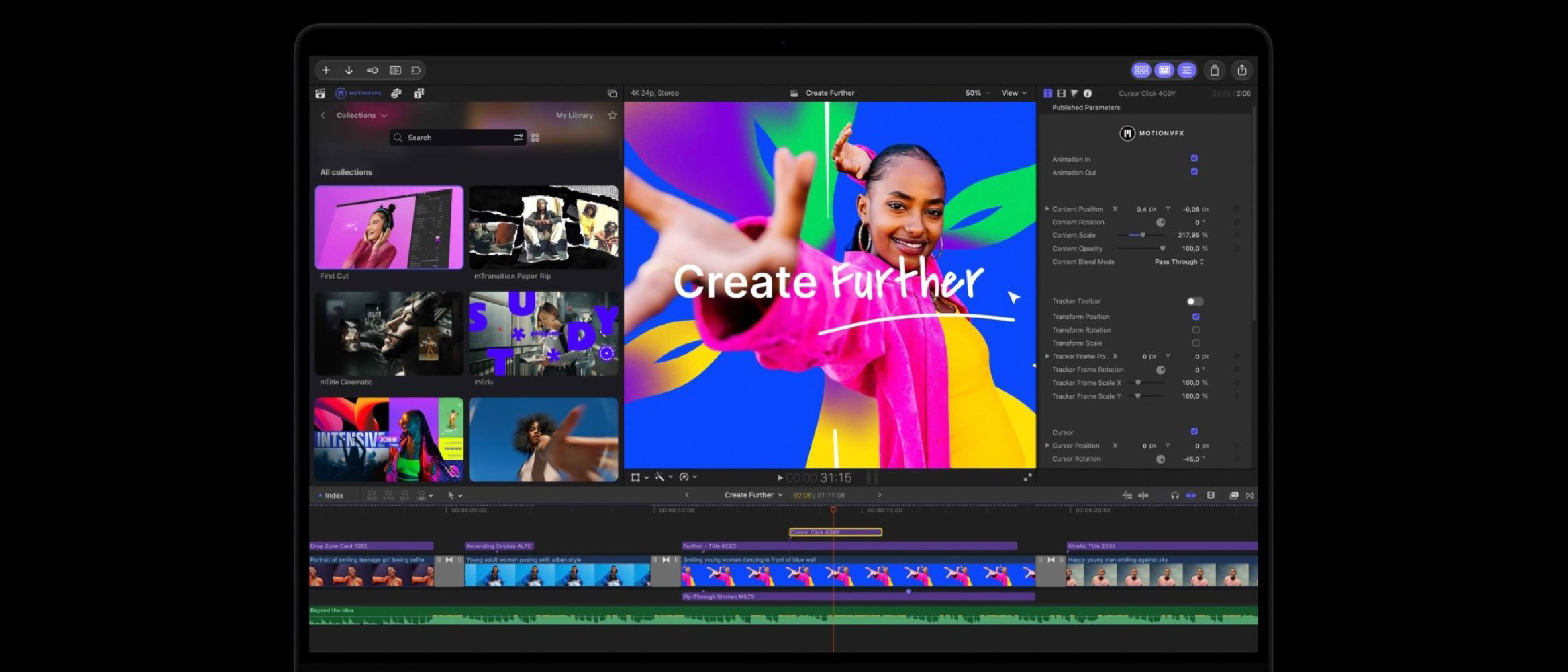
Apple’s Creator Studio has long been positioned as a hub for professional‑grade media production on macOS. By integrating MotionVFX—a suite of motion‑graphics templates and effects—directly into the platform, Apple removes a friction point that previously required creators to purchase and manage third‑party plugins separately. The same logic applies to the fresh Pixelmator Pro capabilities, which extend the studio’s raster‑editing toolbox without forcing users to switch to a different application.
Key implications include:
- Streamlined workflow: Artists can now drag‑and‑drop MotionVFX assets inside Final Cut Pro (FCP) without leaving the timeline, preserving context and reducing render‑time overhead.
- Cost efficiency: Bundling these tools under the Creator Studio umbrella means a single subscription can cover multiple high‑value utilities, a compelling proposition for freelancers and small studios.
- Creative parity: Independent creators gain access to effects that were once the domain of high‑budget post‑production houses, leveling the playing field.
The move also aligns with Apple’s broader strategy of building an end‑to‑end ecosystem that rivals Adobe’s Creative Cloud, where each component is tightly integrated and optimized for Apple silicon.
Technical Breakdown of MotionVFX Integration
MotionVFX has built a reputation for delivering lightweight, GPU‑accelerated motion‑graphics packs that work seamlessly with Final Cut Pro. The integration within Creator Studio introduces several technical enhancements:
Native Library Loading MotionVFX assets are now stored in a dedicated library that Final Cut Pro accesses via Apple’s Unified Media Framework. This eliminates the need for third‑party plugin wrappers, reducing CPU load and memory fragmentation.
Real‑Time Rendering on Apple Silicon Leveraging the M2 and M3 chipsets’ Neural Engine, MotionVFX effects can be previewed at 60 fps even when using complex particle simulations. The rendering pipeline utilizes Metal’s compute shaders, ensuring minimal latency.
Dynamic Parameter Controls Creators can adjust keyframe‑driven parameters (e.g., speed, opacity, color) directly in the inspector panel. These controls are exposed through a new “MotionVFX” tab that mirrors the native FCP UI conventions.
Cross‑Project Asset Sync When a MotionVFX pack is added to a project, it is automatically synced across all open projects under the same Apple ID. This cloud‑based sync uses iCloud Drive, guaranteeing version consistency.
Pixelmator Pro Feature Highlights
While Apple has not disclosed the exact list of new Pixelmator Pro capabilities, the integration hints at several probable upgrades:
- Advanced AI‑assisted selections that use on‑device machine learning to isolate subjects with a single click.
- Non‑destructive RAW workflow enhancements, allowing creators to edit high‑resolution camera files without sacrificing performance.
- Improved color grading tools that integrate with Final Cut Pro’s color wheels, enabling a smoother hand‑off between raster and video editing stages.
Both MotionVFX and Pixelmator Pro now benefit from Apple’s unified licensing model, meaning a single Creator Studio subscription unlocks the full feature set across macOS.
Industry Impact: Shifting the Creative Software Landscape
Apple’s decision to embed these tools directly into Creator Studio could ripple across the broader creative software market:
- Pressure on Adobe: Adobe’s subscription model already bundles After Effects, Photoshop, and Premiere Pro. Apple’s tighter integration and hardware optimization may compel Adobe to revisit pricing or performance guarantees for macOS users.
- Rise of niche plugin developers: MotionVFX’s success demonstrates that specialized, high‑quality plugins can thrive when given a native home. Smaller developers may seek similar partnerships with Apple, fostering a richer ecosystem.
- Hardware considerations: Creators who rely heavily on external peripherals—such as USB‑C hubs for external SSDs—will find the performance gains more noticeable. For a deeper look at how USB‑C expands creator workflows, see the article on USB‑C on Your Phone: More Than Just Charging and Data.
Security Angle
With more powerful tools comes a heightened need for security. Creators often exchange large media files via collaboration platforms like Zoom. Recent revelations about a Zoom zero‑day exploit underscore the importance of keeping communication channels secure while handling high‑value assets. Learn more about that vulnerability in the coverage of the [Zoom Zero‑Day Exploit: Remote Takeover of iPhone
Learn more about that vulnerability in the coverage of the Zoom Zero‑Day Exploit: Remote Takeover of iPhone.
What This Means for Creators
For freelancers and boutique studios, the bundling of Motion VFX and Pixelmator Pro into Apple Creator Studio translates into a single‑pane‑of‑glass experience. Instead of juggling separate licenses, update cycles, and compatibility matrices, creators can now:
- Prototype faster – Drag a Motion VFX title into a FCP timeline, tweak parameters on the fly, and see the result instantly thanks to Metal‑accelerated rendering.
- Iterate without leaving the app – Use Pixelmator Pro’s AI‑assisted selection tools to mask a graphic, then drop it straight into a video project without exporting a PNG or PSD.
- Stay secure – All assets are stored in iCloud‑encrypted libraries, reducing the attack surface that traditionally comes with third‑party plugin installers.
The net effect is a tighter feedback loop between design and edit, which historically has been a major bottleneck in post‑production pipelines.
Getting Started with the New Tools
Update Creator Studio Open the App Store, navigate to the “Updates” tab, and install the latest Creator Studio version (v3.2 as of this writing). The update size is roughly 1.2 GB.
Enable Motion VFX
- In Final Cut Pro, open the “Extensions” menu → “Motion VFX Library.”
- Sign in with your Apple ID if prompted; the library will sync automatically via iCloud.
Activate Pixelmator Pro Features
- Launch Pixelmator Pro from the Creator Studio dashboard.
- Under “Preferences → Integrations,” toggle the “Creator Studio Sync” switch.
- New AI‑selection and RAW workflow options will appear in the toolbar.
Explore Sample Projects Apple has seeded the Creator Studio portal with three starter projects that showcase the combined power of Motion VFX and Pixelmator Pro. Download them, dissect the layers, and use them as templates for your own work.
Pricing and Availability
Apple has not disclosed a separate price tag for the Motion VFX or Pixelmator Pro add‑ons; they are included in the existing Creator Studio subscription tiers:
| Tier | Monthly | Annual (billed) | Included Add‑ons |
|---|---|---|---|
| Individual | $19.99 | $199 | Motion VFX, Pixelmator Pro, 200 GB iCloud storage |
| Team (up to 5 users) | $49.99 | $499 | Same as Individual + shared libraries |
| Enterprise | Custom | Custom | All above + priority support & on‑prem sync |
The subscription model mirrors Apple’s approach with other services (Apple Music, iCloud+, etc.), meaning existing Creator Studio subscribers automatically receive the new tools at no extra cost.
Potential Drawbacks
- Learning Curve – While the UI is native, Motion VFX’s extensive parameter set can overwhelm newcomers. Apple’s documentation is still thin on advanced use‑cases.
- iCloud Dependency – Asset sync relies on iCloud; users on limited bandwidth connections may experience delays when pulling large Motion VFX packs (some exceed 2 GB).
- Plugin Ecosystem Shift – Third‑party developers who previously sold standalone Final Cut Pro plugins may need to renegotiate licensing terms with Apple, potentially reducing the diversity of niche effects in the short term.
Looking Ahead
Analysts predict that Apple will continue to absorb high‑impact third‑party tools into Creator Studio, gradually building a self‑contained alternative to Adobe’s Creative Cloud. Upcoming rumors include a native 3‑D compositing engine and deeper integration with Logic Pro for audio‑driven visual effects. If Apple maintains its current cadence—major feature drops every six months—we could see a fully end‑to‑end production suite by early 2027.
Frequently Asked Questions
Q: Do I need a separate Motion VFX license if I already own it? A: No. Existing Motion VFX licenses are recognized automatically when you sign in with the same Apple ID. If you purchase Motion VFX after subscribing to Creator Studio, the cost will be applied as a one‑time add‑on to your account.
Q: Can I use Motion VFX assets on Windows or Linux? A: Motion VFX packs remain platform‑agnostic, but the native integration described here works only on macOS with Final Cut Pro. Windows users will still need to install the traditional Motion VFX plugin.
Q: Is the Pixelmator Pro integration limited to raster graphics? A: Currently, the integration focuses on raster‑based workflows (photo editing, AI selections, RAW processing). Future updates are expected to add vector‑layer support and direct export to FCP’s “Graphics” track.
Q: How does iCloud sync handle version conflicts? A: Apple employs a “last‑write‑wins” algorithm combined with automatic conflict resolution dialogs. If two collaborators edit the same Motion VFX pack simultaneously, the system prompts each user to merge or overwrite changes.
Q: Will the new tools affect my existing Final Cut Pro projects? A: Existing projects remain untouched. The Motion VFX library is additive; you can choose to import new assets or continue using legacy plugins.
Conclusion
Apple’s strategic move to embed Motion VFX and Pixelmator Pro within Creator Studio marks a significant step toward a unified, subscription‑based creative ecosystem on macOS. By eliminating the friction of third‑party installations, offering real‑time GPU‑accelerated rendering, and leveraging iCloud for seamless asset sync, Apple is positioning Creator Studio as a credible challenger to Adobe’s long‑standing dominance.
For creators who already live in the Apple ecosystem, the upgrade is a clear win: fewer apps to juggle, lower overall cost, and performance that takes full advantage of Apple silicon. For the broader industry, the shift signals that platform owners are willing to curate rather than merely host third‑party plugins, potentially reshaping how creative software is distributed and monetized in the years to come.
Source: Original Article