





Overview of the Adobe‑Slack Integration
On September 2, 2026 Adobe announced a deep‑level partnership with Slack that places more than 70 Creative Cloud applications inside Slack’s collaboration environment. The integration is delivered through two primary channels:
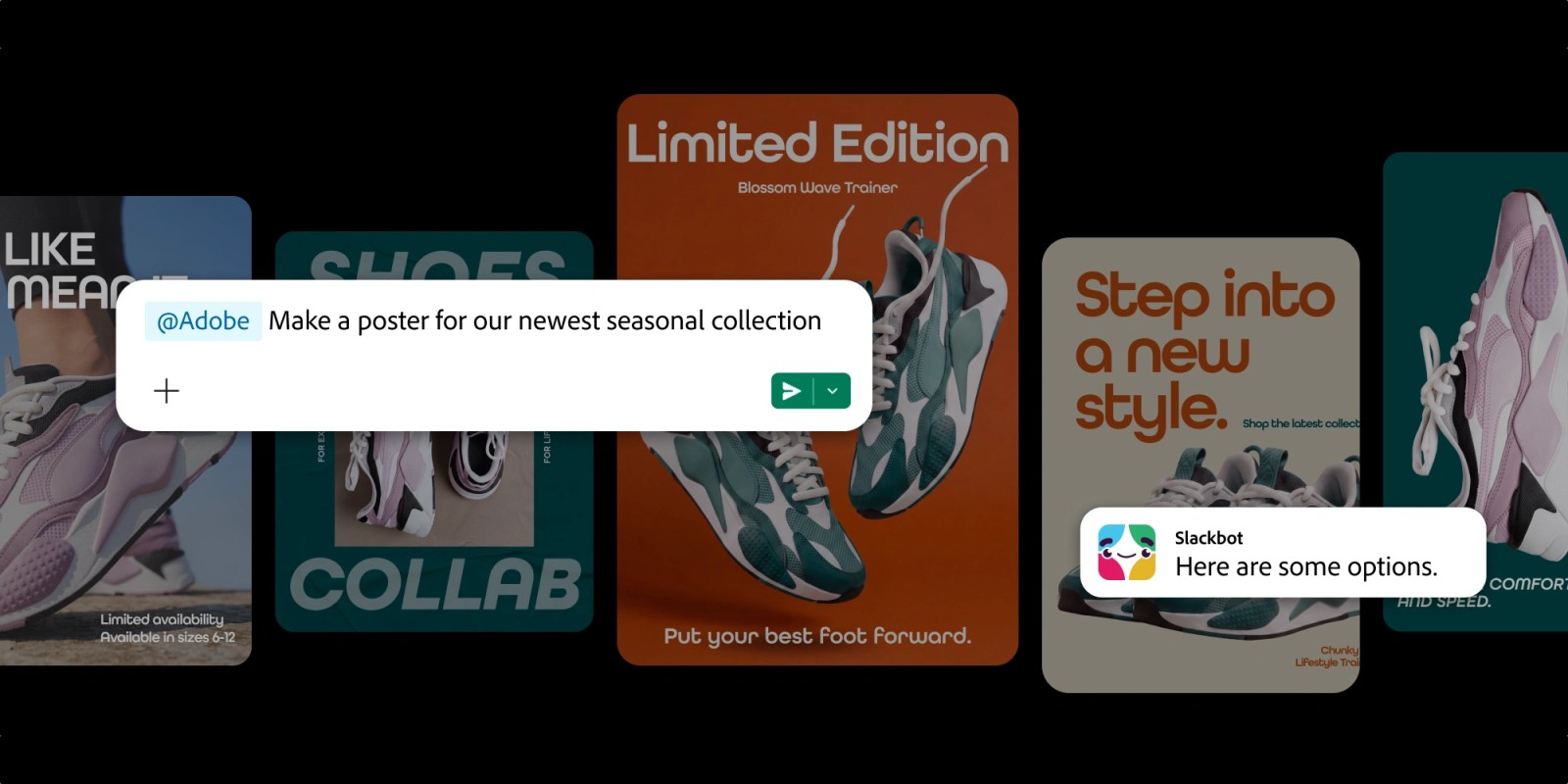
- Slackbot AI assistant – Users type natural‑language requests (e.g., “Create a 30‑second product video with our brand colors”) and Slackbot routes the request to the appropriate Adobe service.
- Adobe for Slack MCP app – A dedicated Marketplace app that surfaces a toolbox of Adobe utilities, from Firefly generative AI to Photoshop, Premiere, InDesign, and the full Stock library.
The offering is limited at launch to Slack Business+ and Enterprise+ customers, positioning it as an enterprise‑grade productivity boost rather than a consumer‑focused add‑on.
Deepti Pradeep, Adobe’s Senior Director for Agentic AI, summed up the vision:
“In focus groups, people talked about the value they get from this experience very clearly: saving time, getting to the outcome they want faster without having to micromanage every step, being able to access Adobe wherever they’re already working.”
The integration is not a simple hyperlink to a web‑based editor; it is a conversational, context‑aware workflow that pulls assets from Creative Cloud libraries, leverages Slack’s “Canvas” data, and returns finished deliverables directly into the chat thread.
Technical Architecture and Workflow
1. Conversational Context Engine
Slackbot’s AI layer is built on a multi‑model stack that includes OpenAI’s ChatGPT, Anthropic’s Claude, and Google’s Gemini (planned for a later rollout). When a user submits a request, the system:
- Parses intent using a large‑language model (LLM) fine‑tuned on Adobe‑specific commands.
- Extracts entities such as brand assets, file types, dimensions, and deadlines.
- Matches intent to an Adobe service endpoint (e.g., Firefly for generative images, Photoshop for raster edits, Premiere for video assembly).
The context engine also reads the surrounding Slack conversation and any attached Canvas files, ensuring that the generated output aligns with the ongoing discussion.
2. Secure Asset Retrieval
Adobe’s asset management APIs are invoked to pull files from:
- Creative Cloud Libraries – User‑specific or shared team libraries.
- Previous campaign folders – Automatically surfaced based on keywords.
- Adobe Stock – Licensed images can be fetched on‑the‑fly.
All asset transfers are encrypted end‑to‑end, and Slack’s Enterprise Key Management (EKM) can be leveraged for additional compliance requirements.
3. Execution Layer
Once the appropriate tool is identified, the request is handed off to Adobe’s micro‑service platform:
- Firefly – Generates images or vector assets from text prompts.
- Express – Quickly assembles social‑media graphics.
- Photoshop/Illustrator – Performs complex raster or vector edits, with optional human‑in‑the‑loop review.
- Premiere – Compiles video clips, adds transitions, and renders final MP4 files.
- Acrobat – Merges PDFs, applies signatures, or optimizes for web.
The micro‑services run in Adobe’s global cloud, returning a URL that Slackbot posts back into the channel. Users can click to preview, download, or continue editing.
4. Feedback Loop
After delivery, Slackbot prompts the user for satisfaction feedback. Positive feedback reinforces the LLM’s routing logic; negative feedback triggers a fallback to a human Adobe specialist via a private thread.
Why It Matters for Teams and Creators
Accelerated Time‑to‑Market
Traditional workflows require switching between Slack, a web browser, and desktop Creative Cloud apps—a costly context‑switch. By collapsing the entire pipeline into a single chat, teams can:
- Produce first drafts in minutes rather than hours.
- Iterate directly in conversation, reducing version‑control friction.
- Maintain a single source of truth—the Slack thread becomes the audit trail for creative decisions.
Democratization of Design
Non‑designers often need quick visual assets (e.g., a banner for an internal announcement). With natural‑language prompts, anyone can generate a polished result without opening Photoshop. This lowers the barrier to entry and frees professional designers to focus on high‑impact work.
Enterprise Governance
Because the integration is gated to Business+ and Enterprise+ tiers, IT admins retain control over:
- Data residency – Adobe’s services can be routed to specific regions.
- License enforcement – Only users with appropriate Creative Cloud subscriptions can invoke premium features.
- Audit logs – Slack’s compliance export captures every request and asset retrieval.
Competitive Differentiation
Slack’s ecosystem now rivals Microsoft Teams’ native Office integration. By offering a full‑featured creative stack, Slack positions itself as the hub for both communication and content production, a strategic move that could influence enterprise procurement decisions.
Industry Impact and Competitive Landscape
Direct Competitors
- Canva + Slack – Canva already offers a Slack bot for quick graphic creation, but its feature set is limited to templates and basic editing. Adobe’s integration brings professional‑grade tools, generative AI, and video capabilities that Canva cannot match today.
- Figma + Slack – Figma’s Slack integration focuses on design hand‑off and prototype sharing. Adobe’s offering expands beyond UI/UX to marketing, video, and document workflows.
Ripple Effects on AI‑Powered Creativity
The partnership underscores a broader trend: AI‑driven creative services are moving from standalone SaaS portals into the daily workflow of knowledge workers. As Adobe leverages LLMs from OpenAI, Anthropic, and Google, the industry will see more “agentic AI” that can autonomously complete multi‑step creative tasks.
For a deeper look at how AI integrations are reshaping product ecosystems, see our coverage of Amazon Alexa for Shopping Launches AI Scam‑Detection , which illustrates the shift toward conversational AI across disparate
disparate platforms, and Adobe’s move into Slack is a clear signal that the future of creative work will be orchestrated through conversational interfaces rather than isolated desktop applications.
Future Outlook
Expansion Beyond Slack
Adobe has hinted that the underlying agentic AI framework could be ported to other collaboration tools such as Microsoft Teams, Zoom Chat, and even emerging metaverse workspaces. By abstracting the service layer into a set of reusable APIs, Adobe can plug its creative engine into any environment that supports OAuth‑based authentication and webhook callbacks.
Generative AI Maturation
While Firefly currently powers text‑to‑image generation, Adobe’s roadmap includes multimodal models that can accept voice, sketch, or video prompts. Imagine a user saying, “Turn this 10‑second clip into a cinematic trailer with a synthwave soundtrack,” and having the request automatically routed through Firefly for visual generation, Adobe Audition for audio synthesis, and Premiere for final assembly—all without leaving the chat.
Deeper Integration with Slack Canvas
Slack Canvas, the collaborative whiteboard feature, will soon be able to host live previews of Adobe assets. As a designer refines a mockup in Photoshop, the updated image can be streamed in real‑time to the Canvas, allowing stakeholders to comment directly on the evolving design. This bidirectional sync reduces the need for static screenshots and version juggling.
Monetization and Tiered Offerings
Although the initial rollout is limited to Business+ and Enterprise+ plans, Adobe is expected to introduce a “Slack Creative Lite” tier for smaller teams. This tier would grant access to a curated subset of tools—Firefly, Express, and Stock—on a consumption‑based pricing model, similar to Adobe’s existing “Creative Cloud Express” subscription.
Potential Challenges
| Challenge | Implications | Mitigation Strategies |
|---|---|---|
| Data Residency & Compliance | Enterprises in regulated industries (e.g., finance, healthcare) must ensure that asset processing stays within approved geographic zones. | Adobe’s cloud can be configured for regional endpoints; Slack’s Enterprise Key Management can enforce encryption keys that never leave the organization’s jurisdiction. |
| Latency for Large Media | Rendering a high‑resolution video in Premiere can take several minutes, which may feel sluggish in a chat context. | Implement progressive rendering previews and allow users to receive a “processing” notification with an estimated completion time. |
| Creative Control vs. Automation | Designers may fear that AI‑driven suggestions could dilute brand consistency. | Provide “brand guardrails” that lock color palettes, typography, and logo usage, ensuring AI outputs adhere to corporate style guides. |
| Cost Management | Unlimited AI generation could lead to unexpected spend spikes. | Offer admin dashboards that track usage per user, set quotas, and trigger alerts when thresholds are approached. |
Industry Reactions
- Canva’s CEO, Melanie Perkins, responded on X: “We love seeing AI bring design to the conversation. Our focus remains on empowering creators with intuitive templates, and we’ll continue to explore deeper Slack integrations.”
- Figma’s Head of Product, Dylan Field, posted on LinkedIn: “Collaboration is at the heart of design. Adobe’s Slack integration pushes the envelope, and we’re excited to see how it influences the broader ecosystem of design tools.”
- Microsoft’s VP of Teams Engineering, Anjali Rao, noted in a recent earnings call: “Teams already offers Office AI, and we’re evaluating how best to provide comparable creative capabilities for our customers.”
Conclusion
Adobe’s integration with Slack marks a pivotal moment in the convergence of AI, creativity, and workplace collaboration. By embedding a full suite of Creative Cloud tools into a conversational workflow, Adobe not only accelerates time‑to‑market for marketing and product teams but also democratizes high‑quality design across the enterprise. The partnership showcases how agentic AI can act as a true digital teammate—understanding context, fetching assets, executing complex multi‑step tasks, and learning from feedback—all within the familiar Slack environment.
As generative models become more sophisticated and the demand for seamless, cross‑platform workflows grows, we can expect a cascade of similar integrations across the SaaS landscape. For now, teams that adopt Adobe for Slack will likely enjoy a measurable boost in productivity, tighter brand governance, and a smoother creative process—making the chat channel not just a place to discuss ideas, but the very place those ideas are brought to life.
Frequently Asked Questions (FAQ)
Q: Do I need a separate Adobe Creative Cloud subscription to use the Slack integration?
A: Yes. The integration authenticates against your existing Creative Cloud license. Users without a valid subscription will see a prompt to upgrade before they can invoke premium tools like Photoshop or Premiere.
Q: Which Slack plans are currently supported?
A: The feature is available to Slack Business+ and Slack Enterprise+ customers at launch. A lighter tier for smaller teams is slated for a later release.
Q: How is my data protected when assets are transferred between Slack and Adobe?
A: All API calls are encrypted via TLS 1.3, and Slack’s Enterprise Key Management can be enabled for end‑to‑end encryption. Adobe also adheres to ISO 27001 and SOC 2 compliance standards.
Q: Can I customize the AI prompts to enforce brand guidelines?
A: Administrators can upload brand style guides into the Adobe for Slack app. The LLM will then prioritize those constraints when generating or editing assets.
Q: What happens if the AI-generated output doesn’t meet my expectations?
A: Slackbot will ask for feedback and can either retry with refined parameters or route the request to a human Adobe specialist for manual intervention.
Q: Is there a way to track usage and costs across the organization?
A: Yes. Both Slack and Adobe provide admin dashboards that display per‑user request counts, token usage for generative models, and associated billing details.
Q: Will the integration work on mobile Slack clients?
A: The core request/response flow works on iOS and Android Slack apps. However, complex editing (e.g., full Photoshop sessions) will still redirect to a web or desktop interface for the final fine‑tuning.
Q: How soon will the Google Gemini model be available in Slackbot?
A: Adobe has announced a phased rollout; Gemini is expected to be added to the multi‑model stack in Q1 2027, pending internal testing and compliance reviews.
Q: Can I export the generated assets directly to other platforms like Asana or Trello?
A: Yes. The integration supports webhook‑based export to popular project‑management tools, allowing you to attach the final deliverable to a task automatically.
Source: Original Article