




Overview of the Adobe‑Slack Integration
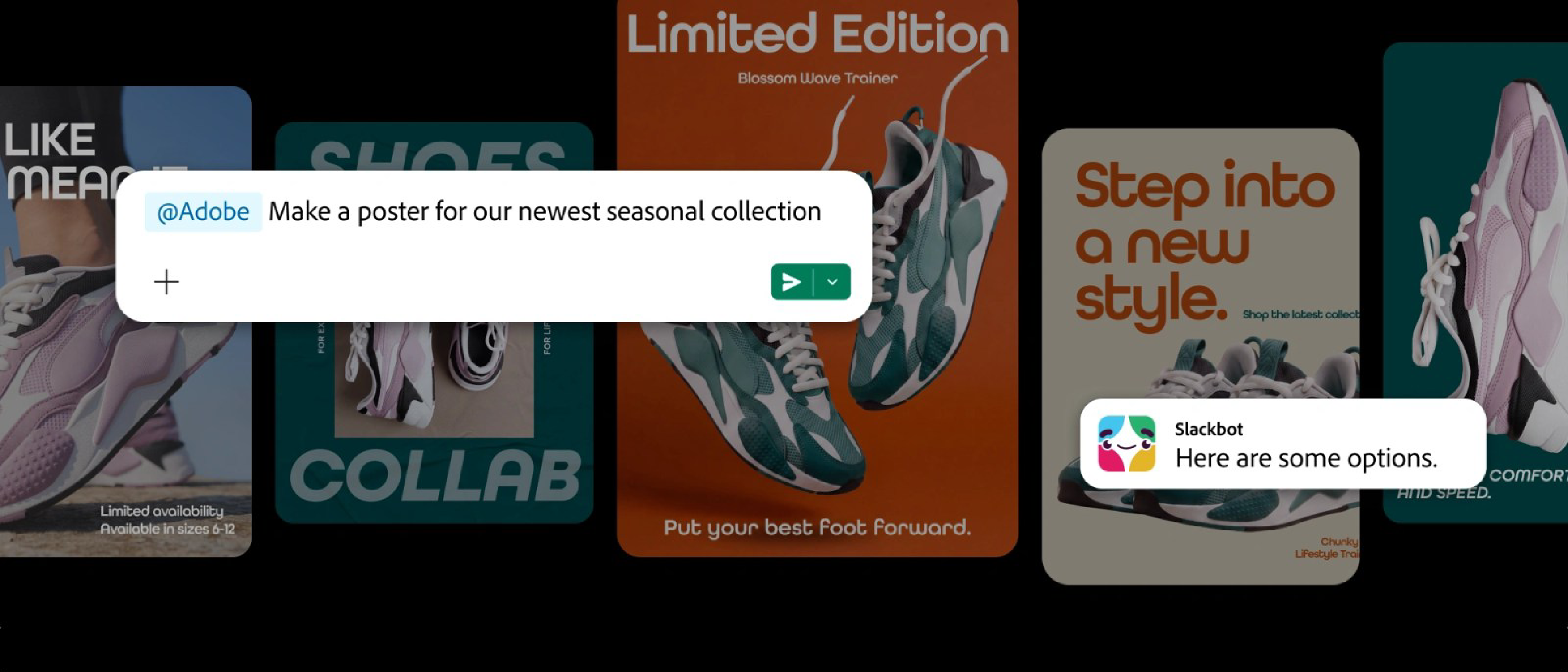
Adobe announced a bold step toward unifying creative workflows with everyday communication by launching a Model Context Protocol (MCP) app that brings Photoshop, the generative AI engine Firefly, and more than 70 additional Adobe tools directly into Slack. The integration is not a simple hyperlink or file‑share shortcut; it embeds full‑featured instances of Adobe’s desktop‑grade applications inside Slack’s chat interface, allowing designers, marketers, and product teams to edit, generate, and iterate on assets without leaving the conversation thread.
The MCP app acts as a bridge between Adobe’s cloud‑based service layer and Slack’s real‑time messaging platform. When a user invokes the app, Slack spawns a sandboxed instance of the requested Adobe tool, authenticates the user via Adobe ID, and streams the UI back into the Slack window. The result is a seamless, context‑aware design experience that lives where decisions are being discussed.
Why It Matters for Creative Professionals
Reducing Context Switching
Creative work traditionally lives in a silo of specialized software—Photoshop on a desktop, Illustrator on a tablet, and cloud storage for asset sharing. Each switch between Slack, a design app, and a file server adds cognitive load and time overhead. By collapsing these steps into a single interface, Adobe tackles the “context‑switch penalty” that can cost teams up to 30 % of productive time, according to internal workflow studies.
Democratizing Access to High‑End Tools
Slack is already the de‑facto hub for many distributed teams. Embedding Photoshop and Firefly means that junior designers, product managers, or even marketers can spin up a quick edit or generate AI‑driven imagery without needing a powerful workstation or a full Adobe license on their machine. The MCP app can enforce granular permission policies, ensuring that only authorized users can publish changes to brand‑critical assets.
Accelerating Feedback Loops
When a designer shares a mockup in a Slack channel, reviewers traditionally download the file, annotate locally, re‑upload, and repeat. With the MCP integration, reviewers can open the same Photoshop instance, add layers, adjust colors, or request AI‑generated variations on the fly. All changes are saved back to Adobe’s cloud, preserving version history and enabling instant “accept” or “reject” actions directly in the chat.
Technical Breakdown of the Model Context Protocol (MCP)
Architecture Overview
The MCP app follows a micro‑service architecture:
- Slack Front‑End Extension – A Slack app manifest registers a
/adobeslash command and a set of interactive blocks (buttons, modals). When invoked, Slack sends an event payload to Adobe’s MCP gateway. - MCP Gateway – Hosted on Adobe’s cloud, this gateway authenticates the user via OAuth 2.0, negotiates a secure WebSocket connection, and provisions a containerized instance of the requested Adobe tool.
- Containerized Tool Instance – Each tool runs inside an isolated Docker container with GPU acceleration (where needed). The UI is rendered via a VNC‑like protocol and streamed as an iframe back to Slack.
- State Synchronization Layer – Changes made in the tool are persisted to Adobe’s Creative Cloud storage in real time. A delta‑sync engine ensures that only modified assets travel over the network, keeping latency low.
Security Considerations
Embedding full‑featured design tools inside a messaging platform raises security questions. Adobe leverages end‑to‑end encryption for the WebSocket channel, and each container is sandboxed with strict file‑system permissions. Role‑based access control (RBAC) is enforced at the gateway level, mirroring Adobe’s existing enterprise policies.
The importance of robust security for collaboration platforms is underscored by recent incidents in the industry. For example, the Zoom Zero‑Day Exploit demonstrated how a single vulnerability could give attackers remote control over devices, including iPhones and Macs. Similarly, the Zoom Annotation Flaw showed that seemingly innocuous UI features can become attack vectors if not properly isolated. Adobe’s approach to containerization and encrypted transport directly addresses these lessons, ensuring that the MCP app does not become a new attack surface.
Performance Optimizations
- Edge Caching – Asset previews are cached at CDN edge nodes to reduce latency when multiple users view the same file.
- Adaptive Bitrate Streaming – The UI stream adapts to the user’s bandwidth, providing a responsive experience even on slower connections.
- GPU Offloading – For compute‑heavy operations (e.g., AI‑generated content in Firefly), the container can request GPU resources from Adobe’s cloud fleet, delivering near‑native performance.
Industry Impact and Competitive Landscape
Shifting the Collaboration Paradigm
The Adobe‑Slack integration signals a broader shift toward “design‑in‑context” solutions. Competitors such as Figma have already embedded live design frames into collaboration tools, but Adobe’s move is unique in that it brings legacy, raster‑heavy applications like Photoshop into the same flow. This could pressure other SaaS providers to expose deeper functionality via APIs or embed‑ready SDKs.
Implications for Enterprise Licensing
Adobe’s traditional licensing model has been subscription‑centric, with separate seats for each application. The MCP app introduces a usage‑based model where organizations can purchase “design minutes” that are consumed as users invoke tools inside Slack. This aligns with the broader trend of consumption‑based pricing seen in cloud services and may lead to more flexible budgeting for creative departments.
Potential for Cross‑Platform Extensions
Because MCP is protocol‑agnostic, the same approach could be extended to other communication platforms (Microsoft Teams, Discord, Mattermost). Adobe may eventually release a “MCP SDK” that lets third‑party developers embed custom UI components, opening a marketplace for specialized design bots or workflow automations.
Future Outlook: What’s Next for Adobe and Slack?
AI‑Driven Collaboration
Firefly’s generative capabilities are already a game‑changer. Within Slack, users could type natural‑language prompts (“Create a pastel‑style banner for our Q4 launch”) and receive instantly rendered assets that can be tweaked in real time. Future updates may incorporate collaborative AI, where multiple participants co‑author a prompt and watch the output evolve together.
Deeper Integration with Project Management
Slack’s workflow builder could be paired with Adobe’s asset‑tracking APIs to automatically move a design from “draft” to “review” status when a specific reaction is added to a message. This would close the loop between creative production and project management without leaving the chat environment.
Expanded Ecosystem Partnerships
Adobe’s MCP protocol could become a standard for “design‑as‑a‑service” across the SaaS ecosystem. Partnerships with digital asset management (DAM) vendors, e‑commerce platforms, and even AR/VR content pipelines could be facilitated through a common protocol layer, turning Slack into a universal creative command center.
Frequently Asked Questions
Q1: Do I need a full Photoshop license to use the tool inside Slack?
A: The MCP app respects your existing Adobe Creative Cloud subscription. Organizations can allocate seats or purchase usage‑based credits that grant access to Photoshop and other tools on a per‑session basis.
Q2: How does the integration handle large files (e.g., multi‑GB PSDs)?
A: Files are streamed directly from Creative Cloud storage to the container. Only the portions needed for the current viewport are transferred, minimizing bandwidth consumption. Full‑resolution saves are performed in the background.
Q3: Is the MCP app available on mobile Slack clients?
A: Currently the full UI is optimized for desktop Slack. Mobile clients can invoke the app to launch a lightweight preview or request AI‑generated assets, but editing complex raster files remains a desktop‑first experience.
Q4: What security measures protect my design data?
A: End‑to‑end encryption, container sandboxing, and Adobe’s enterprise‑grade IAM policies protect data in transit and at rest. The architecture is designed to mitigate the kinds of vulnerabilities highlighted in the Zoom Zero‑Day Exploit and Zoom Annotation Flaw.
Q5: Can I integrate other Adobe tools beyond the 70 listed?
A: Adobe plans to roll out additional applications over the next few quarters. The MCP framework is extensible, so new tools can be added without requiring a separate Slack app installation.
The Adobe‑Slack MCP integration marks a pivotal moment where high‑end creative software meets real‑time collaboration. By eliminating friction, tightening security, and leveraging AI, Adobe is redefining how design teams work together—right where the conversation happens.
Source: Original Article